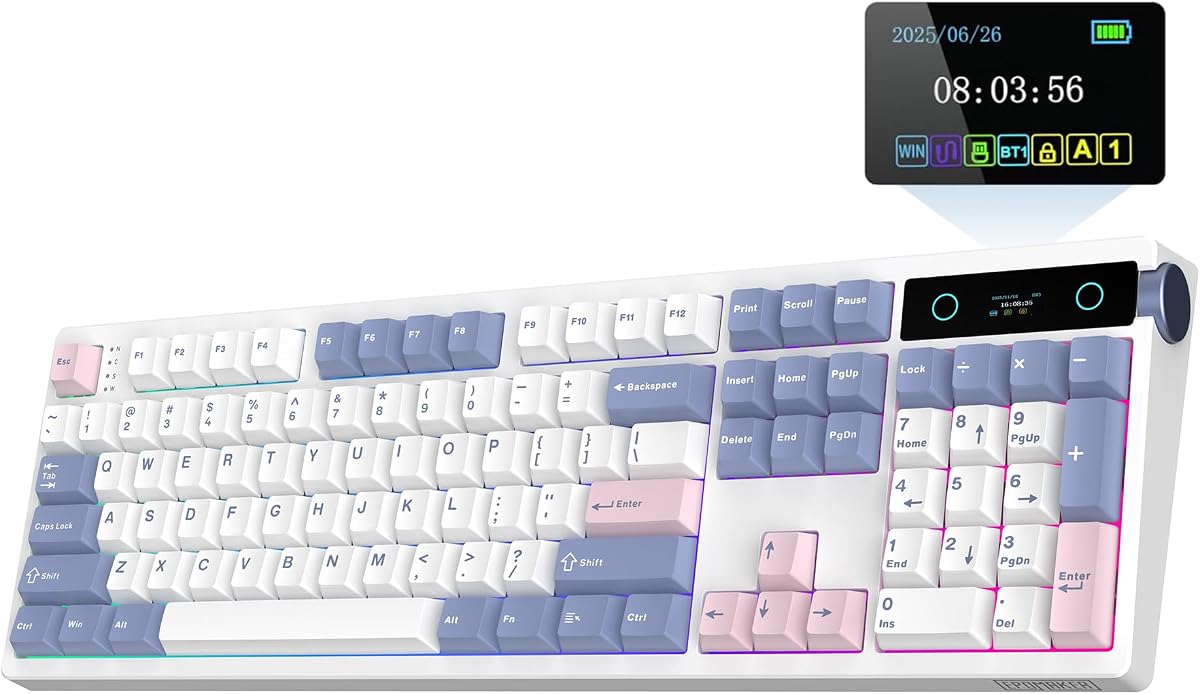
EPOMAKER TH108 PRO
4.7Editor score
Smart screen with GIF support
10000mAh battery life
Hot-swappable gasket design
Discover the top Epomaker Keyboards for gaming and productivity. This guide compares features, layouts, and performance to help you choose the best model.
Finding the right mechanical keyboard can transform your workflow and gaming experience. Epomaker offers a diverse range of keyboards designed to meet various needs, from compact layouts to full-size powerhouses.
We have carefully evaluated ten standout models from the Epomaker lineup. Our analysis focuses on build quality, typing feel, connectivity options, and unique features like smart displays and hot-swap capabilities.
Each pick highlights specific strengths to help you match a keyboard to your style. Note that availability and offers may change, so verify details before making your final purchase decision.
4.7Editor score

4.6Editor score

4.7Editor score
The following table provides a side-by-side overview of each model’s key attributes to simplify your selection process.


The EPOMAKER TH108 PRO stands out as a top-tier full-size keyboard designed for users who demand both functionality and style. With a high rating and sophisticated features like a built-in screen and knob, it delivers a premium experience.
We may earn a commission when you buy through this link, at no additional cost to you.
Its standout feature is the smart screen, which allows you to display GIFs, monitor battery life, or toggle settings without leaving your game or app. The gasket-mounted design ensures a soft, satisfying typing feel with excellent sound dampening.
While the keyboard is substantial in weight due to its large battery, this ensures stability during intense use. The lack of a compact footprint might not suit smaller desks, but the full-size layout is ideal for those who need a numpad.
If you want a desktop centerpiece that combines productivity with flair, the TH108 PRO is an excellent choice. Its robust feature set justifies the investment for users seeking a complete and customizable input solution.
Upload your own images or GIFs via the Chrome-based software to personalize your setup uniquely.
Switch seamlessly between devices using Bluetooth, 2.4GHz wireless, or cable without performance loss.
We may earn a commission when you buy through this link, at no additional cost to you.
The EPOMAKER X Aula F75 MAX is a versatile choice for those who want compact ergonomics without sacrificing features. It balances size and utility effectively, making it suitable for both gaming and office environments.
We may earn a commission when you buy through this link, at no additional cost to you.
This keyboard includes a TFT screen that displays system information and allows for creative expression. The gasket-mounted structure and flexible PCB provide a comfortable typing experience that reduces fatigue over long sessions.
While the software offers extensive customization, it may require some time to master for new users. Additionally, the 75% layout omits the numpad, which might not suit data entry tasks.
Overall, the F75 MAX is a powerful pick for users who value customization and portability. It brings a high-end feel to a mid-range offering, ensuring you get significant value for your investment.
The low front height and adjustable kickstand help maintain a natural wrist position during typing.
Fast polling rates and anti-ghosting ensure accurate inputs during competitive gameplay scenarios.
We may earn a commission when you buy through this link, at no additional cost to you.
The EPOMAKER Ajazz AK820 Pro brings a surprisingly robust feature set to the budget category. It offers a TFT screen and gasket mount at a price that undercuts many competitors, making it highly accessible.
We may earn a commission when you buy through this link, at no additional cost to you.
Despite its cost, the keyboard maintains a solid build and decent typing feel. The TFT display adds a premium touch, allowing you to monitor battery and status without needing extra software.
You may find the customization options somewhat limited compared to high-end models. The battery life is functional but not exceptional, requiring occasional recharging during heavy use.
For anyone seeking a stylish and functional keyboard without breaking the bank, the AK820 Pro is a strong contender. It delivers essential premium features in an easy-to-carry package.
The 75% layout saves desk space while retaining arrow keys and essential function row.
Switch between Bluetooth, 2.4GHz wireless, and wired modes to suit any device.
We may earn a commission when you buy through this link, at no additional cost to you.
The Galaxy100 is designed for users who crave deep customization. With QMK and VIA support, you gain full control over key mapping and macros, making it a favorite for programmers and advanced gamers.
We may earn a commission when you buy through this link, at no additional cost to you.
Its aluminum shell provides a premium, solid feel that is absent in plastic cases. The pre-lubed switches and gasket mount deliver a smooth and quiet typing experience that is immediately satisfying.
The weight and price may be drawbacks for some, but the build quality justifies them. It is not the lightest option, which can be a downside if you travel frequently.
If you want a keyboard that grows with your needs and offers exceptional durability, the Galaxy100 is a standout. It bridges the gap between DIY enthusiast boards and commercial products effectively.
Use the cloud-based VIA app to remap keys and create complex macros instantly.
Multiple foam layers create a deep, thocky sound without needing modification.
We may earn a commission when you buy through this link, at no additional cost to you.
The TH108 V2 PRO is a refined update that focuses on versatility across operating systems. It includes dedicated keycaps for Mac users, making it a rare find in the mechanical keyboard market.
We may earn a commission when you buy through this link, at no additional cost to you.
Its gasket mount and layered cushioning ensure that every keystroke feels soft and responsive. The smart screen and knob add a layer of convenience that enhances usability for both work and play.
The reliance on a web-based driver means you do not need to install software, which is convenient. However, users needing offline features might find this limiting compared to desktop apps.
For hybrid users who switch between Mac and PC, this keyboard is an ideal solution. It combines robust performance with thoughtful design touches that cater to diverse computing environments.
Toggle easily between devices using simple shortcut keys without rebooting.
Bright per-key LEDs offer dynamic effects to match your mood or game.
We may earn a commission when you buy through this link, at no additional cost to you.
The TH99 PRO compresses a full numpad into a smaller footprint, making it perfect for users who need extra keys but have limited desk space. The glass screen adds a modern touch that stands out on any desk.
We may earn a commission when you buy through this link, at no additional cost to you.
Its sound-dampening layers create a very quiet and pleasant typing experience, suitable for shared workspaces. The hot-swappable PCB allows you to change switches later if your preferences evolve.
The layout can take some time to get used to due to the tight packing of keys. Additionally, the weight, while stable, makes it less portable for those who travel regularly.
If you need a numpad for spreadsheets but want to maximize mouse space, the TH99 PRO is an excellent choice. It balances utility and aesthetics in a way few other keyboards do.
The 96% design keeps your mouse closer to your keyboard for better ergonomics.
Multiple layers of foam eliminate hollow sounds for a premium acoustic feel.
We may earn a commission when you buy through this link, at no additional cost to you.
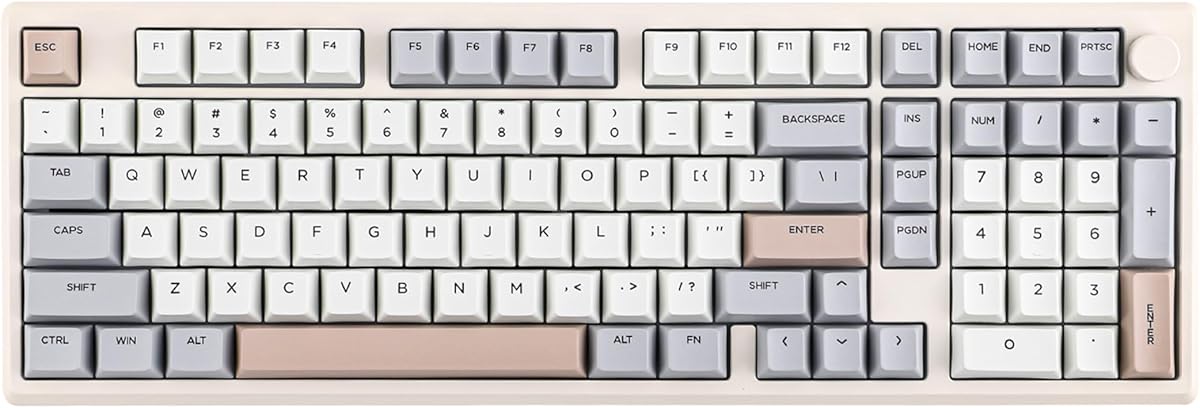
The TH108 Full Size focuses on delivering a pure and comfortable typing experience without extra gimmicks. It uses a five-layer gasket mount to ensure every keystroke feels soft and consistent.
We may earn a commission when you buy through this link, at no additional cost to you.
With 108 keys, it provides all the standard input options without needing a separate numpad. The included PBT keycaps are durable and resist shine, ensuring the keyboard looks new for longer.
Lacking a smart screen or knob, it is more straightforward for users who just want typing and typing. The RGB lighting is functional but not as customizable as other models in the lineup.
This keyboard is perfect for office workers or writers who prioritize comfort over flash. Its reliable performance and robust battery make it a solid workhorse for daily tasks.
The gasket mount absorbs shock to reduce fatigue during long typing sessions.
Double-shot PBT keycaps ensure legends stay clear and durable over time.
We may earn a commission when you buy through this link, at no additional cost to you.
The G84 HE is built for speed and precision. It uses Hall Effect switches that allow you to adjust actuation points and rapid trigger, giving you a competitive edge in fast-paced games.
We may earn a commission when you buy through this link, at no additional cost to you.
With an 8K polling rate, the keyboard reports inputs faster than standard boards, reducing input lag to near zero. This makes it ideal for FPS and MOBA games where every millisecond counts.
The specialized features require a bit of setup to optimize for your playstyle. If you are a casual user, some of these advanced settings might be unnecessary overhead.
For anyone serious about competitive gaming, the G84 HE is a top recommendation. It offers technology that rivals high-end custom boards at a more accessible price point.
Keys react immediately upon release, allowing for quicker movement inputs.
Adjust how far you press a key to trigger an action to your preference.
We may earn a commission when you buy through this link, at no additional cost to you.
The TH99 Tri-Mode is a reliable daily driver that balances functionality with wireless convenience. It includes a numpad for productivity while remaining compact enough for most desks.
We may earn a commission when you buy through this link, at no additional cost to you.
Its gasket mounting delivers a bouncy and cushioned typing feel that is hard to find on standard keyboards. The south-facing LEDs ensure that RGB shines brightly even with keycaps that block light.
While it lacks some advanced customization features found on premium models, it excels at reliability. The battery lasts for weeks on a single charge, reducing the need for frequent plugging.
This is an ideal choice for users who want a dependable and comfortable keyboard without complex features. It delivers consistent performance for both work and gaming tasks effectively.
The 8000mAh battery supports weeks of use without needing a recharge.
Connect via Bluetooth, 2.4GHz, or cable to suit your needs instantly.
We may earn a commission when you buy through this link, at no additional cost to you.
The F99 is a practical option that fits well in the mid-range market. It offers a 96% layout that saves space while keeping the numpad, making it suitable for various tasks.
We may earn a commission when you buy through this link, at no additional cost to you.
Its five-layer sound dampening system ensures a quiet and satisfying typing experience. The hot-swappable design allows you to change switches easily, extending the keyboard's lifespan as your preferences change.
While the software is basic, the keyboard performs well out of the box. It lacks some of the flashier features of other models, focusing instead on core functionality and reliability.
If you want a straightforward and capable keyboard without unnecessary complexity, the F99 is a great choice. It offers solid performance and comfort at a competitive value.
The 96% design keeps your mouse closer for better ergonomics and space.
Swap switches instantly without soldering to customize your sound and feel.
We may earn a commission when you buy through this link, at no additional cost to you.
Choosing the right keyboard involves balancing layout, features, and your specific use case. This guide outlines key factors to help you narrow down your options effectively.
Layout size determines how much desk space the keyboard occupies. Full-size models include a numpad, which is essential for data entry but takes up significant room. Compact models like 75% or 96% save space while retaining essential keys, making them ideal for smaller setups or users who want more mouse movement space.
Select a layout that fits your desk size and workflow. If you rarely use numbers, a compact layout may improve your ergonomic posture by bringing your mouse closer.
Switch type defines the tactile and auditory feedback of your keystrokes. Linear switches are smooth and quiet, while tactile switches offer a bump and clicky switches provide a loud click. Most Epomaker boards come with pre-lubed switches for a smoother experience.
Choose a switch based on your preference for noise and feel. If you share a workspace, silent linear switches might be preferable to avoid distracting others.
Connectivity options dictate how the keyboard connects to your devices. Epomaker keyboards typically offer tri-mode connectivity including Bluetooth, 2.4GHz wireless, and wired USB-C. Bluetooth is great for power saving, while 2.4GHz offers lower latency for gaming.
Ensure the keyboard supports the devices you use most. If you switch between a laptop and desktop, wireless modes allow seamless transitions without plugging in.
Build quality impacts durability and typing feel. Look for features like gasket mounting, which adds cushioning to reduce vibrations. Aluminum shells offer premium durability, while ABS plastic is lighter and more affordable.
A solid build ensures longevity and stability. Gasket-mounted boards often provide a more satisfying typing experience due to the floating design.
Battery life is critical for wireless users. Most Epomaker models include large batteries, often ranging from 4000mAh to 10000mAh, providing hundreds of hours of use. This reduces the frequency of charging and ensures uninterrupted productivity.
Prioritize higher capacity if you use the keyboard extensively. Check if the battery allows for RGB usage or if turning off lights extends life.
Hot-swappable boards allow you to change switches without soldering. This feature is essential for enthusiasts who want to experiment with different switches or replace worn-out ones easily.
If you plan to customize your keyboard, ensure it supports hot-swapping. Most modern Epomaker models include this feature for flexibility.
Customization options range from RGB lighting to key remapping. Models with QMK/VIA support offer advanced macro programming, while others use proprietary software. Smart screens and knobs add interactive elements for extra utility.
Consider how much control you need over your inputs. Simple software is easier to use, while advanced tools offer greater flexibility for complex tasks.
Price varies significantly based on features like smart screens and materials. Budget models offer core functionality, while premium ones include aluminum shells and advanced displays.
Determine your budget early. A higher price often means better materials, but mid-range options provide excellent value for most users.
To start using your keyboard, connect it via the preferred mode. For wireless, toggle the switch to the corresponding icon and hold the pairing button. For wired use, simply plug in the USB cable.
Customize your keyboard using the provided software. You can remap keys, create macros, or adjust RGB settings. For models with screens, upload images or GIFs via the web interface to personalize the display.
Maintain your keyboard by cleaning it regularly. Use compressed air to remove dust and a soft cloth to wipe down keycaps. Avoid harsh chemicals to prevent damage to the surface or lighting.
Yes, most Epomaker keyboards support Mac and Windows systems. They often include a switch to toggle between operating systems. Some models even come with dedicated Mac keycaps for easier access to specific modifiers.
Firmware updates are usually handled through the manufacturer's web-based software. Visit the Epomaker website, download the tool, and follow the on-screen instructions to connect and update your device.
Many Epomaker models are hot-swappable, allowing you to change switches without soldering. Check the specific product details to confirm if it supports 3-pin or 5-pin switches before purchasing.
Battery life varies by model and usage. Larger batteries like 10000mAh can last up to 200 hours or more. Turning off RGB lighting typically extends battery life significantly.
Some Epomaker keyboards work with consoles like Xbox or Switch if they support standard USB protocols. However, specific console features may not function. Wired mode is often most reliable for console play.
Press the dedicated mode key (like Fn+1, Fn+2) to switch between paired devices. The keyboard supports Bluetooth, 2.4GHz, and wired connections, allowing up to three simultaneous connections.
We have reviewed ten top Epomaker keyboards, each offering unique strengths. The TH108 PRO leads for premium features, while the Ajazz AK820 Pro excels as a budget-friendly option.
When choosing, consider your layout needs and how much customization you require. A gasket-mounted board will provide better typing comfort, while wireless models offer more flexibility.
Prices and availability can change, so it is wise to check current offers before purchasing. With the right model, you can elevate your daily workflow and gaming sessions with ease.