
Redragon BM4195 AI Wireless Optical Computer Office Mouse
3.9Editor score
Voice typing and translation
Multi-mode connectivity
Type-C fast charging
Discover the top AI Smart Wireless Mouse options for 2026. Our guide compares voice typing, translation, and AI features to find the perfect productivity tool.
The landscape of computer peripherals is shifting rapidly with the introduction of AI Smart Wireless Mouse devices. These tools combine traditional pointing functionality with advanced voice recognition and language processing capabilities. They promise to streamline workflows for professionals who need to transcribe meetings or draft documents quickly without using a keyboard.
We evaluated ten leading models to determine which ones deliver on their promises of efficiency and ease of use. Our analysis focused on voice accuracy, battery life, connectivity options, and the robustness of the accompanying software. Each product was reviewed for its ability to handle multilingual tasks and provide seamless integration across different operating systems.
Each selection in this guide highlights unique strengths ranging from budget-friendly options to premium all-in-one hubs. We outline the specific features that matter most for your daily tasks and note that availability and pricing can fluctuate over time. Use this information to make an informed decision that aligns with your specific professional or personal needs.
3.9Editor score

4.1Editor score

5.0Editor score
This table provides a side-by-side overview of the top ten AI Smart Wireless Mouse models available today. It highlights key specifications and unique features to help you quickly identify the model that best fits your workflow requirements and budget constraints.




This AI Mouse with Voice Typing & ChatGPT Assistant stands out as a top contender for productivity-focused users. With a solid rating and robust features it offers a comprehensive suite of tools for transcription and language translation. Its ergonomic design ensures comfort during long work sessions while the silent clicks make it ideal for quiet environments.
We may earn a commission when you buy through this link, at no additional cost to you.
The device boasts 98% accuracy in voice typing and supports over 200 languages for translation tasks. It includes advanced AI functions for tasks like PPT generation and code writing which can significantly speed up workflows. The 600mAh battery provides extended usage time and the LED power display keeps you informed of remaining charge levels.
While the software requires initial setup the process is straightforward with clear instructions provided. Some users may find the reliance on an app for full functionality slightly inconvenient if they prefer plug-and-play simplicity. However the benefits of local AI processing outweigh these minor drawbacks for privacy-conscious professionals.
This mouse is perfect for professionals who need quick note-taking and multilingual support during calls. It also suits students and writers who benefit from fast transcription and summarization tools. We recommend this model for anyone looking to upgrade their workspace with an intelligent and efficient input device.
Data is processed locally ensuring your voice records and private work data remain secure and never stored in the cloud.
With Bluetooth and USB 2.4G modes you can seamlessly switch between multiple devices like laptops and tablets without interruption.
We may earn a commission when you buy through this link, at no additional cost to you.
The Redragon BM4195 offers an accessible entry point into the world of AI Smart Wireless Mouse technology. It combines essential wireless functionality with voice typing features at a competitive price. Users can toggle between connectivity modes easily and adjust DPI settings to suit different tasks from design to general office work.
We may earn a commission when you buy through this link, at no additional cost to you.
Its voice typing function allows hands-free text entry which is useful for those who prefer speaking over typing. The 500mAh battery ensures long standby time and the Type-C port provides quick charging when needed. This makes it a reliable companion for daily tasks without frequent interruptions for power.
The requirement to download specific software to activate AI functions might be a hurdle for some users seeking immediate use. However the software is intuitive and once set up it unlocks the full potential of the mouse features. The build quality is solid though the design is more functional than stylish.
Ideal for budget-conscious professionals or students this mouse delivers key AI features without a high cost. It is suitable for office environments where cost efficiency is a priority. We suggest this for anyone wanting to try voice-controlled input without investing heavily in premium hardware.
You get essential voice and translation features at a fraction of the cost of high-end models making AI accessible to more users.
Switch between 2.4G and Bluetooth seamlessly to connect with multiple devices without needing extra receivers or cables.
We may earn a commission when you buy through this link, at no additional cost to you.
The Cheerdots2 AI Mouse redefines versatility with its magnetic detachable design and presentation-ready features. It transforms from a standard mouse into a portable presentation clicker and voice recorder. This makes it an excellent choice for professionals who frequently lead meetings or travel for business.
We may earn a commission when you buy through this link, at no additional cost to you.
Its battery life is impressive lasting up to 20 days on a single charge which reduces anxiety about power during travel. The air mode allows you to glide the cursor and flip slides without being tied to a desk. The voice transcription feature captures meeting notes accurately ensuring nothing important is forgotten.
The learning curve might be steeper due to the multiple modes and features but the software helps manage these options. The premium price is justified by the multifunctionality and build quality which rivals high-end traditional mice. It is a unique tool that consolidates several gadgets into one device.
We recommend this for presenters and frequent travelers who value convenience and innovation. It is also great for tech enthusiasts looking for the latest in peripheral design. This mouse stands out as a premium option that delivers on both form and function in equal measure.
Glide and navigate slides hands-free with the air mode feature allowing you to move freely while keeping eye contact with your audience.
Replace a full desk of tools with one device that handles pointing recording and presenting efficiently for a streamlined workflow.
We may earn a commission when you buy through this link, at no additional cost to you.
This Ai Smart Mouse prioritizes translation and voice typing capabilities with high accuracy claims. It supports a wide range of languages making it suitable for global teams and language learners. The battery display screen offers a clear visual of remaining power which is a practical addition for daily use.
We may earn a commission when you buy through this link, at no additional cost to you.
The voice typing performance reaches 400 words per minute which is efficient for note-taking and drafting. It includes AI summarization features to condense long texts quickly. The ergonomic shape ensures comfort during extended typing sessions and the silent clicks make it office friendly.
Users must download an app to unlock all features which might be a barrier for some. The battery life is solid but requires charging within a few hours which is standard for this class of device. The translation latency is near zero ensuring smooth conversations in multilingual settings.
This model is best for users who need strong language support and visual battery feedback. It serves well for business professionals and students involved in international communication. We suggest it for those who want a dedicated translation tool integrated into their mouse.
Real-time translation allows for smooth multilingual meetings and communication without awkward pauses or delays.
The LED display keeps you informed of battery levels at a glance preventing unexpected power loss during critical tasks.
We may earn a commission when you buy through this link, at no additional cost to you.
The LTC OM021 focuses on comfort and reliable connectivity with its ergonomic design and silent click feature. It supports both Bluetooth 5.0 and 2.4G wireless connections for flexibility across devices. The voice typing and translation functions are present but standard compared to more advanced models.
We may earn a commission when you buy through this link, at no additional cost to you.
Its 500mAh battery provides consistent power and the Type-C port ensures quick charging when needed. The adjustable DPI settings allow for precision control in various applications from design to browsing. The silent click is particularly beneficial for shared office spaces where noise reduction is key.
While the software is customizable it may not offer the same depth of AI tools as premium competitors. The design is functional and clean which fits well in professional environments. Users have reported a reliable connection but the AI performance is basic.
We recommend this mouse for those who prioritize comfort and quiet operation over advanced AI capabilities. It is a solid choice for general office work and daily tasks. This model suits users looking for a reliable wireless mouse with added voice features.
Designed to reduce hand strain during extended use this shape supports natural hand positioning for better comfort.
Silent clicks ensure that your mouse actions do not disturb colleagues or others around you during work.
We may earn a commission when you buy through this link, at no additional cost to you.
The Logitech Signature AI Edition M750 brings brand reliability to the AI Smart Wireless Mouse category. It supports Logi Bolt USB receiver for stable connections and offers long battery life with standard AA batteries. The design is ergonomic and intended for all-day comfort in office settings.
We may earn a commission when you buy through this link, at no additional cost to you.
Its battery life can reach up to 24 months which is significantly longer than rechargeable competitors. It connects via Bluetooth Low Energy and USB receiver allowing seamless switching between devices. The AI features are present but may not be as extensive as niche productivity mice.
Users appreciate the consistent performance and ease of use without needing complex software setup. The use of AA batteries is a drawback for those who prefer rechargeable solutions but ensures long-term usability. The scroll wheel is smooth and the build quality is typical of Logitech standards.
This mouse is ideal for users who value reliability and battery longevity over cutting-edge AI tools. It fits well into corporate environments where standardization is key. We suggest it for those who prefer a traditional mouse experience with added AI integration.
With up to two years of battery life you rarely need to think about power changes or recharging downtime.
Logitech ensures high quality and compatibility which reduces troubleshooting and provides peace of mind for users.
We may earn a commission when you buy through this link, at no additional cost to you.
This Ai Mouse RGB Smart combines productivity features with an attractive design. It offers voice typing and translation capabilities similar to other models in the set. The RGB lighting adds a custom touch making it suitable for users who value aesthetics on their desk.
We may earn a commission when you buy through this link, at no additional cost to you.
The 500mAh battery supports long standby times and the silent click ensures it is suitable for quiet environments. It supports over 200 languages for translation which is beneficial for diverse teams. The software provides AI functions for tasks like writing and image analysis.
The RGB feature might reduce battery life compared to non-lighted versions but adds a personalized look. Setup is straightforward with the accompanying app allowing easy access to AI features. The ergonomic shape ensures comfort during long hours of use.
We recommend this for users who want style without sacrificing functionality. It is a good choice for home offices or creative workspaces. This mouse balances tech features with visual appeal effectively.
RGB lighting lets you personalize your desk setup while maintaining full functionality for productivity tasks.
Over 200 languages are supported for translation breaking barriers in communication and research projects.
We may earn a commission when you buy through this link, at no additional cost to you.
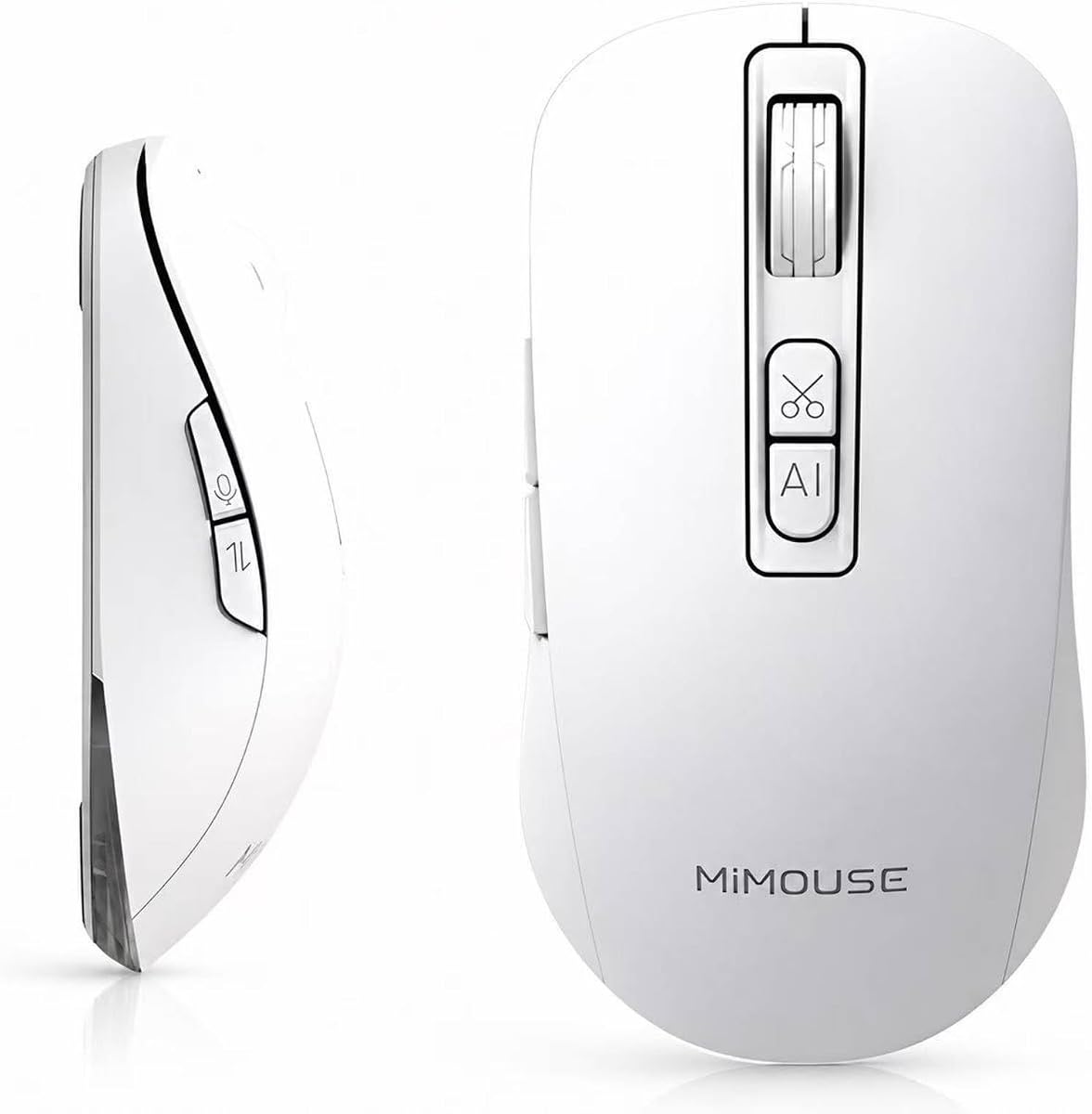
The MiMouse AI Wireless Mouse offers a free centralized AI platform integrating multiple tools like ChatGPT and Claude. This approach simplifies workflow by providing writing summarization and drafting tools in one place. It is lightweight and ergonomic ensuring comfort during extended use.
We may earn a commission when you buy through this link, at no additional cost to you.
Its battery life of up to 30 days and impressive and the polling rate ensures responsive tracking. The mouse supports multi-device connection and works across various operating systems including Windows and macOS. The AI transcription feature is accurate and useful for meeting notes.
The unified platform is a strong selling point for users who want access to multiple AI models. However it relies on the software app which requires setup and updates. The build quality is solid and the weight makes it easy to carry for travel.
We suggest this for professionals who need comprehensive AI support beyond simple voice typing. It is ideal for writers and researchers. This model offers a broad suite of tools in a portable package.
Access multiple AI models within one platform to handle writing and summarization tasks efficiently.
Lightweight and portable design makes it easy to carry for business trips or remote work sessions.
We may earn a commission when you buy through this link, at no additional cost to you.
This Bluetooth Wireless AI Mouse is compatible with a wide range of devices including iPads making it versatile. It offers real-time transcription and translation which are key for remote work and meetings. The triple-mode connectivity allows switching between up to three devices seamlessly.
We may earn a commission when you buy through this link, at no additional cost to you.
The ergonomic shape ensures a secure grip for all-day use and the DPI settings provide precise control. It includes tools for generating PPT and summarizing text which speeds up content creation. The app is intuitive and provides access to AI art creation and templates.
Users appreciate the flexibility of connecting multiple devices without extra hardware. The translation feature is accurate and useful for international communication. Setup is quick and the software enhances productivity without being overly complex.
We recommend this for users who work across tablets and laptops. It is a strong choice for remote workers and students. This mouse provides broad compatibility and useful AI tools for daily tasks.
Connect up to three devices at once and switch between them effortlessly for a seamless workflow across platforms.
Built-in AI tools help generate presentations and summarize content quickly enhancing creative and office tasks.
We may earn a commission when you buy through this link, at no additional cost to you.
The AI Mouse Voice Typing focuses on core voice to text functionality with translation support. It is designed for users who need to capture ideas quickly without typing. The silent clicks make it suitable for quiet environments and the rechargeable design ensures longevity.
We may earn a commission when you buy through this link, at no additional cost to you.
It supports over 200 languages for translation and offers basic text summarization tools. The setup is straightforward allowing for quick use for meetings and emails. The battery life is decent and the charging is convenient for daily use.
While it may not have advanced AI tools it covers essential tasks effectively. The rating indicates some users may have experienced issues but the core features work as described. It is an affordable option for those new to voice input devices.
We suggest this for users who want a simple voice typing tool without complexity. It is a good starter option for voice input. This mouse provides basic assistance for typing and translation tasks.
Convert speech to text quickly for notes and emails without needing complex software or setup.
Silent clicks ensure that your work does not disturb others in shared or quiet spaces.
We may earn a commission when you buy through this link, at no additional cost to you.
Selecting the right AI Smart Wireless Mouse depends on understanding your specific workflow needs and device ecosystem. This guide outlines key factors to help you make an informed decision.
Accuracy is critical for any voice-enabled device to ensure your spoken words are transcribed correctly without errors. Look for models claiming high recognition rates and multilingual support if you work in diverse environments.
Prioritize models with tested high accuracy rates to minimize correction time.
Many mice rely on specific apps to unlock AI capabilities like summarization or translation. Check if the software is intuitive and compatible with your operating system before buying.
Ensure the software offers the specific tools you need for productivity.
Multi-device support allows you to switch between computers and tablets seamlessly. Bluetooth and 2.4G wireless options provide flexibility depending on your setup and connectivity needs.
Choose a mouse that supports your preferred connection methods for smooth switching.
Long battery life ensures you do not face interruptions during important tasks. Rechargeable models with Type-C ports offer convenience while AA battery models may provide longer standby times.
Select a battery type that balances longevity with your recharging preferences.
Comfort is key for devices used over long periods to avoid strain and fatigue. Look for shapes that fit your hand well and silent clicks if you work in shared spaces.
Prioritize ergonomic design to maintain comfort during extended use.
Some models offer local processing which keeps your voice data secure without cloud storage. This is vital for professionals handling sensitive information.
Check if the device supports local processing for enhanced data security.
Prices vary widely so determine which features justify the cost for your needs. Budget models may offer basic functionality while premium ones provide advanced AI hubs.
Balance the cost with the features that impact your daily work most.
Ensure the mouse works with your specific operating system such as Windows macOS or iPad. Cross-platform compatibility is often necessary for modern workflows.
Verify compatibility with all your devices before purchasing.
Begin by installing the necessary software provided by the manufacturer to unlock full AI features. This ensures that voice typing and translation functions operate correctly on your system.
Connect the mouse via Bluetooth or the provided USB receiver to pair it with your devices. Switch modes using the dedicated button to toggle between different devices as needed.
Keep the device clean and dry to maintain performance. Charge it regularly using the Type-C port to ensure optimal battery health and usage.
Most models require specific software to activate advanced features like voice typing and translation. Some offer basic plug-and-play functionality but full capabilities are unlocked via an app.
Many models claim up to 98% accuracy in ideal conditions. Accuracy may vary based on background noise and speaking style so test in your environment.
Yes many models support multi-device connectivity allowing seamless switching between computers and tablets. Check the specific connectivity options for each mouse.
Some models process data locally to ensure privacy without cloud storage. Verify if your chosen model offers this feature before purchasing.
Most devices work with Windows macOS and Linux. Some also support tablets like iPad. Check the specifications for your specific operating system.
Battery life varies by model ranging from days to months on a single charge. Rechargeable models typically offer 10 to 30 days of usage.
The Redragon BM4195 Cheerdots2 and Ai Mouse with ChatGPT Assistant stand out as top picks for different user needs. They offer balanced features ranging from budget-friendly options to premium multifunctional hubs.
Prioritize features like accuracy privacy and battery life based on your work environment. Ensure the software and connectivity options meet your device requirements for a seamless experience.
Check current availability and pricing on Amazon before purchasing as these can change frequently. Use this guide to find the model that best enhances your productivity.