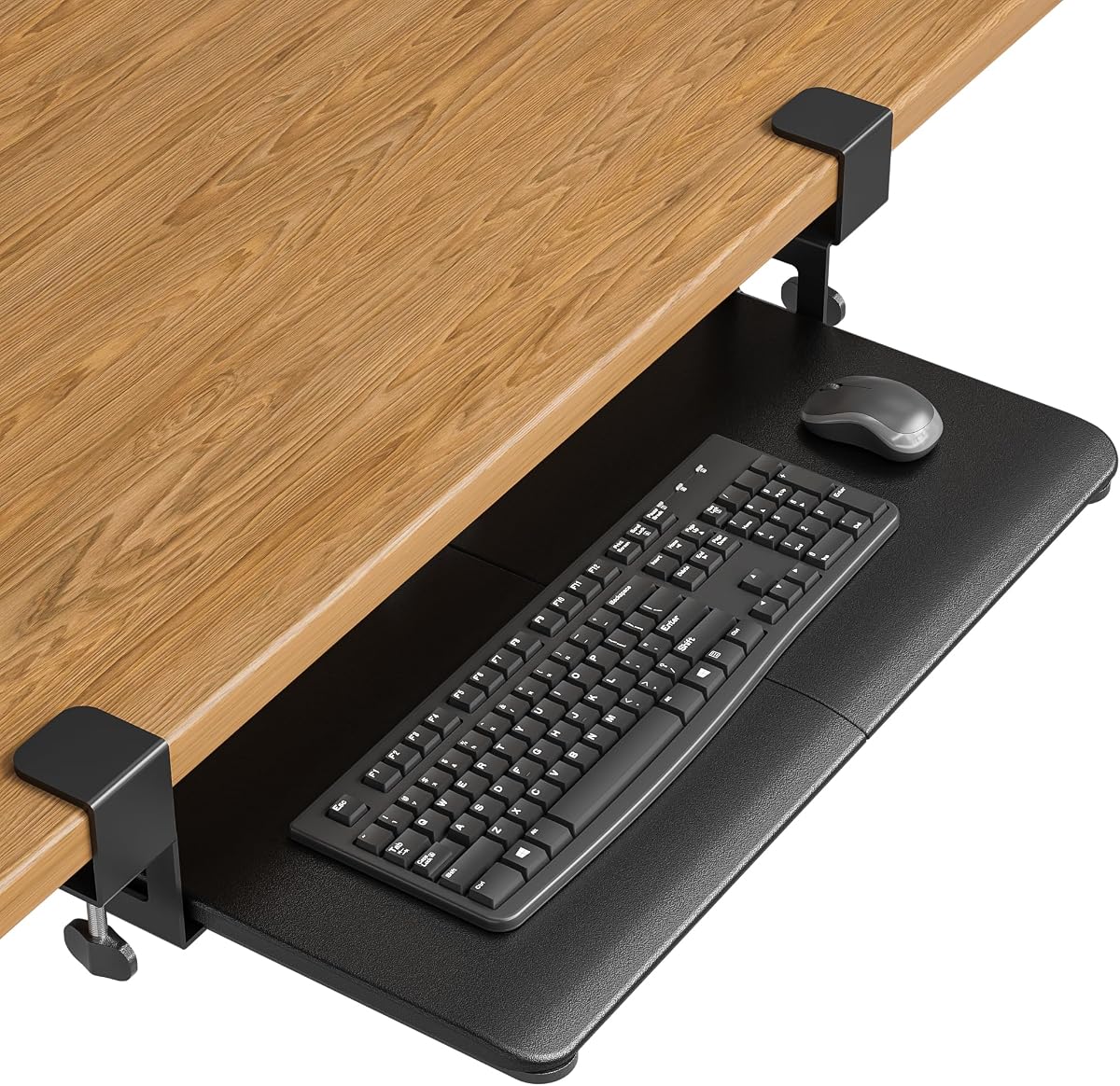
BONTEC Under Desk Keyboard Tray
4.4Editor score
No-drill C-clamp mount
Supports up to 11 lbs
Fits flat desk undersides
Creating a comfortable workspace is essential for productivity and health. A clamp on keyboard tray offers an ergonomic solution by positioning your input devices below the desktop level. This adjustment helps maintain a neutral wrist position and reduces strain during long work sessions.
We analyzed ten highly rated models based on installation ease, build quality, and adjustability. Each product was evaluated for desk compatibility, load capacity, and overall user satisfaction. Our goal is to help you find the right tray for your specific office environment without unnecessary expense.
Each review highlights key features, pros, and cons to guide your decision. We focus on real-world usability and mounting requirements to ensure a proper fit. Please note that availability and pricing can change quickly, so verify current details before purchasing.
4.4Editor score

4.4Editor score

4.3Editor score
As an Amazon Associate we earn from qualifying purchases.
This side-by-side comparison outlines the critical specifications and unique features of each model to help you make an informed choice for your workspace setup.


This model is highly rated for its balance of affordability and functionality. It features a sturdy design that keeps your keyboard and mouse organized below the desktop. The ergonomic angles help reduce wrist strain during extended typing sessions.
We may earn a commission when you buy through this link, at no additional cost to you.
The sliding mechanism allows you to pull the tray out for use and push it back when not needed. This flexibility is essential for maintaining a tidy workspace. The C-clamps provide a secure hold without damaging your desk surface.
One limitation is the maximum desk thickness of 1.25 inches, which may not fit thicker tables. Additionally, it requires a specific clamp-to-clamp clearance of 32.5 inches. These constraints are acceptable for most standard office desks.
This tray is ideal for users seeking a reliable, straightforward solution. It delivers on space-saving and comfort without unnecessary complexity. For those with compatible desks, it remains a top choice.
Positioning the keyboard below the desk aligns wrists and elbows naturally. This reduces tension in the shoulders and forearms over time.
By storing your input devices under the desk, you reclaim valuable surface area for monitors and documents. This leads to a cleaner and more organized environment.
We may earn a commission when you buy through this link, at no additional cost to you.
This tray offers greater flexibility with its height and width adjustments. It is designed to accommodate a wider range of desk thicknesses up to 3.4 inches. The included wrist pad adds immediate comfort for users.
We may earn a commission when you buy through this link, at no additional cost to you.
The adjustable nature allows you to fine-tune the position for your specific posture. Five set points provide customized placement to suit different ergonomic needs. This makes it suitable for shared workspaces or varied user heights.
While versatile, the larger clamp requirement might limit use on smaller desks. The assembly process involves more steps due to the adjustable components. However, the result is a highly adaptable workstation extension.
Ideal for users needing specific height or width customization. This model bridges the gap between standard trays and fully mechanical arms. It remains a strong contender for ergonomic setups.
Adjustability ensures the tray fits various desk depths and user preferences. This flexibility is rare at this price point.
The included wrist rest and mouse pad enhance comfort immediately. This saves additional cost and ensures coordination with the tray.
We may earn a commission when you buy through this link, at no additional cost to you.
This tray stands out with its ability to rotate fully around the mounting point. It allows you to move the keyboard out of the way when guests visit. The single clamp simplifies installation on desks with limited edge access.
We may earn a commission when you buy through this link, at no additional cost to you.
The rotating feature provides unique flexibility for layout changes. You can pivot the tray to face different directions without moving the clamp. This is useful for collaborative environments or irregular desk shapes.
The rotation requires significant clearance space around the desk edge. Additionally, single clamp designs may be less rigid than dual clamp systems. These factors should be weighed against the added mobility benefit.
Best for users who need occasional flexibility and minimal footprint. It offers a clever solution for limited spaces. The rotation mechanic adds a layer of utility not found elsewhere.
The ability to rotate allows for versatile workspace arrangements. You can hide the tray away quickly for a clean look.
A single clamp means fewer parts and faster setup. This reduces the time spent on assembly significantly.
We may earn a commission when you buy through this link, at no additional cost to you.
This model provides a cost-effective way to improve your workspace ergonomics. It features a simple pull-out mechanism that is intuitive to use. The build quality is solid for the price category and handles standard keyboards well.
We may earn a commission when you buy through this link, at no additional cost to you.
The no-drill installation means you can set it up in minutes without tools. Protective pads on the clamps prevent scratching your desk surface. This makes it a safe choice for rented offices or shared desks.
It lacks tilt adjustment and requires a flat underside for secure mounting. These trade-offs are expected at this price level. The focus is on utility and ease of installation rather than premium features.
Perfect for budget-conscious users needing a reliable upgrade. It delivers essential ergonomic benefits without extra cost. A great starting point for home office improvements.
You get essential functionality without paying for unnecessary add-ons. The value proposition is strong for entry-level setups.
Integrated pads protect your desk from scratches during use. This maintains the desk finish over time.
We may earn a commission when you buy through this link, at no additional cost to you.
This premium model offers extensive customization options for typing posture. It includes nine tilt settings ranging from positive to negative angles. This level of control is rare in standard clamp-on trays.
We may earn a commission when you buy through this link, at no additional cost to you.
The swivel clamps allow independent rotation for flexible placement. Combined with height adjustable brackets, you can find the perfect fit. This accommodates various desk types and user heights effectively.
The complexity of adjustments may make initial setup more time consuming. The higher price reflects the added features and build quality. It is a justified expense for long-term ergonomic health.
Recommended for professionals seeking advanced ergonomic control. It provides the most versatile platform in this lineup. Ideal for those with specific posture requirements.
Nine settings allow you to find the exact angle for your wrists. This precision helps prevent repetitive strain injuries.
Rotating clamps let you position the tray at angles relative to the desk. This helps optimize space in tight corners.
We may earn a commission when you buy through this link, at no additional cost to you.
This tray is specifically designed to fit L-shaped corner workstations. The clamps rotate 90 degrees to align with the corner edge. This allows for efficient use of the corner space without obstruction.
We may earn a commission when you buy through this link, at no additional cost to you.
The design supports the natural flow of work in a corner setup. You can slide it in and out easily as needed. The sturdy clamps ensure it stays secure even during active typing.
Compatibility is limited to desks without beveled edges and of thickness. This restricts its use for some modern furniture designs. Users must verify their desk dimensions before purchase.
Best for those with L-shaped desks needing a dedicated tray. It maximizes the corner utility. A specialized solution that works well in targeted scenarios.
The 90-degree clamp rotation aligns perfectly with corner desks. This eliminates the gap often found with standard trays.
By fitting into the corner, it keeps your main workspace clear. This improves access to other tools and documents.
We may earn a commission when you buy through this link, at no additional cost to you.
This model adds a dedicated pencil drawer to the standard keyboard tray. It offers extra storage for small accessories like pens and notes. This keeps clutter off the main desk surface effectively.
We may earn a commission when you buy through this link, at no additional cost to you.
The drawer and tray operate independently for flexible use. You can slide the tray out while keeping the drawer closed. This adds utility without compromising the primary typing function.
Installation is slightly more involved due to the dual component system. The 1.25 inch thickness limit is lower than premium alternatives. These factors are acceptable for the added convenience.
Ideal for users needing extra storage under the desk. It combines typing comfort with organizational benefits. A practical upgrade for busy workspaces.
The pencil drawer organizes small items efficiently. This reduces the need for additional desk organizers.
Having both typing and storage in one unit saves space. It streamlines your desk setup significantly.
We may earn a commission when you buy through this link, at no additional cost to you.
This tray focuses on providing a generous surface area for input devices. The back baffle prevents keyboards from sliding off during use. This simple safety feature enhances usability and peace of mind.
We may earn a commission when you buy through this link, at no additional cost to you.
It supports thicker desks up to 2.76 inches. This broadens compatibility compared to many standard models. The dual clamps offer stability and secure attachment.
The platform is basic with no tilt or height adjustment. It relies on a fixed position that works for most users. This simplicity is a benefit for those avoiding complexity.
Suitable for users needing a reliable, flat surface. It handles diverse desk thicknesses well. A straightforward option for ergonomic typing.
The back baffle keeps your keyboard in place securely. This prevents accidental drops and distractions.
Supports up to 2.76 inches for wider desk range. This allows fitment on many standard office tables.
We may earn a commission when you buy through this link, at no additional cost to you.
This extender can function as a keyboard tray but offers more utility. It supports printers or other heavy items due to its robust build. The folding design lets you store it away when not in use.
We may earn a commission when you buy through this link, at no additional cost to you.
The K-shaped brackets provide rigid support up to 44 lbs. This exceeds the capacity of most dedicated keyboard trays. It offers versatility for diverse workspace needs.
It may not have the same ergonomic height options as specialized trays. The clamp width requirement limits smaller desks. These trade-offs are minimal given the durability and versatility.
Best for multi-purpose use beyond just typing. It supports heavy equipment and can be stowed easily. A flexible choice for dynamic offices.
The reinforced K-shape supports heavy loads securely. This makes it safe for printers or large monitors.
The foldable design saves space when not in use. You can move it out of the way instantly.
We may earn a commission when you buy through this link, at no additional cost to you.
This tray stands out with its lifetime warranty and US-based support. It provides confidence in long-term durability and service. The platform is spacious enough for full-size keyboards and mouse use.
We may earn a commission when you buy through this link, at no additional cost to you.
The no-drill clamp-on design is ideal for renters. It avoids permanent modification to the desk surface. This makes setup and removal easy without leaving marks.
It is not compatible with glass desks which limits some options. The assembly process involves more parts than basic models. These drawbacks are outweighed by the warranty protection.
Recommended for those seeking long-term reliability. It offers peace of mind with robust support. A solid choice for stable office environments.
The lifetime warranty ensures long-term use protection. You do not need to worry about defects.
No drilling means you can remove it cleanly. This is crucial for rental agreements.
We may earn a commission when you buy through this link, at no additional cost to you.
Choosing the right tray involves considering desk compatibility, ergonomic features, and installation requirements. These factors ensure a proper fit and comfortable typing experience.
Measure your desk thickness carefully before purchasing. Most trays accept up to 1.25 to 2.2 inches, but some go higher. Check the total clamp-to-clamp length to ensure it fits your desk width.
Always verify your desk dimensions match the tray's requirements. This prevents return hassles and ensures a secure installation.
Most trays use C-clamps that do not require drilling. Look for clamps with protective pads to avoid scratching your desk. Ensure the clamps rotate if you need flexible placement options.
A sturdy mounting system is essential for stability. Weak clamps may lead to wobbling during typing sessions.
Select a tray that accommodates your keyboard and mouse comfortably. Standard widths range from 20 to 27 inches. Check load capacity to ensure it supports your peripherals safely.
Ensure the surface area suits your needs. Oversized keyboards may require larger platforms for full functionality.
Look for trays that offer tilt or height adjustment. These features allow you to maintain a neutral wrist position. Fixed trays are cheaper but may limit posture optimization.
Adjustability helps reduce strain during long work hours. Prioritize this if you type frequently or have existing wrist issues.
Check the construction material for build quality. Metal frames often offer more durability than plastic. The sliding mechanism should move smoothly without sticking.
High-quality materials ensure long-term performance. Avoid cheap builds that might degrade over time.
Most trays come with tools and instructions for setup. Look for designs that simplify assembly steps. Clear manuals reduce the time needed to set up.
A straightforward installation process saves time and effort. Check reviews for any reported assembly difficulties.
Some models include drawers, wrist rests, or rotation. These extras add value and convenience to your workspace. Decide if you need these add-ons based on your habits.
Consider if extra features justify the cost. A simple tray might suffice if storage is already available.
A longer warranty indicates manufacturer confidence. Look for brands offering at least a year of coverage. Access to customer support helps resolve issues quickly.
Prioritize brands with responsive support. Good service adds peace of mind to your purchase.
Install the tray by positioning the clamps on a flat desk edge. Ensure the pads are aligned to grip securely. Tighten the clamps by hand until the tray feels stable.
Adjust the tray height and tilt to match your body posture. Place your keyboard and mouse on the platform with enough space to move. Ensure the slide mechanism moves freely without obstruction.
Regularly clean the tray surface to prevent dust buildup. Check the clamps periodically to ensure they remain tight. Avoid placing excessive weight beyond the recommended limit.
Most standard trays fit desks up to 1.25 to 2.2 inches thick. Some models like the VIVO MOUNT-KBST1 support up to 3.4 inches. Always check the product specs before buying to avoid fit issues.
No tools are usually required for installation as they come with necessary hardware. The clamps typically tighten by hand for a secure fit. This makes setup quick and simple for most users.
Most clamp trays are not suitable for glass desks due to slipping risks. Mount-It! specifically notes incompatibility with glass surfaces. Consider alternative mounting solutions if you have a glass table.
You need at least 31.3 to 32.5 inches of width for most standard trays. Verify your desk clearance before installation to ensure smooth slide operation. Insufficient space may restrict movement and usability.
Tilt adjustment helps align wrists in a neutral position to reduce strain. This ergonomic feature is vital for long typing sessions. Look for models with multiple tilt settings for customization.
Most trays support standard and mechanical keyboards with a 11 lbs limit. Check the dimensions to ensure oversized boards fit the platform. Avoid exceeding the weight limit for safe operation.
Yes, no-drill clamp trays are ideal for renters as they do not damage surfaces. They can be removed easily when moving out. Always verify the clamp mechanism suits your specific desk type.
Wipe the surface with a dry or slightly damp cloth regularly. Check the clamps for tightness every few months to ensure stability. Keep the slide rails free of debris for smooth operation.
We reviewed ten top models offering various features to suit different needs. From basic budget trays to premium adjustable options, there is a choice for every office setup.
Prioritize ergonomics and desk compatibility to ensure a good fit. Features like tilt and rotation add value but may cost more.
Always verify current availability and specifications before purchase as they can change.