
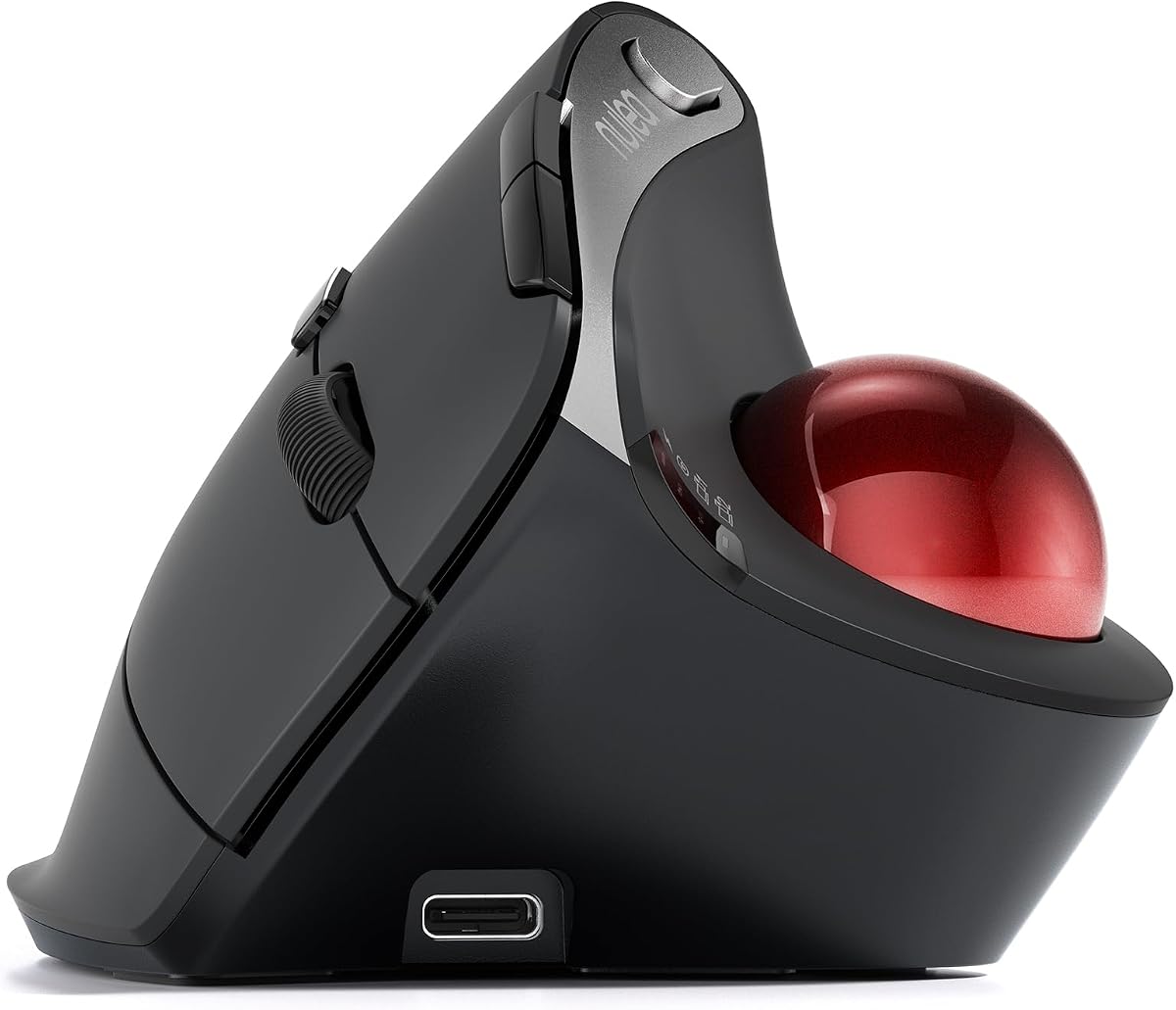
Nulea M501 Wireless Trackball Mouse
4.4Editor score
Rechargeable battery included
Three device connectivity
Adjustable DPI levels
Discover the top ergonomic trackball mice for comfort and precision. Our guide compares features, design, and performance to help you find the perfect wireless
Finding the right input device can transform your daily workflow. Ergonomic trackball mice offer a unique solution for users seeking comfort and precision. These devices reduce strain by minimizing hand movement while maintaining high accuracy.
We have carefully selected ten top models based on user feedback and expert analysis. Our comparison covers connectivity, battery life, and ergonomic design features. Each product brings distinct advantages for different work environments.
Every pick highlights specific strengths to help you make an informed decision. Note that availability and pricing may fluctuate over time. Always verify current details before finalizing your purchase online.
4.4Editor score
4.5Editor score

4.4Editor score
This side-by-side comparison highlights the core specifications of our top ten selections. We examine design, connectivity options, and battery performance to give you a clear overview of each model.




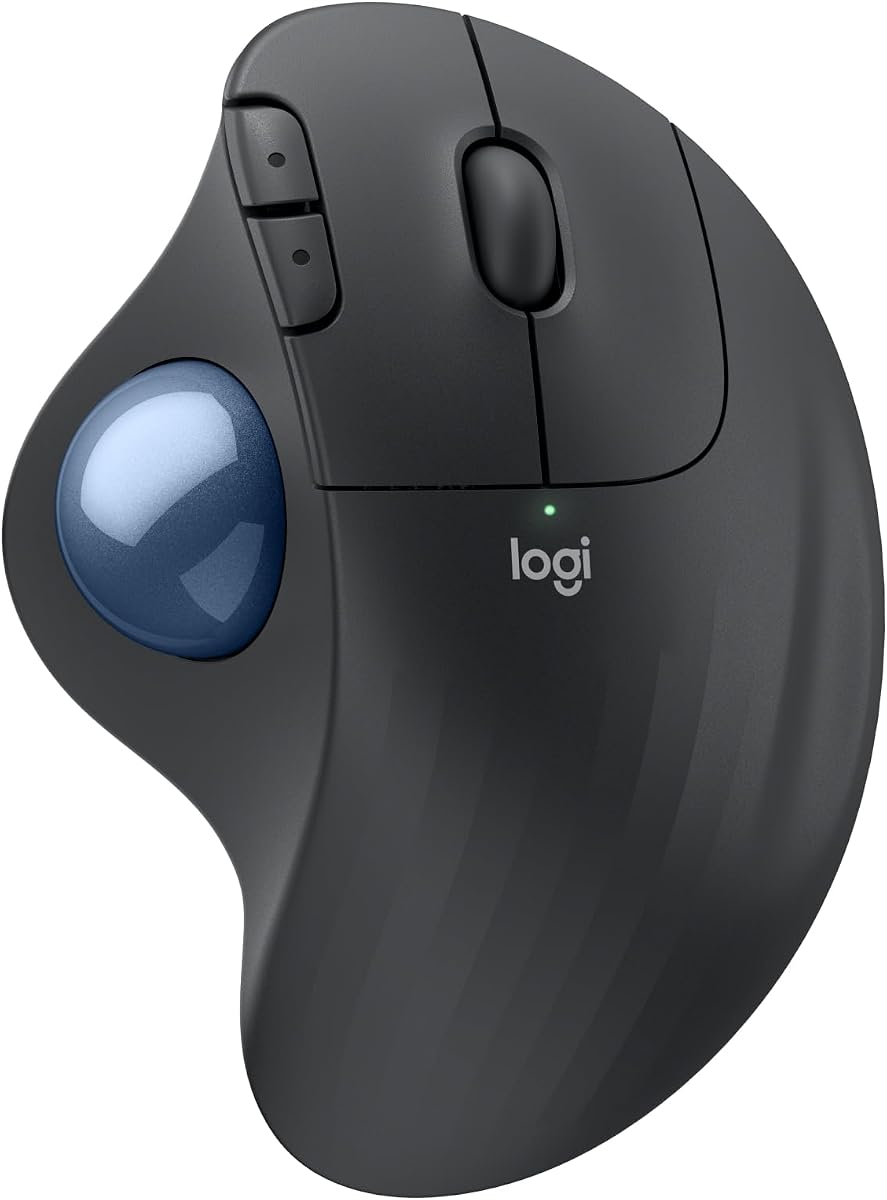
The Logitech Ergo M575S stands out as a leading choice for ergonomic computing. It combines a sculpted shape with thumb control to minimize arm movement during long sessions.
We may earn a commission when you buy through this link, at no additional cost to you.
This device features quiet clicks that reduce noise pollution in shared spaces. Users report improved forearm posture due to the specific ergonomic angle designed for comfort.
While the battery relies on standard AA cells, its lifespan is exceptionally long. The trade-off of non-rechargeable power is balanced by the ease of replacement and longevity.
Ideal for professionals seeking comfort without sacrificing performance, this mouse delivers reliability. Its design supports all-day use effectively for both office and home environments.
The sculpted shape realigns your forearm into a better posture throughout the day.
Enhanced control with customizable buttons allows time-saving shortcuts for your workflow.
We may earn a commission when you buy through this link, at no additional cost to you.
The Nulea M501 offers an accessible entry point into ergonomic trackball technology. Its rechargeable design eliminates the need for frequent disposable battery replacements.
We may earn a commission when you buy through this link, at no additional cost to you.
Connectivity is versatile with support for both Bluetooth and USB connections. This flexibility allows seamless switching between multiple devices for varied productivity needs.
Though the buttons lack advanced programmability, the core functionality remains robust. The smooth trackball ensures precise cursor control across different surfaces effortlessly.
Perfect for budget-conscious users, this model delivers essential ergonomic benefits. It is a practical choice for those prioritizing comfort and value in equal measure.
Connect up to three devices and switch easily to improve your efficiency.
The optimal angle keeps your palm in a natural position for all-day comfort.
We may earn a commission when you buy through this link, at no additional cost to you.
This variant of the M575S series focuses on delivering core ergonomic benefits in black. It maintains the same reliable performance and design principles as other models.
We may earn a commission when you buy through this link, at no additional cost to you.
The thumb control mechanism allows you to move the cursor without moving your hand. This feature is ideal for setups where desk space is limited or tight.
Battery life remains a strong suit with long-term endurance for daily tasks. The design ensures your hand stays relaxed even during extended periods of work.
Recommended for those who prefer a classic look with modern functionality. It serves well as a primary input device for both professional and personal use.
Save space with thumb control by moving your cursor without moving your hand.
The ergonomic shape supports your hand and realigns your forearm posture.
We may earn a commission when you buy through this link, at no additional cost to you.
The MX Ergo S sets a new standard with its advanced adjustable tilt feature. This allows users to customize the angle for optimal forearm comfort and posture.
We may earn a commission when you buy through this link, at no additional cost to you.
With a rechargeable battery and fast USB-C charging, downtime is minimized significantly. You can enjoy over two hours of use from just one minute of charging.
The quiet click technology ensures a peaceful work environment for everyone. Six customizable buttons provide time-saving shortcuts that enhance overall productivity levels.
Best suited for professionals needing high-end ergonomic features, this mouse excels. It combines sustainability with performance for a comprehensive ergonomic solution.
Switch between speed and high-precision tracking at the tap of a button.
Experience enhanced control in daily tasks with time-saving shortcuts and smart actions.
We may earn a commission when you buy through this link, at no additional cost to you.
TECKNET delivers a vertical design that promotes better forearm posture significantly. The sixteen-degree angle reduces muscle strain effectively during extensive use sessions.
We may earn a commission when you buy through this link, at no additional cost to you.
Users can switch between three devices seamlessly using Bluetooth and USB options. This multi-device capability enhances workflow efficiency for those managing multiple systems.
Charging is rapid with just fifteen minutes of power lasting a full day. The silent operation ensures that clicks do not disturb colleagues or household members.
This model is a strong contender for those seeking vertical ergonomic benefits. It balances technical features with comfort to deliver a reliable typing experience.
A unique 16-degree vertical angle promotes better forearm posture and reduces muscle strain.
Built-in rechargeable battery powers a full day of use after just 15 minutes.
We may earn a commission when you buy through this link, at no additional cost to you.
The Nulea M506 introduces a steep vertical angle to maximize wrist relaxation. This design keeps wrists and forearms in natural relaxed positions throughout the day.
We may earn a commission when you buy through this link, at no additional cost to you.
A detachable trackball makes cleaning simple and ensures smooth movement over time. This maintenance feature extends the lifespan and usability of the device significantly.
With up to three weeks of battery life on a single charge, recharging is infrequent. The textured palm surface offers a comfortable grip for steady cursor control.
Ideal for users needing significant vertical support, this mouse delivers comfort. It is a solid choice for office work and creative tasks alike.
The 54-degree vertical structure keeps your wrists and forearms in natural relaxed positions.
The trackball is removable for easy cleaning to clear dust and dirt quickly.
We may earn a commission when you buy through this link, at no additional cost to you.
This model features a perfect sixty-five-degree angle for maximum natural relaxation. The wave-textured surface fits your palm seamlessly for all-day comfort and control.
We may earn a commission when you buy through this link, at no additional cost to you.
Advanced infinite scroll switches between precise and fast modes based on speed. This feature supports smooth four-way scrolling for effortless navigation through long documents.
Silent control ensures completely noise-free operation from the trackball to the wheel. It is perfect for shared spaces where distraction-free work is essential for productivity.
Recommended for those prioritizing vertical design and quiet operation. It offers a unique approach to ergonomic comfort that minimizes strain effectively.
Advanced infinite scroll wheel switches between precise and fast modes based on speed.
Experience completely noise-free operation with this cordless mouse perfect for shared spaces.
We may earn a commission when you buy through this link, at no additional cost to you.
The Nulea model includes a built-in stand that elevates the mouse for better posture. This tilt stand supports a more natural wrist position during standard work tasks.
We may earn a commission when you buy through this link, at no additional cost to you.
It pairs well with various devices through Bluetooth or the included USB receiver. Seamless switching between multiple computers ensures uninterrupted workflow and productivity levels.
Silent control ensures quiet operation that does not disturb those around you. The six-button high performance layout allows for easy navigation and quick actions.
Ideal for users seeking ergonomic support with elevated design features. It provides comfortable and effortless grip for long working hours effectively.
The ergonomic wireless mouse comes with a 21.7-degree tilt stand for a more natural wrist position.
The tilted elevated mouse fits your palm precisely delivering a more comfortable grip.
We may earn a commission when you buy through this link, at no additional cost to you.
Designed for enterprise deployment, this version supports remote management tools efficiently. It is ideal for companies looking to standardize ergonomic hardware across employees.
We may earn a commission when you buy through this link, at no additional cost to you.
The shape reduces muscle activity significantly while promoting better forearm posture. Smooth thumb control offers precision on any surface for accurate daily task performance.
Features like Logitech Sync allow remote monitoring to ensure device health. This scalability makes it a practical solution for large corporate IT environments.
Best for business environments needing durable and ergonomic trackball solutions. It combines sustainability with professional-grade features for reliable performance.
Enterprise-grade wireless trackball mouse is ideal to deploy at scale for employees.
The plastic parts include 52 percent post-consumer recycled plastic for sustainability.
We may earn a commission when you buy through this link, at no additional cost to you.
This advanced version supports high productivity with six programmable buttons. The USB-C charging ensures quick power-ups for users on the go frequently.
We may earn a commission when you buy through this link, at no additional cost to you.
Encrypted dongles provide secure connections for sensitive professional tasks safely. The tilt mechanism continues to offer superior ergonomic support for long hours.
Designed for medium to large hands, it offers a soft rubber grip for stability. It stands out as a robust tool for demanding work environments requiring precision.
Recommended for power users needing customization and fast charging. It delivers high performance and comfort for sustained professional usage.
Enjoy up to 24 hours of use from a one-minute charge for convenience.
Experience enhanced control in daily tasks with customizable buttons and smart actions.
We may earn a commission when you buy through this link, at no additional cost to you.
Selecting the right trackball mouse depends on specific ergonomic needs and workflow preferences. This section breaks down key factors to consider before making a purchase decision.
Trackball size determines how your fingers interact with the cursor control mechanism. Larger balls generally offer finer control but require more finger movement to turn. Smaller balls can be controlled easily with the thumb but may reduce precision in detailed work.
Choose a size that matches your hand dimensions and comfort preferences effectively.
The vertical angle of the mouse body affects wrist posture significantly. Higher angles like 54 or 65 degrees promote a handshake position that reduces strain. Lower angles may feel more natural for traditional users but provide less ergonomic relief.
Select an angle that allows your forearm to rest naturally during use.
Modern trackball mice offer Bluetooth, USB dongles, or dual connectivity. Dual options allow switching between devices effortlessly which is vital for multi-device users. Ensure the connection method matches your computer ports to avoid using adapters.
Prioritize models with flexible connectivity to support your specific setup needs.
Power sources range from standard AA batteries to rechargeable lithium-ion cells. Rechargeable models reduce waste and cost over time but require regular charging. AA batteries provide ease of swap but may need frequent replacement for heavy users.
Decide between convenience and sustainability based on your daily usage habits.
Customizable buttons allow shortcuts that streamline workflows significantly. Look for mice that support software customization to map functions to physical keys. This feature is critical for professionals who need quick access to common tasks.
Verify software compatibility and button count before buying for optimal utility.
Tilt mechanisms like the 20-degree angle on some models adjust the resting posture. Certification by ergonomists ensures the design meets health standards for comfort. These features are essential for users recovering from or preventing repetitive strain injuries.
Look for verified ergonomic designs to ensure long-term health benefits.
The materials used impact durability and tactile feel during operation. High-quality plastics and rubber grips enhance comfort and longevity significantly. Models using recycled materials also contribute to environmental sustainability goals.
Choose a device with robust construction to ensure it lasts for years.
Most modern trackball mice track well on various surfaces without needing pads. Some optical sensors perform best on specific textures like wood or glass. Verify the sensor type if you plan to use the mouse in different environments.
Ensure the mouse works on your intended workspace surfaces to avoid issues.
Position your forearm flat on the desk surface to support the ergonomic angle. Your hand should rest naturally without lifting or twisting the wrist excessively. This alignment reduces strain and allows smooth thumb movement for cursor navigation.
Regularly clean the trackball by removing it from the cage and wiping it down. Dust accumulation can cause the ball to stick or roll unevenly over time. A dry cloth is usually sufficient to restore smooth operation quickly.
Calibrate sensitivity settings via any provided software to match your workflow. Adjusting DPI levels allows you to switch between precision and speed as needed. Proper calibration ensures the device responds exactly how you expect during tasks.
Trackball mice are widely recommended for reducing wrist pain because they minimize arm movement. The thumb or finger-controlled ball keeps the wrist stationary while the cursor moves across the screen. This reduction in repetitive motion significantly lowers the risk of strain and carpal tunnel syndrome.
Battery life varies significantly by model and usage intensity. Some AA-powered models can last up to 18 months on a single set of batteries. Rechargeable models typically offer 30 to 90 days of use per charge depending on settings.
Basic functionality works immediately without software installation. However, many models offer dedicated apps for customizing buttons and adjusting DPI settings. These programs enhance productivity but are optional for simple cursor control tasks.
Yes, wireless trackball mice are perfect for travel due to their small footprint. They require no surface space and connect easily via Bluetooth to laptops or tablets. This portability makes them ideal for cramped workspaces like airplane seats or hotel rooms.
Models with larger bases and extended contours generally fit large hands better. Look for ergonomic descriptions that mention medium to large hand sizes in their specifications. A wider body prevents hand cramping during extended sessions significantly.
Modern wireless technology ensures almost zero latency for daily tasks. Bluetooth and USB dongles provide stable connections that feel similar to wired mice. Lag is rarely an issue unless the battery is critically low or interference is severe.
Our top picks highlight the Logitech M575S for overall value and the MX Ergo S for premium features. The Nulea M501 offers an excellent entry point for budget-conscious buyers seeking comfort. Each model addresses different needs within the ergonomic workspace category effectively.
Prioritize factors like tilt angle and button programmability based on your daily workflow. Choosing the right shape and connectivity ensures the mouse supports rather than hinders your productivity. Comfort should remain the primary metric when selecting your next input device.
Always check current prices and availability before finalizing your purchase online. These prices may fluctuate due to demand or seasonal sales. Stay informed to get the best deal on the model that suits your needs.