
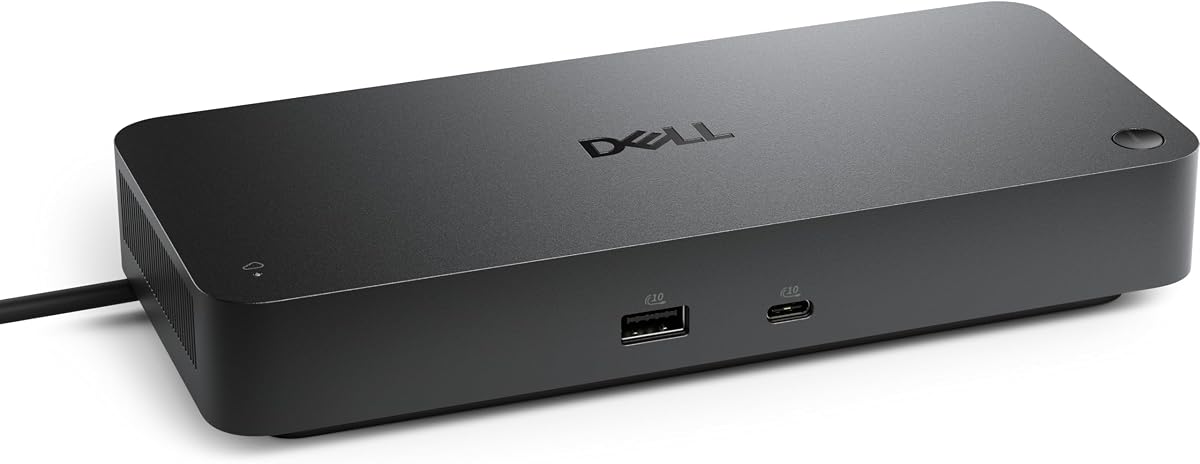
Dell Pro Laptop Docking Station WD25
4.5Editor score
Delivers 100W power to laptops
Features ambidextrous USB-C cable
Supports up to four high-res displays
This guide compares the best docking stations for Dell Pro 14 Plus laptops, evaluating power delivery, display support, and connectivity for professionals.
Finding the right docking station for your Dell Pro 14 Plus is essential for maximizing productivity in modern workspaces. A quality dock transforms your laptop into a full desktop setup, offering multiple display outputs and fast data transfer speeds for seamless workflow integration.
We evaluated ten top-rated models based on power delivery capacity, display support, network speeds, and build quality. Our analysis focuses on compatibility with Dell AI PCs and universal USB-C standards, ensuring you can connect various peripherals without technical headaches.
Each pick highlights specific strengths like multi-monitor support or enterprise management features. Prices and availability fluctuate frequently, so please check the latest offers before purchasing to ensure you get the best value for your specific workspace needs today.
4.5Editor score
4.2Editor score

4.5Editor score
The following table provides a side-by-side comparison of the top ten docking stations evaluated for the Dell Pro 14 Plus. Review key specifications like power output, video port types, and networking speeds to find the perfect match for your workflow.




The Dell Pro Thunderbolt 4 Smart Dock SD25TB4 is a robust solution for users needing maximum connectivity and power. With a rating reflecting its high-end capabilities, it stands out for delivering up to 130W of charging power while supporting four 4K displays simultaneously.
We may earn a commission when you buy through this link, at no additional cost to you.
Its standout feature is the dual Thunderbolt 4 ports, which allow for chaining up to six devices and delivering massive data throughput. This model is ideal for creative professionals or data scientists who need to run multiple high-resolution monitors without sacrificing performance or charging speed for their laptop.
While the price point is higher than basic docks, the inclusion of enterprise-level security features like DMA protection and secure enclosure justifies the investment. The ambidextrous design ensures that the USB-C cable can be routed left or right, adapting to any desk layout efficiently.
If you prioritize future-proof connectivity and need to drive multiple monitors without compromise, this dock is the top choice. It balances high power delivery with comprehensive connectivity, making it a reliable centerpiece for a sophisticated workstation setup.
This dock supports up to four 4K monitors via HDMI 2.1 and DisplayPort 1.4, ideal for creative or data work.
Dual Thunderbolt 4 ports enable high-speed data transfer and support chaining up to six external devices seamlessly.
We may earn a commission when you buy through this link, at no additional cost to you.
The Dell Pro Laptop Docking Station WD25 offers a compelling balance of performance and cost. With a solid 4.5 rating, it provides essential productivity tools by delivering up to 100W of power to mainstream Dell AI PCs and non-Dell devices alike.
We may earn a commission when you buy through this link, at no additional cost to you.
This model focuses on practicality, featuring an ambidextrous USB-C cable that simplifies cable management on any desk. It is part of a highly manageable docking family, which allows IT teams to update firmware remotely, ensuring users stay productive without interruption.
While it lacks the Thunderbolt 4 speeds of premium models, it covers the basics efficiently for most office tasks. The sustainable design, incorporating recycled materials and reduced power consumption, aligns well with modern corporate environmental goals.
For users seeking a reliable, no-fuss connection hub that supports multiple high-res displays and fast charging without breaking the budget, this is an excellent choice. It ensures your accessories stay connected while keeping your workspace organized and efficient.
Configure your workspace with an ambidextrous USB-C cable that can be routed left or right for better ergonomics.
Drives up to 100W of power to new mainstream Dell AI PCs and non-Dell PCs efficiently.
We may earn a commission when you buy through this link, at no additional cost to you.
The Dell Pro Smart Dock SD25 excels in environments where remote management and security are top priorities. It stands out for offering the industry's first holistic peripheral management solution, allowing IT admins to configure and update docks over Wi-Fi without end-user presence.
We may earn a commission when you buy through this link, at no additional cost to you.
Security is built into the hardware with tamper-resistant encryption and WPA-3 standards, safeguarding sensitive data across the fleet. This makes it a secure choice for enterprises that need to ensure compliance and protect assets from physical or digital threats.
Effortless maintenance is another key benefit, as updates can be scheduled during off-hours to avoid disrupting workflow. The compact design and use of recycled materials ensure that the dock remains a small footprint on your desk while meeting sustainability targets.
If your organization values security and ease of IT oversight, this dock is the smart investment. It provides a reliable connection while giving administrators the tools they need to maintain the network efficiently and securely.
Keep working confidently with enterprise-grade WPA-3 192-bit encryption for secure Wi-Fi communication.
Remotely manage your smart docks without end-user presence from the Dell Device Management Console.
We may earn a commission when you buy through this link, at no additional cost to you.
The Anker Prime Docking Station is a versatile all-in-one solution for users with many peripheral needs. Rated highly for its connectivity, it offers 14 ports in total, allowing you to charge up to four devices simultaneously while managing data transfer efficiently.
We may earn a commission when you buy through this link, at no additional cost to you.
With a massive 160W total output, it ensures your laptop stays charged even when multiple high-power devices are connected. The dual HDMI ports support up to 2K@60Hz displays, making it a great option for general productivity and media consumption without needing multiple cables.
This dock supports USB-C, USB4, and Thunderbolt connections, ensuring broad compatibility across Windows and ChromeOS laptops. However, users on macOS should note that external monitors will be identical due to OS limitations, and Linux users may face compatibility challenges.
For those who want to consolidate all their connections into a single hub with high power delivery, this is a strong contender. It brings together all your devices with ease, perfect for keeping a clean and efficient workspace.
Deliver a powerful charge with 160W of total output capable of charging up to four devices simultaneously.
Manage data across multiple devices with versatile ports offering speeds up to 10Gbps efficiently.
We may earn a commission when you buy through this link, at no additional cost to you.
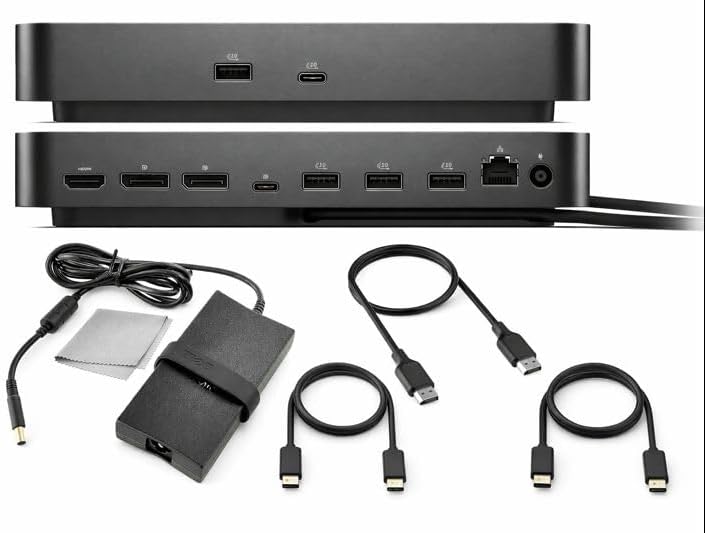
This bundle provides everything you need to set up a multi-monitor workspace right out of the box. It includes the Dell WD25 Dock along with original cables and a powerful 100W adapter, eliminating the guesswork of finding compatible cords.
We may earn a commission when you buy through this link, at no additional cost to you.
A unique addition is the premium microfiber cleaning cloth, which helps keep your screens and laptops spotless. This attention to detail makes the package feel more complete and professional, adding value beyond just the dock itself.
The inclusion of HDMI, USB-C, and DisplayPort cables ensures you can connect various devices immediately. While the rating reflects mixed experiences with bundle quality, the convenience of having all necessary parts included is a major plus for new setups.
If you want a hassle-free purchase that ensures you have all the right cables to start working immediately, this bundle is ideal. It simplifies the procurement process so you can focus on setting up your productivity environment.
Includes premium HDMI cable, USB-C data/video cable, and DisplayPort cable—everything you need out of the box.
Comes fully equipped with the Dell WD25 Dock, powerful 100W adapter, and original Dell cables.
We may earn a commission when you buy through this link, at no additional cost to you.
The Dell Pro Dock WD25Z is a specialized unit designed to handle high-power requirements. With a standout 4.9 rating, this dock is recognized for its capability to deliver 180W of power via USB-C, ensuring even the most demanding workstations stay fully charged.
We may earn a commission when you buy through this link, at no additional cost to you.
Its specific model number, DELL-WD25Z, indicates it is tailored for advanced Dell systems that require more than standard power delivery. This makes it a robust choice for professionals running heavy applications that drain battery power quickly during operation.
Although port details are minimal in the provided data, the high power rating suggests it is built to support multiple displays and peripherals simultaneously without voltage drop. The reliability associated with the Dell brand adds confidence to its performance.
For users with high-performance laptops that need maximum charging headroom, this dock is worth the investment. It ensures your machine stays at peak performance levels regardless of how much you push it during work hours.
Supports high power delivery requirements with 180W capacity for maximum laptop performance.
We may earn a commission when you buy through this link, at no additional cost to you.
This Dell Pro Dock WD25 model stands out for its reliability and comprehensive cable inclusion. With a 4.5 rating, it offers dual 4K display support and high-speed Ethernet, making it a solid choice for office environments needing stable connectivity.
We may earn a commission when you buy through this link, at no additional cost to you.
The inclusion of a 3-year warranty adds significant peace of mind for long-term use. Along with the dock, it comes with necessary HDMI, DisplayPort, and C to C cables, ensuring you have the connectivity needed without additional purchases.
It delivers up to 100W of power, which is sufficient for most laptops, while supporting a multi-port USB hub for fast data transfer. The 2.5GbE Ethernet port provides a stable connection for heavy network usage, ensuring your workflow remains uninterrupted.
If you prioritize durability and need a complete package that gets you up and running quickly, this model is highly recommended. It balances performance with the assurance of a strong warranty, making it a safe bet for daily use.
Expand your workspace with multiple display ports for multiple display setups and high-speed internet.
Delivers up to 100W of power to laptops and devices ensuring your system stays charged.
We may earn a commission when you buy through this link, at no additional cost to you.
The Dell Pro Smart Dock SD25 Bundle boasts a perfect 5-star rating, signaling exceptional customer satisfaction. It provides a complete workspace setup by including the 130W charging adapter and all necessary HDMI, USB-C, and DisplayPort cables in one package.
We may earn a commission when you buy through this link, at no additional cost to you.
This bundle supports up to four displays simultaneously, making it ideal for professionals and multitaskers who need ample screen real estate. The addition of a premium cleaning cloth adds a thoughtful touch that keeps your workspace looking professional and clean.
With 2.5GbE Ethernet included, you get faster network speeds compared to standard options. The bundle ensures you do not need to hunt for extra accessories, saving time and effort during your initial setup process.
If you are looking for a ready-to-use solution with top-tier ratings and all the tools needed to start immediately, this bundle is excellent. It combines powerful charging capabilities with the convenience of a full accessory kit.
Get the dock with everything you need to set up your workspace including all cables and a cleaning cloth.
We may earn a commission when you buy through this link, at no additional cost to you.
The WD25 Dell Pro Dock is a robust choice for those needing reliable performance and strong support. With a 4.8 rating, it offers 100W power support and ultra-fast networking via a 2.5GbE Ethernet port, ensuring your system stays stable.
We may earn a commission when you buy through this link, at no additional cost to you.
It includes a 3-year warranty which is a significant advantage for long-term business use. The multi-port USB hub features fast transfer speeds allowing you to connect peripherals while keeping your data moving efficiently.
This model is straightforward and effective, focusing on core connectivity without unnecessary extras. It supports various connection options to enhance your workspace, ensuring you have the necessary video and data ports.
For users seeking a dependable dock with a long warranty and solid connectivity, this is a great option. It balances simplicity with the high performance needed for daily professional tasks without complexity.
Stay connected with the built-in 2.5GbE Ethernet port offering faster stable internet connections.
Supports up to 100W power delivery for Dell laptops and 96W for other USB-C devices.
We may earn a commission when you buy through this link, at no additional cost to you.
The Dell Pro Dock WD25 is designed with a focus on multi-screen performance and compact usability. With a 4.4 rating, it supports up to four WQHD displays, making it ideal for professionals who need to manage multiple windows simultaneously.
We may earn a commission when you buy through this link, at no additional cost to you.
Its ambidextrous USB-C cable allows flexible routing to suit left or right-facing setups. The durable compact design ensures it occupies minimal desk space while providing 6 USB ports and a 2.5GbE Ethernet connection for all your devices.
Manufactured with 65% recycled plastic, this dock aligns with sustainable practices without compromising on power delivery. The flexible wiring and support for various display types make it a versatile addition to any office environment.
If you need a compact dock that still delivers on multi-monitor support and connectivity, this model is highly recommended. It offers a sustainable, durable solution that keeps your workspace organized and your peripherals powered efficiently.
Supports up to four WQHD displays ideal for high-resolution multitasking and workflow efficiency.
Made with 65% post-consumer recycled plastic and 100% recycled packaging.
We may earn a commission when you buy through this link, at no additional cost to you.
Selecting the right dock requires understanding your laptop capabilities and workspace needs. This guide outlines the key factors to consider.
Ensure the dock provides at least 100W of power delivery to keep your Dell Pro 14 Plus charged during heavy use. Higher wattage options like 130W or 180W support demanding workloads better.
Look for a dock that matches or exceeds your laptop's charging requirements for stable performance.
Check how many displays the dock supports and at what resolution. For multitasking, models supporting up to four 4K monitors offer maximum flexibility.
Prioritize docks with HDMI 2.1 and DisplayPort 1.4 for the best video quality and refresh rates.
Count your USB-A and USB-C ports to ensure you can connect all peripherals. Thunderbolt 4 support offers the highest data transfer speeds.
A mix of USB-C and USB-A ports ensures compatibility with legacy devices and modern accessories.
A 2.5GbE Ethernet port is essential for fast and stable wired connections. It reduces lag compared to standard Gigabit ports.
Look for Ethernet support if you need reliable internet for large file transfers or cloud work.
An ambidextrous USB-C cable allows you to route the connection left or right for better ergonomics. This feature helps keep your desk tidy.
Choose a dock with a flexible cable design to match your desk layout and prevent clutter.
For enterprise users, features like WPA-3 encryption and hardware-based security are critical. These protect sensitive data from physical access.
Look for docks that support secure boot and remote management to maintain IT compliance.
Many modern docks are built with recycled materials and come in eco-friendly packaging. This reduces environmental impact.
Prioritize models made with post-consumer recycled plastic for greener computing practices.
A longer warranty period like three years provides better protection against hardware failures. Check if the manufacturer offers reliable support.
Ensure the dock comes with a clear warranty policy to safeguard your investment over time.
Connect the USB-C cable to your laptop and plug the power adapter into a wall outlet. Ensure all cables are securely seated to prevent connection drops.
Keep your workspace clean by using a microfiber cloth to wipe dust off the ports and surface of the dock. This prevents debris from interfering with connections.
Manage cables using the ambidextrous routing to maintain a tidy desk. Regularly check cables for wear and replace them if they show signs of damage.
Yes, your laptop must have a USB-C port with DisplayPort Alt Mode and Power Delivery support. Most modern Dell models include this, but checking your manual ensures compatibility before buying.
Yes, most models support up to four external displays. Depending on the dock, you can mix HDMI and DisplayPort connections to drive multiple high-resolution screens.
Thunderbolt 4 offers faster data transfer and supports more devices than standard USB-C. It is ideal if you need to chain multiple displays or transfer large files quickly.
Premium models include features like WPA-3 encryption and remote management for IT. These ensure that data remains secure even if the device is accessed by unauthorized users.
Most docks work plug-and-play, but you should install Dell Display Manager for better control. This helps manage your display settings and updates more easily.
Bundles often include all necessary cables and accessories like cleaning cloths. This saves time and ensures you have everything needed to set up your workspace immediately.
Most docks listed come with an AC adapter, but always verify before purchasing. Some bundles include extra cables which adds value to the setup process.
While physical connection works, macOS has limitations like identical mirror displays. Check compatibility notes as some docks may not support dual external monitors on macOS.
We highlighted the top models that deliver power, connectivity, and reliability for the Dell Pro 14 Plus. Whether you need multi-monitor support or enterprise security, there is a dock that fits your needs.
Prioritize power delivery and display support to ensure your laptop runs smoothly without draining battery. Select a model with the right ports for your specific peripherals and workflow.
Always check current offers and availability before purchasing to get the best value. Prices change often so visiting the official links will help you secure the best deal available.