
Moezuti Charging Station
4.8Editor score
20 mixed USB ports
Includes short charging cables
GaN protection technology
This guide compares the top charging stations for Chromebooks including portable carts and desktop racks to help schools and offices organize devices efficientl
Finding the right charging station for Chromebooks ensures your devices stay powered and organized in any setting. Whether you manage a classroom or a corporate office, a quality station keeps cables tidy and devices safe from damage while allowing quick access when needed most.
We evaluated ten top-rated solutions based on capacity, durability, safety features, and ease of use. Our comparison covers stationary desktop racks and mobile carts designed to handle various device sizes and charging needs without compromising on build quality or electrical safety standards.
Each pick highlights unique strengths for different environments and user groups. You will see detailed pros and cons to help you decide quickly. Keep in mind that product availability and pricing can change over time so check current listings before purchasing.
4.8Editor score

5.0Editor score
The following comparison table provides a side by side look at key specifications and features for each of the ten selected charging stations. This overview helps you quickly identify which model fits your space and device capacity requirements.


This open charging rack stands out as the top choice for high capacity storage without built in power issues. With a perfect rating from users it delivers reliability and flexibility for classrooms or libraries needing organized device management.
We may earn a commission when you buy through this link, at no additional cost to you.
The solid steel frame ensures long term durability even under heavy use. Adjustable feet balance the unit on uneven surfaces while the open layout promotes natural cooling to protect sensitive electronics during extended sessions.
While it lacks an integrated power strip the trade off allows flexible cable routing based on your existing infrastructure. Assembly requires attention to avoid overtightening screws but once set up the unit offers stable and accessible storage.
Buy this if you need a durable rack for many devices and already have power sources nearby. It combines safety and capacity effectively for schools or offices prioritizing device health and organization.
The open frame design promotes airflow around devices preventing heat buildup during charging. This feature extends device lifespan and ensures safe operation in confined spaces.
Four leveling feet adapt to uneven floors ensuring the rack stays balanced. This prevents tipping and protects devices from damage when placed on varied surfaces.
We may earn a commission when you buy through this link, at no additional cost to you.
The Moezuti station offers exceptional value for users needing high density USB charging without heavy metal enclosures. Its high rating reflects reliable performance and safety features that protect connected gadgets during daily use.
We may earn a commission when you buy through this link, at no additional cost to you.
With twenty ports including high speed PD options it handles laptops and phones simultaneously. The included cables reduce clutter while the GaN chip monitors temperature to prevent overheating or overcharging risks effectively.
While the ABS slots are sturdy they may not fit oversized cases easily. The plastic build is lighter than steel but still flame retardant and designed for frequent handling in busy environments.
Choose this for a versatile and affordable charging solution for mixed device fleets. It simplifies power needs with built in protection and cables making it ideal for small offices or homes.
Ten short cables are included to match various device types. This eliminates the need to buy extra adapters and keeps the desk area organized.
GaN technology provides real time temperature monitoring and protects against electrical faults. This ensures safe overnight charging for laptops and mobile devices.
We may earn a commission when you buy through this link, at no additional cost to you.
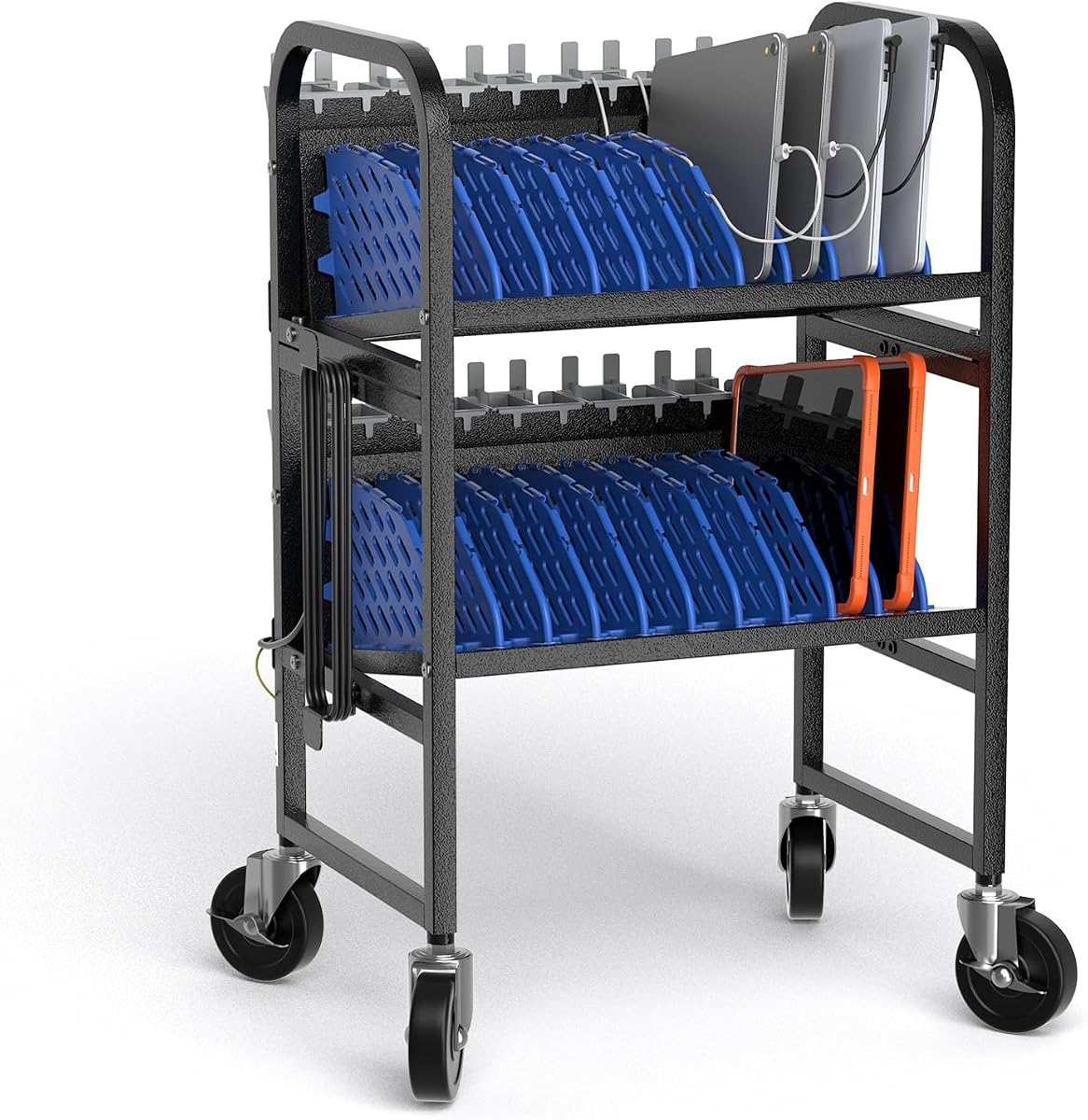
This mobile cart delivers premium features for institutions needing to move large device fleets between rooms. Its industrial grade construction ensures it withstands high traffic use while keeping devices secure and accessible throughout the day.
We may earn a commission when you buy through this link, at no additional cost to you.
The twenty slots accommodate various laptop sizes with adjustable dividers for flexibility. Locking casters allow smooth transport and secure parking while the integrated power strip simplifies setup without extra equipment.
While it costs more than desktop racks the mobility and durability justify the investment for schools. The open frame aids cooling but requires assembly which might take extra time before first use.
Invest in this cart for large scale device management in dynamic environments. It combines safety transport and capacity to support seamless learning or training sessions across different spaces.
Four durable casters with two locks enable effortless movement and stability. This feature supports flexible classroom layouts and quick setup in different rooms.
A built in twenty outlet strip handles charging needs without extra power strips. This simplifies power management and reduces cable clutter during daily use.
We may earn a commission when you buy through this link, at no additional cost to you.
This desktop station offers immediate usability with no assembly required making it ideal for quick classroom setup. Its surge protected strip ensures safe charging for multiple laptops without extra equipment or complicated wiring setups.
We may earn a commission when you buy through this link, at no additional cost to you.
The wide angle slots accommodate larger Chromebooks up to fourteen inches easily. High quality materials provide stability and resistance to daily wear while the compact design fits neatly on desks or tables.
Capacity is limited to eight devices which may not suit larger groups. Fixed dividers work well for standard sizes but offer less flexibility than models with removable options for varied hardware.
Choose this for small classes or offices needing simple and safe device charging. It provides reliable protection and easy access for students or staff requiring frequent laptop use.
No tools or assembly are required to start using the unit. This feature saves time and allows instant setup in busy educational or office environments.
The integrated power strip protects devices from voltage spikes during charging. This safety feature helps extend device lifespan and ensures safe operation.
We may earn a commission when you buy through this link, at no additional cost to you.
This station supports versatile charging with both AC outlets and USB ports for different device types. Its vertical layout maximizes space on desks while integrated routing keeps cables organized and reduces clutter effectively.
We may earn a commission when you buy through this link, at no additional cost to you.
The open design allows quick access to devices without removing them from the rack. A built in surge protected power strip supports safe charging for multiple devices simultaneously in shared workspaces.
While convenient the vertical slots can be tight for larger laptops with cases. Assembly requires care to align cables properly but once set up the unit offers practical organization for mixed device fleets.
Select this for workspaces needing flexible power options in a compact form. It balances accessibility with cable management to support efficient daily use in offices or libraries.
Six AC outlets and four USB ports accommodate diverse device charging needs. This flexibility reduces the need for extra adapters and simplifies power management.
The vertical slot design minimizes countertop space usage while holding ten devices. This layout is ideal for tight desks or limited workspace areas.
We may earn a commission when you buy through this link, at no additional cost to you.
This desktop cart combines safety features with soft padding to protect devices during charging. The UL approved power strip ensures electrical safety while removable dividers offer flexibility for varying device sizes and shapes.
We may earn a commission when you buy through this link, at no additional cost to you.
Padded shelves prevent accidental scratches and damage to sensitive screens or bodies. A back tray keeps chargers and adapters organized while the compact size fits easily on standard desks or tables.
Assembly is required which adds setup time before use. Eight slots may be limiting for larger groups but the durable construction and safety certifications make it reliable for school or office settings.
Choose this for secure and protected device storage on a desk. It prioritizes safety and organization for smaller fleets needing reliable daily charging access.
Soft padding on shelves and dividers prevents scratches during storage. This feature ensures devices remain in good condition over time.
UL approved power strips provide reliable safety against electrical faults. This certification ensures compliance with safety standards for educational environments.
We may earn a commission when you buy through this link, at no additional cost to you.
This robust station uses industrial strength steel to withstand demanding environments like schools or offices. The open frame design promotes optimal airflow to reduce overheating while the integrated power strip simplifies setup for ten devices.
We may earn a commission when you buy through this link, at no additional cost to you.
Cable clips and a storage tray keep accessories organized and accessible. The sturdy construction ensures stability even when fully loaded with laptops or tablets requiring regular charging cycles.
The fixed slot spacing may limit flexibility for unusual device sizes. Weight makes it less portable than cart models but the durability supports long term use in high traffic areas.
Select this for reliable and safe charging in busy workspaces. It balances capacity with protection to ensure devices stay powered and organized daily.
Industrial grade steel ensures the unit withstands frequent handling and heavy loads. This construction supports long term reliability in high traffic environments.
Built in clips and a lower tray organize cables and accessories efficiently. This reduces clutter and prevents tangles during daily use.
We may earn a commission when you buy through this link, at no additional cost to you.
Belkin offers a reliable charging station designed for K through twelve classrooms needing organized device access. Its automatic surge protection safeguards equipment while labeling space helps identify devices quickly during use.
We may earn a commission when you buy through this link, at no additional cost to you.
The station fits on AV carts or mounts to desks for flexible placement. Wide angle slots accommodate cases up to a specific thickness ensuring most tablets and laptops fit securely without damage.
Cost may be higher than generic options but the warranty and brand reputation provide peace of mind. Slots are fixed which limits flexibility for unusual device sizes but works well for standard hardware.
Choose this for schools prioritizing safety and brand reliability. It simplifies device management with labeling and surge protection to support consistent classroom use.
Belkin is known for durable electronics with strong warranties. This trust factor ensures long term performance and support for educational setups.
Automatic surge guard protects against voltage spikes during charging. This safety feature helps extend device lifespan and protects connected equipment.
We may earn a commission when you buy through this link, at no additional cost to you.
This USB C focused station delivers fast charging for modern devices through high wattage GaN technology. Non slip pads keep the unit secure on desks while included cables simplify setup for multiple phone or tablet users.
We may earn a commission when you buy through this link, at no additional cost to you.
Five USB C ports support quick power delivery for laptops and smartphones simultaneously. Flame retardant ABS ensures safety and durability even during extended overnight charging sessions.
Lack of AC outlets limits compatibility with older devices using standard chargers. Narrow slots may not fit oversized cases easily but the design works well for standard tablets and phones.
Select this for modern device fleets needing rapid USB C charging. It combines speed with safety to support efficient daily power for tech focused environments.
High wattage USB C ports deliver rapid charging for modern laptops. This technology ensures devices stay powered quickly during busy workdays.
Four rubber pads prevent the unit from sliding on smooth surfaces. This ensures safety and protects desktops from scratches during use.
We may earn a commission when you buy through this link, at no additional cost to you.
This mobile cart balances capacity with affordability for classrooms needing flexible storage. Locking casters allow easy transport between rooms while removable dividers adapt to different laptop or tablet sizes easily.
We may earn a commission when you buy through this link, at no additional cost to you.
Steel construction ensures durability and rust resistance for long term use. The open design supports airflow during charging and tool-free assembly gets you started quickly without extra equipment.
A power strip is not included so you will need to connect external adapters. Dividers require manual adjustment for different hardware sizes but the process is simple and effective.
Choose this for flexible and affordable mobile storage in schools. It combines easy access and durable build to support dynamic learning environments.
Tool-free assembly allows quick setup without extra tools or hardware. This feature saves time and simplifies installation for new classrooms.
Removable dividers adapt to various device sizes and shapes. This flexibility ensures secure storage for mixed fleets of tablets and laptops.
We may earn a commission when you buy through this link, at no additional cost to you.
Choosing the right charging station requires considering capacity safety and durability. This guide outlines key factors to help you match a station to your specific needs and environment.
Assess how many Chromebooks or laptops you need to charge at once. Consider device dimensions and thickness to ensure slots accommodate your hardware without tight fits or damage.
Look for adjustable dividers or slots wide enough for your specific models to ensure secure storage.
Decide if you need built in AC outlets or if you already have power sources available. Integrated strips simplify wiring but may limit flexibility for different plug types.
Ensure the included strip has surge protection and enough outlets for all your devices.
Choose materials that can withstand daily use in your environment. Steel frames offer long term resilience while high grade plastics can be lighter and cheaper for low traffic areas.
Prioritize units with flame retardant materials to ensure safety during extended charging.
Overheating can damage batteries during charging. Look for open frame designs that allow airflow around devices to keep them cool.
Check that the design includes vents or open spacing to prevent heat buildup.
If you need to move the station between rooms consider units with casters and handles. Locking wheels ensure stability when the cart is stationary.
Verify the unit is lightweight enough to transport without damaging connected devices.
Ensure the charging station meets safety standards like UL or ETL certification for electrical safety. This protects your devices from electrical hazards.
Check for overcharge and short circuit protection built into the power system.
Organized cables reduce clutter and trip hazards. Look for built in clips trays or routing systems to keep cords neat.
Confirm that the system accommodates the length and number of your existing adapters.
Some stations require tools and time to assemble while others are plug and play. Consider your setup timeline and tools available.
Read instructions carefully to ensure stable assembly and avoid damage.
Set up the station in a dry well ventilated area away from water sources. Ensure all cables are neatly routed and secured with clips to prevent tangling or accidental disconnection.
Regularly inspect cables for wear or fraying and replace damaged units immediately. Clean the shelves and slots with a soft dry cloth to prevent dust buildup that can cause overheating.
When not in use turn off the power strip to save energy and protect devices from power surges. Adjust dividers as needed when swapping between different device types.
Typical stations hold between eight and twenty devices depending on the model. Desktop racks often accommodate fewer units while larger carts can support more for group environments.
Many models include integrated power strips with multiple outlets. Some racks require you to supply your own surge protected power strip so check before purchasing.
Most stations with USB ports support various devices including tablets and phones. Ensure the ports match your devices charging requirements for proper power delivery.
Steel is durable and long lasting for high traffic use. Plastic is lighter and cheaper but ensure it is flame retardant for safety.
Yes if they include overcharge protection and safety certifications. Look for surge protection and temperature control features to ensure safe extended charging.
Some models require assembly while others come pre assembled. Check product details to confirm if tools are needed for setup.
Mobile carts with casters allow easy movement and locking wheels. Desktop racks are stationary so choose based on your need for transport.
Use a soft dry cloth to wipe shelves and slots regularly. Avoid using liquids directly on electronic parts to prevent damage.
The top picks include the Moezuti Budget station the 14-Slot Open Rack and the POCHAR 20-Device Cart. These models balance capacity durability and price to suit most classroom or office needs.
Prioritize safety features like surge protection and ventilation to protect your devices. Consider mobility and assembly requirements based on how often you move the station.
Prices and availability change so always verify current listings before buying. Choose the station that best matches your device count and space constraints.