
2026 Mac OS Shortcuts Sticker
4.6Editor score
Zero residue adhesive
Water repellent matte finish
Ultra thin design
Finding the right Mac Keyboard Shortcut Sticker can transform your workflow by keeping essential commands visible at all times. These tools help both beginners and power users navigate macOS efficiently without constant online searches for reference material.
We evaluated ten top-rated options based on compatibility, durability, design clarity, and adhesive quality. Our analysis considers real-world usage scenarios across various MacBook models and macOS versions to ensure you get the most reliable reference guide.
Each pick highlights key strengths and ideal use cases so you can choose the best fit for your setup. Please note that product availability and pricing may change frequently on retailer platforms so check current details before purchasing.
4.6Editor score

4.6Editor score

4.8Editor score
As an Amazon Associate we earn from qualifying purchases.
The following table provides a side by side comparison of all ten products including key specifications and direct links to view detailed information.


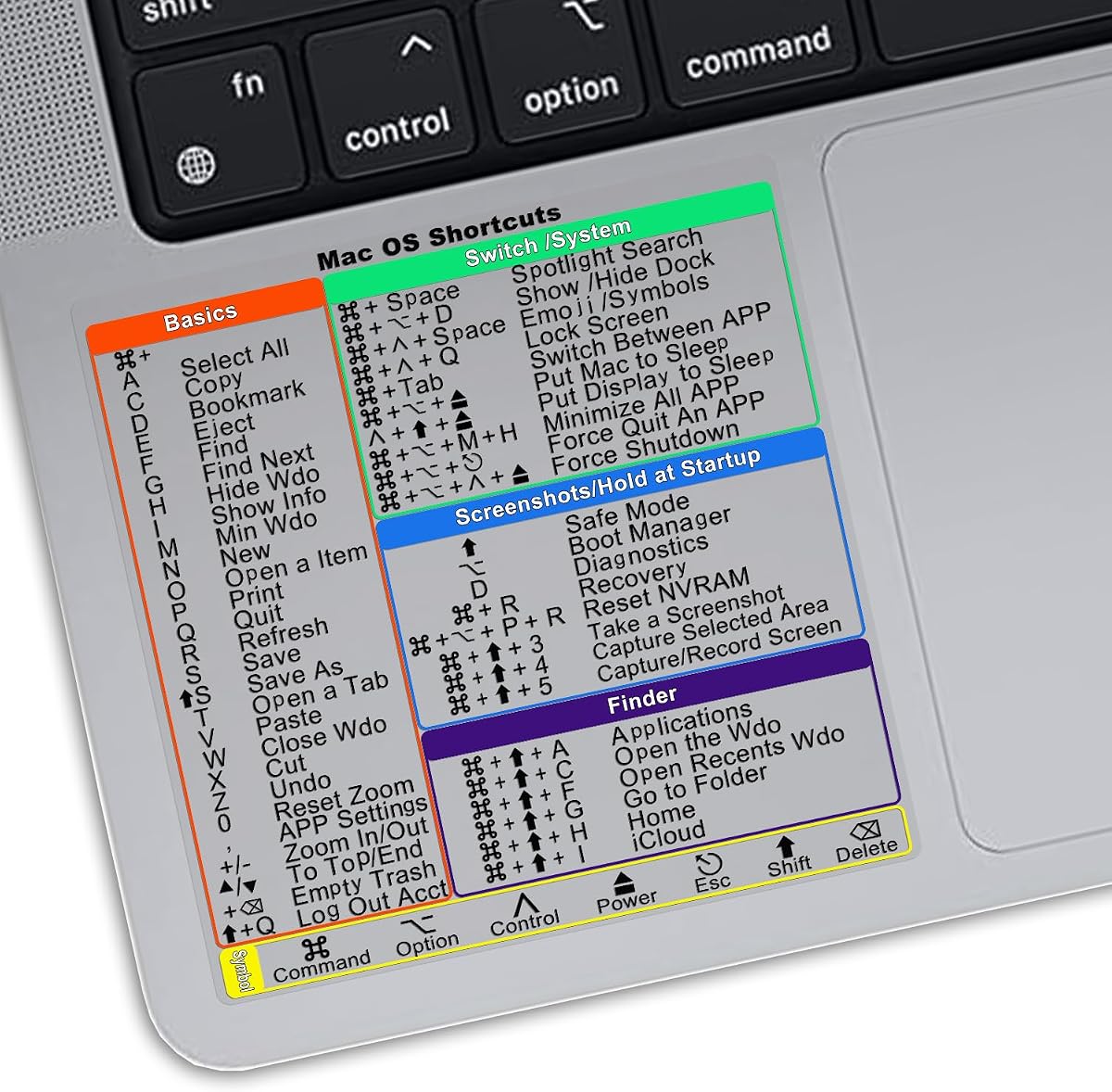


This Synerlogic sticker stands out as the top choice for Mac users needing quick access to essential commands. It offers a laminated vinyl finish that protects against daily wear while keeping shortcut references clear and visible. With a high rating from satisfied users it proves its value for both new and experienced Mac owners.
We may earn a commission when you buy through this link, at no additional cost to you.
The sticker is designed to fit any MacBook Air or Pro regardless of CPU type or macOS version. It includes the most important shortcuts needed for everyday tasks so you stop searching online constantly. The clear white option blends well with most Apple device finishes maintaining a sleek professional look on your desk.
While the adhesive is strong it may leave a light residue upon removal which can be wiped away easily with warm soapy water. Application requires patience to avoid air bubbles so peeling gradually is recommended over removing the entire backing at once. These minor trade offs are acceptable given the durability and convenience it provides.
Ideal for students professionals and seniors this sticker helps boost productivity by making shortcuts instantly accessible. It is an affordable upgrade that enhances your workflow and helps you learn commands faster without frustration. We recommend this for anyone wanting a reliable permanent reference on their Mac device.
Works with any MacBook Air Pro iMac or Mini regardless of CPU or OS version.
Vinyl material resists scratches and maintains print clarity for years of daily use.
We may earn a commission when you buy through this link, at no additional cost to you.
This SYNERLOGIC sticker combines Mac OS shortcuts with Word and Excel references making it perfect for office workflows. It features military grade vinyl for long lasting durability and includes startup commands for both M chip and Intel Macs. The clear design keeps your device looking clean while providing quick access to vital productivity tools.
We may earn a commission when you buy through this link, at no additional cost to you.
Users appreciate the comprehensive coverage that covers basic to advanced commands without cluttering your workspace. The stickers are designed to look like original equipment so they integrate seamlessly into your laptop aesthetic. Applying them carefully ensures air free results that stay in place during intensive typing sessions.
A key note is to avoid touching the adhesive surface before application to maintain optimal stickiness. If bubbles appear you can smooth them out by pressing gradually while peeling back the backing paper. These steps ensure a professional finish that lasts longer and looks better over time.
Whether you are a student or professional this sticker accelerates learning and streamlines document creation tasks. It helps you reach a new level of computer proficiency quickly. We suggest it for users who work extensively with spreadsheets and word processing on their Mac.
Adds essential Word and Excel shortcuts alongside standard Mac commands for complete productivity.
Includes startup commands for both M series and Intel based Macs for broader utility.
We may earn a commission when you buy through this link, at no additional cost to you.
This 2026 sticker offers excellent value with zero residue adhesive that leaves no marks when removed. Its matte vinyl is water repellent so it withstands spills and smudges better than glossy alternatives. The ultra thin 0.10mm design ensures you barely feel it under your wrists during typing sessions.
We may earn a commission when you buy through this link, at no additional cost to you.
Only the most essential shortcuts are included to keep the layout clean and easy to scan. This prevents information overload and helps users focus on commands they actually use daily. The print is fade resistant so it stays sharp for years even with frequent exposure to light.
While it fits most models including the 2026 Neo be sure to check your device size before purchasing. Clear colors are offered to match different MacBook finishes so it blends in rather than clashing with your hardware. This balance of function and form makes it a smart budget friendly choice.
Buyers looking for a hassle free application and clean removal will love this option. It provides all the benefits of reference stickers without the worry of damage or sticky residue. We recommend it for anyone wanting a reliable upgrade for their MacBook Air or Pro.
Lifts off clean without glue marks or discoloration when you are ready to remove.
Matte vinyl shrugs off coffee spills and sweat while maintaining sharp print clarity.
We may earn a commission when you buy through this link, at no additional cost to you.
This sticker features over 50 essential shortcuts designed specifically for 13 to 16 inch MacBook Pro and Air models. It comes in finishes like Sky Blue and Space Gray to match your device color perfectly. The residue free adhesive ensures easy removal without leaving any sticky marks on your laptop surface.
We may earn a commission when you buy through this link, at no additional cost to you.
The layout is clean and easy to read so you can locate commands quickly while working. It supports macOS versions from Tahoe to Mojave ensuring compatibility with a wide range of systems. Choosing a color that contrasts with your finish improves readability significantly during low light conditions.
Do not use on models smaller than 13 inches as the fit will not be precise enough. On dark finishes like Space Black clear stickers with black text may be hard to read so check your model before ordering. This attention to detail ensures a better user experience overall.
For users wanting a personalized touch that matches their device this is a great pick. It helps streamline workflows and boosts efficiency by keeping commands visible. We suggest it for those who prioritize aesthetics alongside productivity in their workspace setup.
Works with Tahoe Sequoia Sonoma Ventura Monterey and older versions for broad support.
Select from multiple colors to complement your Mac finish and improve contrast.
We may earn a commission when you buy through this link, at no additional cost to you.
The KEANBOLL 2-pack offers great value by providing two sets so you can use one now and save a spare. It is compatible with M1 through M5 chips ensuring future proofing as your hardware updates. The transparent design blends with your keyboard backlight keeping the sleek Mac aesthetic intact.
We may earn a commission when you buy through this link, at no additional cost to you.
UV resistant ink prevents fading even after months of daily typing and palm rest contact. Laser cutting ensures perfect alignment with US layout spacing so keys are never blocked by overlapping stickers. This precision improves usability and comfort during long work sessions.
While the removable adhesive works well take care not to stretch the vinyl during removal to maintain residue free results. It fits 13 to 16 inch models and iMac keyboards but not smaller 11 or 12 inch devices. Check your device size to ensure a snug fit.
Sharing with colleagues or having a backup makes this a smart choice for busy environments. It helps teams learn shortcuts faster and standardizes workflows across multiple devices. We recommend it for offices or families with multiple MacBooks needing consistent reference tools.
Supports current and upcoming Apple Silicon chips for long term relevance and utility.
Two sets allow sharing or replacement if one gets damaged or needs replacement.
We may earn a commission when you buy through this link, at no additional cost to you.
This premium pick provides three clear stickers for maximum flexibility across multiple devices or backups. It works seamlessly with all MacBook Pro and Air models from 13 to 16 inches plus iMacs and Mac Minis. The high rating reflects strong user satisfaction and reliable performance in daily office and home environments.
We may earn a commission when you buy through this link, at no additional cost to you.
All models are supported including M1 to M5 chips so you stay compatible with newer releases. The size is standard at 3.25 by 3.25 inches which fits comfortably in the palm rest area without blocking keys. Clear vinyl ensures visibility of your keyboard while providing the necessary command reference.
While the packaging is straightforward the quality of the adhesive and print stands up to testing. Users report easy application and long lasting hold that does not peel at edges over time. Having extras allows you to upgrade multiple devices without buying multiple single units separately.
Best for teams or households with many Macs this set simplifies setup and standardization. It offers the highest quantity per purchase making it a cost effective choice for bulk needs. We recommend it for those wanting a complete solution for a full Mac ecosystem.
Fits Pro Air iMac and Mini models ensuring no device is left without a reference.
4.8 star rating indicates strong reliability and positive user experiences across the board.
We may earn a commission when you buy through this link, at no additional cost to you.
This universal version from Synerlogic ensures compatibility across Neo Air Pro iMac and Mini models. The laminated vinyl protects print clarity while the clear white design blends in with most device finishes. It includes essential shortcuts to boost skills and speed up tasks without constant online searches.
We may earn a commission when you buy through this link, at no additional cost to you.
The new adhesive holds strongly to prevent peeling during daily use. If removal is needed the residue can be wiped off with warm soapy water. To avoid bubbles peel the backing gradually rather than all at once for a smooth professional finish.
Backed by responsive customer support and a satisfaction guarantee you can buy with confidence. It is made in the USA ensuring high quality standards for printing and packaging. This makes it a trustworthy option for users who value reliability and after sales service.
Ideal for beginners and power users alike this sticker helps avoid frustration and learn smarter. It is especially useful for seniors and creatives who rely on consistent shortcuts for daily work. We recommend it for anyone needing a dependable universal reference tool.
Designed for Neo Air Pro iMac and Mini models regardless of CPU or OS version.
New hold ensures secure placement that resists daily typing wear and tear.
We may earn a commission when you buy through this link, at no additional cost to you.
This 4-pack includes Black White Clear and Rainbow options so you can pick the best match for your style. It is compatible with all Intel MacBook Pro Air iMac and Mini models making it ideal for older devices. The military grade vinyl ensures durability that stands up to intense daily usage environments.
We may earn a commission when you buy through this link, at no additional cost to you.
The 3.25 by 2.7 inch size fits standard laptop palm rests without overlapping keys. The professional design gives it an OEM appearance so it looks like a factory installed feature. Each color is printed with high quality ink to maintain legibility over time.
Be aware that this version is designed specifically for Intel chips and may not include M chip startup commands. For users with older hardware this is a great way to get multiple units for different devices. The variety ensures you can personalize your workspace while staying productive.
We recommend this for offices with mixed Intel and non Intel Macs needing consistent reference. The multiple sets allow you to replace worn units without waiting for new shipments. It is a practical choice for maximizing utility across a broader fleet of computers.
Choose from four finishes to match different device colors or personal preferences.
Optimized for Intel based Macs ensuring precise fit and compatibility for those users.
We may earn a commission when you buy through this link, at no additional cost to you.
This sticker focuses on Word and Excel shortcuts making it perfect for heavy document users. It is designed for midnight black MacBook Air 2022 and similar dark surfaces but works on light ones too. The clear white design ensures readability on contrasty backgrounds so you never miss a command.
We may earn a commission when you buy through this link, at no additional cost to you.
The adhesive holds strongly but may leave residue removed with warm soapy water. Apply gradually to avoid air bubbles for a smooth finish that looks professional. It fits Macs from 2020 to 2023 including 14 and 16 inch models as well as older 13 inch versions.
Shift key symbols are clearly marked so there is no confusion about shortcuts. Whether you are a beginner or seasoned pro this helps you reach a new level of proficiency. The focus on office apps streamlines data entry and formatting tasks significantly.
We recommend this for office workers who spend most of their day in spreadsheets and documents. It is an affordable tool that boosts efficiency and reduces time spent hunting for commands. Add this to your setup if productivity in Word and Excel is your main priority.
Cheat sheet specifically targets Word and Excel commands to accelerate document work.
Fits 2020 to 2023 MacBook models ensuring compatibility with most modern devices.
We may earn a commission when you buy through this link, at no additional cost to you.
TEACHUCOMP is a trusted brand in software training and this sticker reflects that expertise. It features no residue adhesive so you can remove it cleanly later without leaving marks. The large 3.25 by 3.25 inch size makes text bigger and easier to read at a glance.
We may earn a commission when you buy through this link, at no additional cost to you.
Shortcuts are alphabetized to help you locate commands quickly. The laminated vinyl protects against water and scratches ensuring long lasting use. This design helps users work faster and with precision improving productivity and saving time during critical tasks.
While it is larger than some options it may be hard to notice for those who prefer compact styles. It fits 13 to 16 inch models and desktops like iMac and Mac Mini keyboards perfectly. Check your palm rest space before applying to ensure a good fit.
Ideal for classrooms and corporate training this sticker serves as a reliable visual aid. It helps users with mobility or vision difficulties navigate better using keyboard commands. We recommend it for anyone valuing educational quality and easy readability in a reference guide.
Commands sorted alphabetically for quick scanning without remembering exact categories.
3.25 by 3.25 size provides bigger text for easier reading at a distance.
We may earn a commission when you buy through this link, at no additional cost to you.
Selecting the right Mac Keyboard Shortcut Sticker involves balancing compatibility, durability, and design to fit your workflow.
Ensure the sticker matches your MacBook model size and chip type. Most are designed for 13 to 16 inch models but verify if your Neo or Intel Mac is supported. Newer M chip stickers often include specific startup commands older versions miss.
Always check product descriptions for model lists before buying to avoid return hassles and ensure proper fit.
Look for residue free adhesives if you plan to remove the sticker later. Some stronger adhesives may leave light marks that require warm soapy water to clean. Test peel methods gradually to avoid bubbles during installation for best results.
A good adhesive should hold firmly against typing friction without peeling at the edges over time.
Laminated vinyl and military grade materials offer the best protection against spills and scratches. These materials keep the print sharp and legible for years of daily use. Matte finishes often resist smudges better than glossy options.
Invest in high quality vinyl to ensure your reference guide lasts as long as your laptop.
Decide if you need general Mac OS commands or specific Office app shortcuts like Word and Excel. Comprehensive lists help beginners while curated essentials prevent clutter on the screen. Look for clear grouping by task for quick lookup.
Ensure the set includes the shortcuts you actually use to maximize productivity gains.
Choose a color and contrast that matches your device finish. Clear stickers on dark backgrounds may be hard to read so select accordingly. Alphabetized layouts simplify finding commands faster than random lists.
A clean design keeps your device looking professional while providing functional utility.
Multi-pack options offer value if you have multiple devices or want a spare set. Check if packaging includes application tools or instructions to simplify the process. Single units are fine if you only need one replacement.
More units allow for easier updates and sharing among colleagues or family members.
Trusted brands often provide better quality control and customer support. Look for satisfaction guarantees and responsive service teams in case of issues. Made in USA products sometimes offer higher manufacturing standards.
Reviews from verified buyers provide insight into real world performance and longevity.
Compare features like pack size and materials rather than just price. A slightly higher cost for better durability can save money long term. Budget options may work well but check reviews for durability concerns.
Prioritize features that match your usage intensity to find the best cost benefit ratio.
Clean your MacBook surface with a dry microfiber cloth to remove dust and oils before applying the sticker. This helps the adhesive bond properly and prevents air bubbles from forming during installation. Ensure the area is dry before starting the application.
Fold back the backing paper slightly and align the sticker with the palm rest space. Peel gradually while smoothing out any air with a soft card to push trapped air out. Avoid removing the entire backing at once to control placement better.
Clean the sticker gently with a dry cloth to remove fingerprints and spills. Avoid using harsh chemicals or abrasive pads that might scratch the laminated surface. With proper care the sticker will remain sharp and functional for years.
Most stickers support a wide range of macOS versions from older releases to the latest. However some specific startup commands may vary between M chip and Intel Macs. Check the product description for version compatibility before purchasing to ensure fit.
Yes most high quality stickers use residue free adhesive that lifts off cleanly. If residue remains a soft cloth with warm soapy water can wipe it away safely. Avoid using sharp tools to prevent scratching the laptop surface during removal.
These stickers are designed to fit the palm rest area below the keyboard so they do not cover trackpads. Always measure your device to ensure the sticker size matches your available space. Proper alignment avoids any interference with device components.
Many stickers use vinyl materials that resist water and spills to keep prints intact. However they are not fully waterproof submersible items so avoid direct liquid exposure. Wipe off spills quickly to maintain long term durability and legibility.
Stickers with clear layouts and curated essential lists are best for new users. Look for options that group commands by task like navigation or screenshots. Alphabetized arrangements help you find commands quickly without feeling overwhelmed by too many options.
Applying a sticker usually does not void warranty as long as you remove it without damage. However check your warranty policy regarding adhesive products on devices. Residue free adhesives reduce the risk of surface damage during removal.
The Synerlogic Universal option stands out for its broad compatibility and durable build while the 2026 sticker offers great value with zero residue removal. For those needing multiple units the 3-pack provides excellent flexibility across different devices.
Prioritize fit and adhesive quality to ensure a long lasting result that matches your needs. Whether you work in office apps or general productivity a well chosen sticker can streamline your daily tasks effectively.
Prices and availability may change so review current listings before making a final purchase. Investing in the right reference tool pays off quickly in saved time and reduced frustration.