
YATINEY Desktop Printer Stand 2-Tier
4.7Editor score
Compact 40 footprint
Z shaped modern design
Easy assembly process
Finding the right desktop printer stand can transform your cluttered workspace into an organized and efficient environment. A quality stand elevates your printer while providing additional storage space for essential office supplies and documents.
We have carefully evaluated ten top-rated models based on durability, storage capacity, ease of assembly, and overall value. Our analysis focuses on real-world usability and how each option fits into different office setups.
Each selection highlights specific strengths and ideal use cases to help you make an informed decision. Please note that product availability and pricing may change over time so verify current details before purchasing.
4.7Editor score

4.8Editor score

4.7Editor score
As an Amazon Associate we earn from qualifying purchases.
The following table provides a side-by-side comparison of all ten selected models highlighting their key specifications and standout features for quick reference.


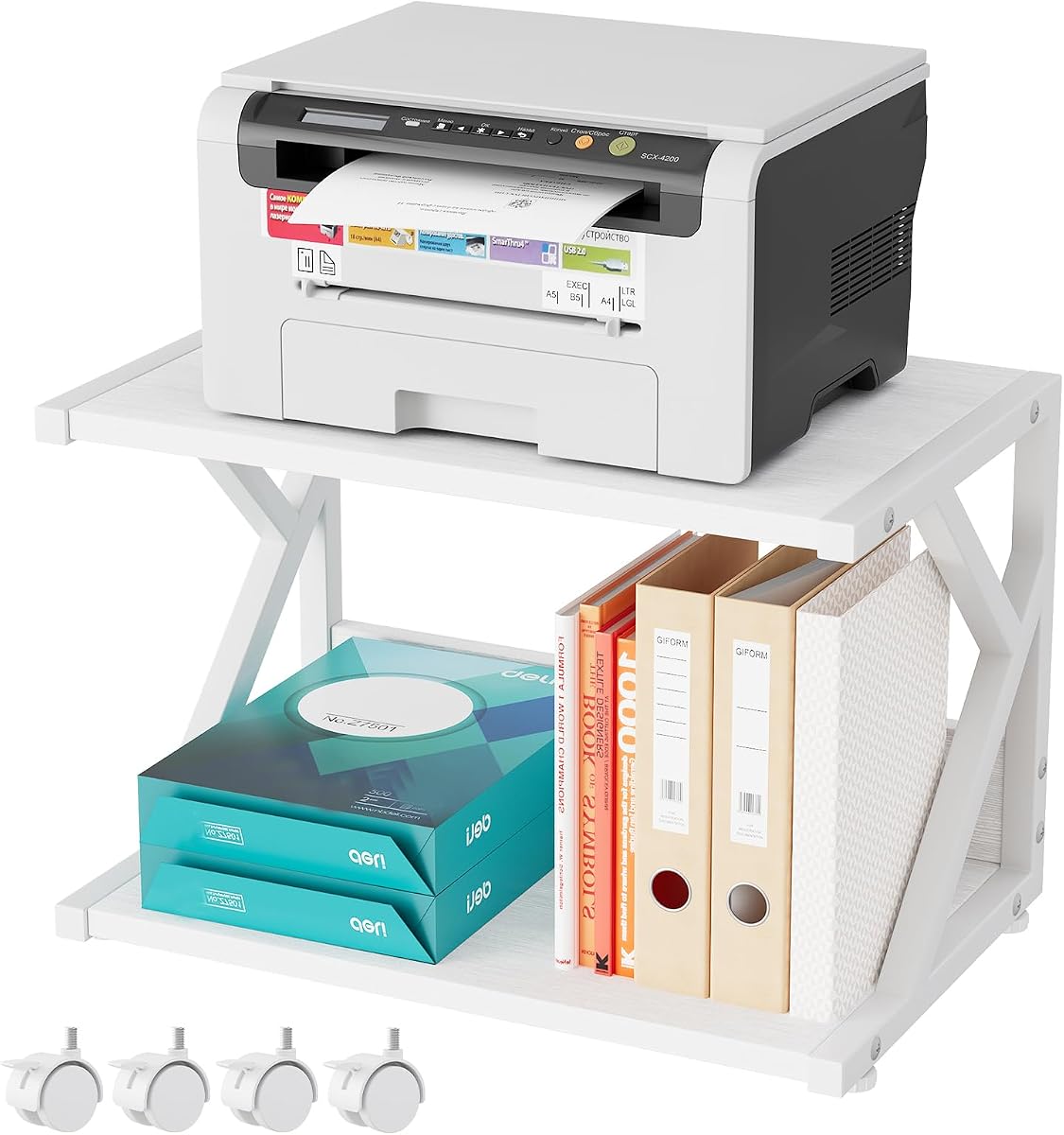
The YAOHUOO 2-Tier Desktop Printer Stand earns our Editor's Choice award for its exceptional balance of functionality and design. With a 4.8 star rating from verified buyers it stands out as a reliable solution for organizing your workspace efficiently.
We may earn a commission when you buy through this link, at no additional cost to you.
This model features two open tiers that can accommodate two printers or a printer and a scanner simultaneously. The middle open shelf provides additional space for files and documents while the fabric drawer adds privacy for sensitive office supplies.
The construction uses high-quality MDF combined with a stable metal frame to support up to 44 pounds. The waterproof tabletop ensures easy cleaning and maintenance making it practical for daily use in busy home or office environments.
While assembly is required the clear instructions and included hardware make the process straightforward. This stand is ideal for users seeking a compact yet spacious organizer that keeps essentials within reach without cluttering the desktop.
The dual tier design allows you to place two devices side by side maximizing efficiency without consuming extra desk real estate.
The fabric drawer offers a concealed space for personal items or confidential documents helping you maintain a tidy and professional workspace.
We may earn a commission when you buy through this link, at no additional cost to you.
For those seeking exceptional value the YATINEY Desktop Printer Stand offers a budget-friendly option without compromising on stability or style. Its 4.7 star rating reflects satisfaction with its durable construction and elegant design.
We may earn a commission when you buy through this link, at no additional cost to you.
This model features a unique Z-shaped design that maximizes vertical space while maintaining a sleek profile. The two open shelves provide ample room for printers papers and office accessories keeping everything organized and easily accessible.
Each tier can bear up to 44 pounds ensuring it can support heavy printers or multiple devices. The rustic brown finish complements various interior styles making it a versatile addition to any home office or workspace.
Assembly is straightforward with clear instructions and included accessories. This stand is perfect for users who want a modern efficient organizer at an accessible price point while maintaining high quality standards.
The distinctive Z-shape adds a contemporary touch to your decor while optimizing space usage on smaller desks or corners.
The metal frame and particleboard construction ensure stability even under significant weight making it suitable for large office equipment.
We may earn a commission when you buy through this link, at no additional cost to you.
The FITUEYES Large Desktop Printer Stand delivers premium quality with its three storage compartments and spacious design. Its 4.7 star rating highlights user appreciation for its robust build and versatile storage capabilities.
We may earn a commission when you buy through this link, at no additional cost to you.
This stand offers significant space with dimensions of 18.9 inches wide and 15.7 inches deep. It accommodates large printers and provides dedicated areas for files papers and other office supplies keeping your desktop organized and functional.
The stackable feature allows you to expand storage vertically if needed. Non-slip rubber feet protect your work surface from scratches while ensuring the stand remains stable during daily use.
Assembly takes about twenty minutes with all hardware included. This model is ideal for users who prioritize maximum storage and durability and are willing to invest in a high-end organizer solution.
The ability to stack units enables you to customize your storage configuration based on evolving office needs and available space.
Rubber feet prevent sliding and scratching ensuring your desk remains pristine while the stand stays securely in place.
We may earn a commission when you buy through this link, at no additional cost to you.
This versatile stand distinguishes itself with a remarkable 100 pound weight capacity making it suitable for the heaviest printers and office equipment. A 4.6 star rating confirms its reliability and sturdy construction across various environments.
We may earn a commission when you buy through this link, at no additional cost to you.
Constructed with high-quality board and a strong steel frame it offers exceptional durability. The rounded corners ensure safety during use while anti-slip pads prevent sliding and protect your desktop from scratches.
Beyond printers it can function as a laptop riser bookshelf plant stand or spice organizer. This adaptability makes it an excellent choice for multi-purpose spaces like kitchens craft rooms or dorms.
Assembly is straightforward and maintenance is minimal. For users requiring maximum stability and load support this stand provides a secure foundation for valuable equipment without compromising safety or functionality.
Rounded corners reduce injury risks making it safe for homes with children or high-traffic office areas.
The simple structure allows flexible use cases beyond just printers adapting to various organizational needs seamlessly.
We may earn a commission when you buy through this link, at no additional cost to you.
The Marbrasse Metal Printer Stand stands out for its thoughtful organization features including a storage drawer and two pen holders. Its 4.6 star rating reflects satisfaction with its patented design that enhances desk productivity.
We may earn a commission when you buy through this link, at no additional cost to you.
This model features a lightweight durable metal mesh frame reinforced with solid steel for long-lasting strength. The paper letter tray stores A4 paper and documents while the divider drawer organizes pens markers and office accessories.
Non-skid adjustable rubber feet ensure stability and prevent rusting. This design addresses common clutter issues by keeping stationery and files neatly arranged and within easy reach during busy work sessions.
Assembly takes approximately twelve minutes with clear instructions provided. This option is perfect for users who value organization and convenience looking to maximize utility on a limited desktop surface.
Unique patented features include specific slots for pens and papers reducing time wasted searching for office supplies.
Adjustable feet allow leveling on uneven surfaces ensuring the stand remains steady regardless of floor conditions.
We may earn a commission when you buy through this link, at no additional cost to you.
The HUANUO Printer Stand is designed specifically for under desk placement with lockable wheels for easy mobility. A 4.5 star rating highlights its utility in maximizing floor space while keeping equipment accessible.
We may earn a commission when you buy through this link, at no additional cost to you.
With a max height of 14.1 inches it fits comfortably under most desks. The storage drawer with dividers organizes office supplies while the bottom shelf holds paper and reference materials out of the way.
The stackable design allows for quick tool-free assembly. Optional wheels enable you to move the stand easily or use it as a fixed shelf depending on your specific layout preferences.
Assembly can be customized by using fewer extensions for a shorter height. This model suits users needing flexible storage solutions that adapt to tight spaces without sacrificing functionality.
Adjustable extensions let you configure the exact height needed to fit under specific desks or counters effortlessly.
Lockable casters provide stability when needed but allow repositioning quickly when cleaning or reorganizing.
We may earn a commission when you buy through this link, at no additional cost to you.
This three-tier model offers versatile storage with a foldable fabric drawer that saves space when not in use. Its 4.7 star rating reflects strong performance in supporting heavy printers while maintaining a rustic aesthetic.
We may earn a commission when you buy through this link, at no additional cost to you.
The upper and middle shelves can hold two printers simultaneously laser inkjet or 3D. The dual-rod support enhances load capacity preventing wobbling and ensuring safety for valuable equipment on any surface.
Crafted from vintage particle board and iron pipes it blends well with various home or office decors. The compact dimensions fit easily into small spaces while providing ample room for organizational needs.
Assembly requires basic tools and clear instructions. This stand is ideal for users who want a stylish solution that adapts to multiple devices and can be tucked away when extra space is needed.
The foldable fabric drawer can be tucked away completely when full storage is not required clearing the visual space.
Designed to hold two printers side by side reducing the need for multiple stands in shared work environments.
We may earn a commission when you buy through this link, at no additional cost to you.
The YATINEY Desktop Printer Stand features a hidden non-woven drawer for private storage alongside two open shelves. A 4.6 star rating shows reliability for organizing both documents and daily office supplies efficiently.
We may earn a commission when you buy through this link, at no additional cost to you.
This industrial model uses quality chipboard and a metal frame for excellent stability. The open top and middle shelves keep frequently used items handy while the bottom drawer protects sensitive documents from view.
The smooth particleboard surface is easy to dust off and maintain. Assembly is effortless within ten minutes using included tools and clear instructions for immediate setup and use.
Its multi-purpose design works well in offices kitchens or study rooms. This stand suits users needing a balance of open accessibility and discreet storage without sacrificing durability or modern looks.
The closed bottom compartment keeps confidential papers or personal items out of sight while keeping the desk looking tidy.
A rugged metal frame and rustic finish complement loft or factory style interiors adding character to functional spaces.
We may earn a commission when you buy through this link, at no additional cost to you.
This innovative stand includes a charging station with a standard outlet and USB ports keeping devices powered up near your workspace. Its 4.6 star rating reflects convenience and strong build quality for home office use.
We may earn a commission when you buy through this link, at no additional cost to you.
The metal frame and thick particleboard support up to 44 pounds ensuring stable placement for printers or scanners. Storage hooks provide additional hanging space for cables or small office tools keeping them organized.
Measuring 15.7 inches long it fits into tight corners or under desks. The rustic industrial design complements home or office decor while providing functional utility beyond just printer storage.
Installation is simple with numbered parts and supplied tools. This option is perfect for users who want to reduce cable clutter and charge phones or tablets directly from their desk surface.
Built-in outlets and USB ports allow charging devices without reaching for wall sockets improving desk ergonomics.
Small dimensions make it ideal for smaller desks where space is limited but organization remains essential.
We may earn a commission when you buy through this link, at no additional cost to you.
The aboxoo Desktop Printer Stand offers flexibility with options for wheels or adjustable foot pads. A 4.6 star rating highlights its durability and adaptability for various office needs and floor types.
We may earn a commission when you buy through this link, at no additional cost to you.
Made of high-quality MDF wood it features a waterproof and scratch-resistant surface. The metal frame ensures stability with a 44 pound capacity per layer making it suitable for heavy printers or multiple devices.
The two-tier design increases storage capacity for office supplies and documents. Assembly takes about fifteen minutes with numbered components and tools included for a straightforward setup process.
This stand works as a desktop shelf or under desk organizer. It is ideal for users who value customization and a clean white finish that blends into any modern home or office environment.
Choose between wheels for mobility or foot pads for stability depending on your specific workspace needs.
Waterproof and scratch-resistant MDF ensures the stand looks good and performs well over years of daily use.
We may earn a commission when you buy through this link, at no additional cost to you.
Selecting the right desktop printer stand involves considering multiple factors to ensure it meets your specific workspace needs and budget.
Measure your available space carefully before purchasing. Check both the footprint of the stand and the height clearance especially if placing it under a desk or near shelves. Ensure the top surface is wide enough to hold your printer securely.
Prioritize stands that offer enough surface area without overwhelming your desk space.
Verify the maximum weight the stand can support including your printer and any accessories like paper trays. Heavy printers require sturdier models with reinforced frames to prevent wobbling or collapse during use.
Always choose a stand with a capacity higher than your equipment's total weight for safety and durability.
Consider whether you need open shelves drawers or hooks for organizing documents and supplies. Models with drawers provide privacy for sensitive files while open shelves offer quick access to frequently used items.
Select a configuration that matches your typical workflow and organizational needs.
Look for stands made from high-quality materials like MDF metal frames or reinforced plastic. These materials ensure longevity and stability under regular use and potential wear and tear.
Metal frames often provide better support while wood surfaces offer aesthetic appeal and scratch resistance.
Check if the stand requires tools or complex assembly. Clear instructions and included hardware reduce setup time and frustration for users with limited DIY experience.
Pre-assembled or tool-free options are ideal for quick deployment in busy environments.
Choose a design that complements your existing office decor. Options range from rustic wood finishes to modern industrial metal frames to blend seamlessly with different interior styles.
Aesthetics matter as much as function in creating a professional and inviting workspace.
Decide if you need wheels for easy movement or fixed feet for stability. Lockable casters provide the best of both worlds by allowing mobility while preventing accidental shifts during operation.
Consider your need for repositioning when choosing between stationary and mobile options.
Set a realistic budget based on your needs and compare features accordingly. Higher priced models often offer additional storage and durable materials but affordable options can also deliver solid performance.
Balance cost against required features to maximize value without overspending.
Begin by placing the stand on a level floor or desk surface ensuring all feet are firmly in contact to prevent wobbling. Adjust leveling feet if provided to stabilize the unit on uneven surfaces.
Place your printer securely on the top surface centered to distribute weight evenly. Avoid overhanging the edges to maintain balance and prevent tipping during paper loading or removal.
Clean the surfaces regularly with a soft dry cloth to remove dust and debris. Avoid harsh chemicals that could damage the finish especially on wooden or coated surfaces.
Measure your printer dimensions and compare them to the stand's top surface size. Ensure there is enough clearance around the edges for ventilation and access to trays. Also consider vertical clearance for the space where it will be placed.
Yes many models support up to 100 pounds which is sufficient for most laser printers. Always check the weight capacity specification before purchase to ensure safety and stability for your specific equipment.
Most modern stands come with simple tool-free assembly or include basic tools needed. Instructions are typically clear and numbered parts help streamline the process for quick setup in minutes.
Options vary by model with some offering interchangeable wheels and feet. Many provide adjustable feet for stability while others include locking casters for mobility depending on your workspace requirements.
Regularly dust the surfaces with a soft cloth to prevent buildup that can scratch finishes. Avoid placing heavy objects on the sides and tighten any loose screws periodically to maintain structural integrity.
Many models are specifically designed with under desk clearance in mind. Check the height dimensions and ensure your desk allows enough vertical space for the stand and printer combination without obstruction.
We have highlighted ten exceptional models each offering unique benefits for different workspace needs. From the YAOHUOO 2-Tier stand to the HOOBRO charging station there is an option for every budget and layout.
When selecting prioritize factors such as weight capacity storage options and ease of assembly to match your specific requirements. Investing in a quality stand improves organization and protects your equipment over the long term.
Always verify current product details and availability before purchasing as features and inventory may change. With the right stand you can maintain a clean efficient workspace ready for any task.