
Elgato Stream Deck Pedal
4.5Editor score
Three customizable hands-free macros
Heavy-duty chassis with adjustable springs
Plugins for OBS Discord and more
This guide compares the top 10 foot pedals for Star Citizen, evaluating durability, programmability, and comfort for immersive hands-free flight control in the
Finding the right foot pedals for Star Citizen can transform your flight experience by allowing hands-free control of essential functions. These devices let you manage systems without taking your hands off the keyboard or mouse, keeping you focused on the vast universe around you.
We evaluated ten top-rated models based on build quality, switch type, programmability, and ergonomic design. Each product was analyzed for its ability to handle repetitive use and integrate seamlessly with PC setups common among gamers and sim pilots alike.
Each pick highlights key strengths and trade-offs to help you decide which pedal fits your setup. Prices and availability may change over time, so verify details on the product pages before making your final purchase decision for your station.
4.5Editor score
4.4Editor score
4.3Editor score
Below is a side-by-side comparison of all ten foot pedals to help you quickly identify which model offers the features you need for your Star Citizen gameplay or general PC control tasks.


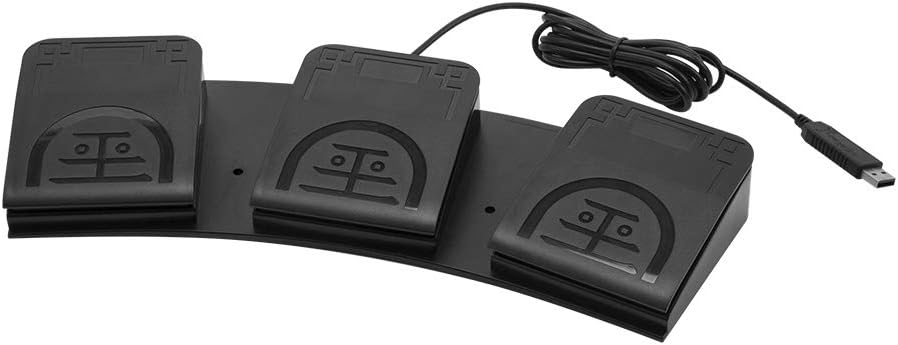
This triple pedal switch is designed to replace keyboard or mouse functions for hands-free operation. With a 4.4 rating it stands out for its quiet optical switches and ergonomic wide pedal that supports long sessions.
We may earn a commission when you buy through this link, at no additional cost to you.
The three keys can be individually programmed to execute different commands like push to talk or system activation. The optical switch mechanism ensures low resistance and quiet operation which is ideal for voice communication environments.
While the software is functional it lacks advanced macro features found in premium models. However the simple setup process makes it accessible for users who need immediate functionality without complex configuration steps.
If you need a reliable triple pedal for Star Citizen system management without breaking the bank this model is a strong candidate. Its durable construction and stability make it suitable for various gaming and office tasks.
The optical switches trigger without physical contact friction ensuring quiet and rapid response times ideal for stealthy gameplay or focused work.
The wide surface area distributes foot pressure evenly reducing fatigue during extended use and making it easier to hit targets accurately.
We may earn a commission when you buy through this link, at no additional cost to you.
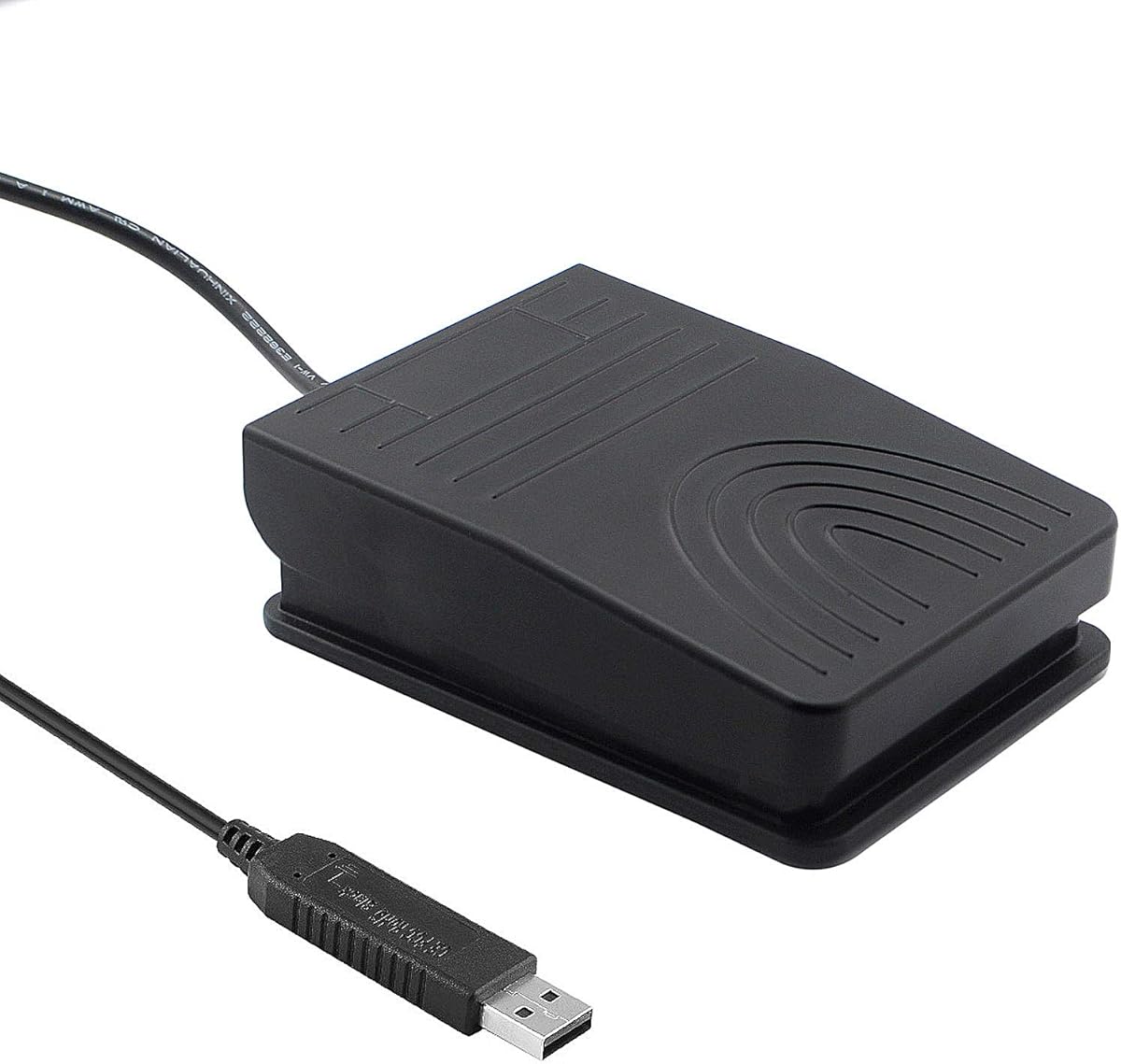
This single pedal switch offers an affordable entry point for hands-free control. Rated 4.3 stars it provides a wide pedal and simple programmability that suits basic tasks like push to talk or media control.
We may earn a commission when you buy through this link, at no additional cost to you.
The USB connection ensures it acts as a standard HID device requiring no drivers. The 2M cable provides flexibility in placement allowing you to position the pedal comfortably near your gaming chair or workstation.
While it lacks multiple keys the single button is robust and responsive. It is perfect for users who only need one specific function triggered by foot without the complexity of multi-key systems.
For budget-conscious gamers or professionals needing a single macro trigger this pedal delivers solid performance. It balances cost and reliability effectively making it a practical choice for essential tasks.
No driver installation is required since it functions as a standard HID device ensuring immediate usability on most operating systems.
The wide pedal shape ensures your foot has enough room to press comfortably reducing strain during repeated use throughout the day.
We may earn a commission when you buy through this link, at no additional cost to you.
This digital optical pedal offers flexibility across different operating systems. With a 4.0 rating it is built for users who need a sturdy triple switch that works on Windows and Mac environments equally well.
We may earn a commission when you buy through this link, at no additional cost to you.
The software allows detailed configuration of keys to emulate various inputs. Once configured the pedal works seamlessly across systems without needing software reinstallation making it versatile for multi-device setups.
While the rating is slightly lower due to setup complexity the device itself is robust. The optical mechanism ensures quiet and responsive performance which is beneficial for gaming or recording environments.
If you use multiple computers or need cross-platform compatibility this pedal offers a practical solution. Its sturdy build and quiet operation make it a reliable choice for technical or creative work.
The configuration software supports Windows and Mac allowing you to set up keys once and use the device on other systems seamlessly.
The photoelectric switches avoid physical contact noise providing a quiet experience ideal for voice communication or sensitive recording tasks.
We may earn a commission when you buy through this link, at no additional cost to you.
This triple pedal is optimized for quiet performance with optical switches. It holds a 4.2 rating and is designed to reduce noise while maintaining quick response times for fast-paced gaming scenarios.
We may earn a commission when you buy through this link, at no additional cost to you.
The light press requirement minimizes fatigue during long sessions. The ergonomic wide pedal provides comfort while the optical switches ensure that you trigger actions without loud clicking sounds disturbing others.
While the software is straightforward it lacks advanced macro scripting. However for simple key bindings like voice mute or action triggers it performs reliably and consistently across various applications.
If silence is a priority for your gaming setup this pedal is a great choice. Its responsive design and durable build ensure you stay focused on the game without distracting mechanical noise.
The optical mechanism eliminates physical contact noise allowing for silent actuation which is perfect for quiet rooms or shared spaces.
Minimal force is needed to activate each switch reducing effort and increasing speed during rapid gameplay commands.
We may earn a commission when you buy through this link, at no additional cost to you.
This pedal is built for versatility across many operating systems including Android and iOS after initial setup. With a 4.3 rating it offers three programmable keys that can handle complex workflows in office or gaming settings.
We may earn a commission when you buy through this link, at no additional cost to you.
The photoelectric switches provide quiet and reliable feedback. The in-mold injection design improves waterproof and moisture proof capabilities making it robust for various environments including potentially dusty or busy workspaces.
While the software setup is specific to Windows or Mac the pedal works universally once configured. This ensures you can use the same device across different machines without hardware changes.
If you need a robust pedal that travels between systems this model is well-suited. Its durable build and cross-platform flexibility make it a practical tool for power users and gamers.
Once configured on Windows or Mac the device works on many systems including Linux and mobile platforms ensuring consistent utility.
The injection molded casing protects against spills and moisture extending the lifespan of the device in demanding environments.
We may earn a commission when you buy through this link, at no additional cost to you.
This premium pedal offers extensive integration with streaming and productivity tools. With a 4.5 rating it stands out for its heavy-duty chassis and adjustable springs that let you customize tactile feedback.
We may earn a commission when you buy through this link, at no additional cost to you.
The software allows you to bind macros to multiple apps including Discord and OBS. This makes it ideal for streamers or pilots who need complex sequences triggered with a simple foot tap without interrupting workflow.
While it costs more than standard pedals the build quality and plugin support justify the investment. The interchangeable springs let you fine-tune pressure to suit your preference for light or firm actuation.
If you want a high-end pedal that integrates deeply with your software stack this is the top choice. Its premium design and extensive features make it worth the extra expense for serious users.
Extensive plugin support allows you to control apps like OBS and Spotify directly from the pedals streamlining your workflow.
The interchangeable springs let you adjust how much force is needed to activate each pedal ensuring personalized comfort.
We may earn a commission when you buy through this link, at no additional cost to you.
This model uses mechanical switches for distinct tactile feedback. Rated 4.3 stars it is built for users who prefer a physical click and firm actuation over silent optical options for better precision.
We may earn a commission when you buy through this link, at no additional cost to you.
The spring-loaded levers ensure consistent actuation with every press. The wide ergonomic design supports comfort during long sessions and the durable build can handle heavy use in various environments.
While mechanical switches may be slightly louder than optical ones they offer a clearer confirmation of input. The ElfKey software allows detailed customization of key assignments to fit specific workflow needs.
If you value tactile confirmation and sturdy construction this pedal is a strong option. Its mechanical design and wide surface make it reliable for repetitive tasks in gaming or professional settings.
The mechanical switches provide a distinct click and physical feedback confirming each action for precise control.
Spring-loaded levers ensure every actuation feels consistent reducing the chance of missed inputs during high-speed tasks.
We may earn a commission when you buy through this link, at no additional cost to you.
This upgraded triple pedal focuses on ergonomic comfort and stability. With a 4.3 rating it features a wide pedal and stable TPU rubber feet that keep the device in place during active use.
We may earn a commission when you buy through this link, at no additional cost to you.
The optical switches ensure quiet operation ideal for voice chat or recording. The durable construction supports high weight capacity ensuring the pedal remains functional even under heavy or repeated foot pressure.
While the software is basic the setup process is straightforward. The wide pedal size helps reduce foot fatigue making it suitable for long periods of operation in gaming or office environments.
If comfort and stability are priorities for your setup this pedal offers a reliable solution. Its ergonomic design and quiet switches make it a comfortable choice for extended use sessions.
The wide pedal surface allows natural foot positioning reducing strain and fatigue during prolonged use.
TPU rubber feet grip hard floors effectively preventing the pedal from sliding during active gameplay.
We may earn a commission when you buy through this link, at no additional cost to you.
This blue triple pedal offers quiet optical performance with a wide ergonomic design. It holds a 4.1 rating and is built for users seeking a visually distinct device that provides reliable hands-free control.
We may earn a commission when you buy through this link, at no additional cost to you.
The optical switches minimize noise and reduce resistance for quick actions. The stable TPU rubber feet ensure the pedal stays put on hard floors providing a consistent experience during gaming or work.
Software configuration is straightforward allowing you to assign various actions to each key. While it requires initial setup the plug-and-play nature after configuration makes it flexible for different systems.
If you want a pedal that fits a specific aesthetic while delivering solid performance this model is a good fit. Its quiet operation and durable build make it suitable for diverse environments.
Optical switches provide noiseless actuation ensuring your environment remains quiet while you control inputs.
The device supports various key and mouse functions allowing it to adapt to different workflow requirements.
We may earn a commission when you buy through this link, at no additional cost to you.
This triple switch provides a reliable option for basic programmable control. With a 4.4 rating it features mechanical switches for fast response and a wide ergonomic design for comfortable use over time.
We may earn a commission when you buy through this link, at no additional cost to you.
The shaftless design simplifies the structure and improves flexibility. The device supports many operating systems but configuration requires a Windows PC first ensuring broad compatibility across your network.
While it may not have advanced software features it delivers solid core performance. The durable construction can handle regular use and the responsive switches make it effective for simple game commands.
If you need a functional and affordable pedal without extra frills this model is a strong contender. Its responsive design and wide compatibility make it a practical choice for general control tasks.
The mechanical switches ensure fast and reliable actuation providing consistent input for critical game commands.
Once configured on Windows the device works on Linux and Mac ensuring you can use it across multiple systems.
We may earn a commission when you buy through this link, at no additional cost to you.
Choosing the right foot pedal requires balancing comfort, durability, and programmability. This guide outlines the key factors to consider when selecting a device for your gaming setup.
Optical switches offer quiet and rapid actuation while mechanical switches provide tactile feedback. Consider your preference for noise levels and physical feel when choosing a model.
Prioritize quiet switches for voice communication setups and tactile ones for input confirmation.
Single pedals suit basic tasks like mute triggers while triple pedals allow complex system management. Star Citizen players often benefit from multiple keys to handle various flight systems.
Choose a model with enough keys to cover your most frequent commands.
All listed models support keyboard emulation. Check if the software allows custom macros or key combos to suit your workflow needs effectively.
Ensure the software supports your operating system and offers intuitive configuration.
Wide pedals distribute weight and reduce strain during long use. Look for designs that match your foot size to avoid fatigue.
Select a pedal with a large surface for maximum comfort.
Build quality determines lifespan under regular use. Models with sturdy housings and rubber feet resist sliding and wear over time.
Pick a device with strong materials and stable feet for longevity.
Most pedals work across Windows and Mac but configuration may require one system. Ensure the model supports your primary and secondary devices.
Confirm OS support before purchasing to avoid setup issues.
USB cable length affects placement flexibility. Longer cables allow you to position the pedal further from your computer tower.
Check cable specs to ensure they fit your desk layout.
Budget models offer essential functions while premium ones provide extensive macros. Determine which features justify the extra cost for your needs.
Balance cost with required features to avoid overspending.
Begin by connecting the USB cable to your computer and installing the software. Launch the app to assign each pedal to a keyboard key or macro.
Test the assignments within Star Citizen or your preferred software to ensure responsiveness. Adjust the key bindings until they feel comfortable for your foot.
Keep the pedals clean by wiping them regularly with a dry cloth. Check the rubber feet occasionally to ensure they maintain grip on the floor.
Yes most listed models support Mac after configuration on a Windows PC. The device will work as a standard HID input on your Mac once keys are set.
Optical switch models are designed to operate quietly. They minimize noise so you can use push to talk without disturbing others during gameplay.
Most act as standard USB HID devices requiring no drivers. Some include configuration software that is only needed when assigning specific key actions.
Cable lengths vary by model but many include 2 meters or more. Check the specs to ensure the length fits your setup layout.
Yes most software allows assigning complex macros or key combos. Some premium models offer deeper macro features than basic configurations.
Yes ergonomic designs and wide pedals reduce fatigue. Mechanical and optical switches allow comfortable repeated use without strain.
Optical switches are quieter and faster. Mechanical switches provide tactile feedback which some users prefer for input confirmation.
Yes they work for transcription and office tasks. Their programmable nature makes them versatile for many productivity workflows.
The top picks offer distinct advantages ranging from budget-friendly single switches to premium macro tools. Selecting the right one depends on your needs for complexity and comfort.
Prioritize ergonomic design and quiet operation if you plan to use the pedal for voice communication. Durability should also factor into your decision for long-term value.
Remember to check current prices and availability on the product pages. Your setup may benefit from a specific pedal that matches your preferred control style.