
ASRock Motherboard Micro ATX DDR3 1066 NA D1800M
4.0Editor score
Includes dual core CPU
Affordable entry level price
Multiple USB and video ports
This guide compares the top low power motherboards for efficient NAS, home server, and industrial builds based on performance and connectivity features.
Low power motherboards are essential for building energy-efficient systems like NAS, home servers, and industrial appliances. These boards use processors with low TDP to reduce heat and electricity costs while maintaining reliable operation.
We compared ten real products based on their processor efficiency, connectivity options, storage support, and thermal design. Our analysis covers micro-ATX and mini-ITX form factors suitable for compact or high-density deployments in modern environments.
Each pick shows key specs and real-world use cases to help you choose the right board for your project. Prices change frequently so please verify current listings before making your final purchase decision today.
4.0Editor score

4.5Editor score

5.0Editor score
This side-by-side comparison shows key specifications for all ten low power motherboards to help you find the right balance of performance features and efficiency for your build.




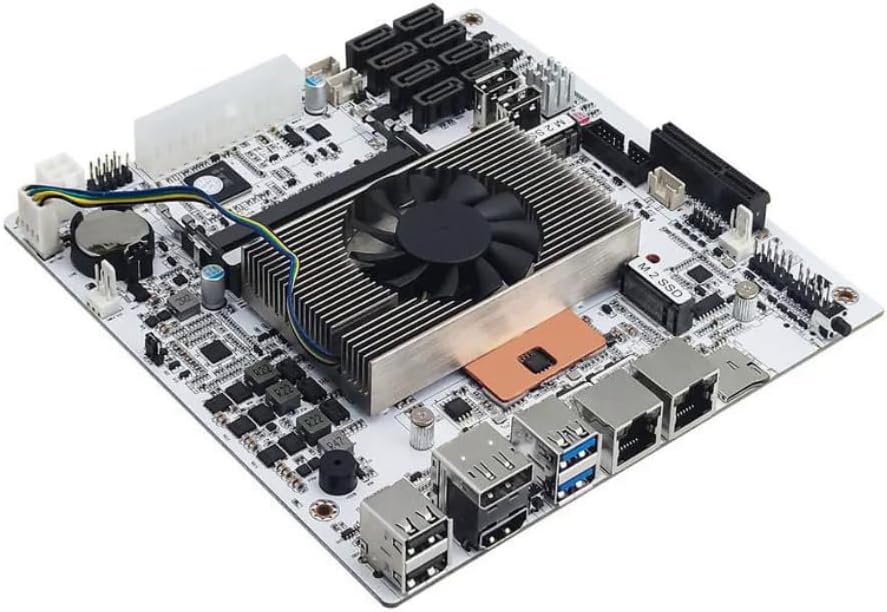
The Celeron N5105 Industrial Motherboard NAS ranks first for its exceptional balance of efficiency and connectivity. It earns a 4.5 star rating for its quad-core performance and four 2.5GbE LAN ports that serve advanced networking needs well.
We may earn a commission when you buy through this link, at no additional cost to you.
Its standout qualities include support for dual 4K displays via HDMI and DP plus six SATA3 ports and two M.2 NVMe slots. The board uses a high-density moisture-proof fiber circuit that ensures stability in industrial or server environments.
Honest trade-offs involve the power requirement for both 24PIN and 4PIN connectors which limits PSU choices slightly. Also the first boot may take minutes to read memory so patience is needed during initial setup.
Professional users building firewalls, routers, or home servers should buy this board. It delivers reliable low power operation with enough performance for virtualization and multimedia tasks effectively.
This board supports dual 4K at 60Hz via HDMI 2.0 and DP 1.4 ports which enables multi-monitor setups for surveillance or server management.
Four integrated i226 2.5GbE ports deliver secure stable connections perfect for network security appliances or high-throughput NAS builds.
We may earn a commission when you buy through this link, at no additional cost to you.
The ASRock D1800M offers an affordable entry into low power builds with an included Intel J1800 processor. It carries a 4.0 star rating and provides essential features for basic home or office PCs.
We may earn a commission when you buy through this link, at no additional cost to you.
Key strengths include one USB 3.0 port and six USB 2.0 ports plus legacy PS/2 keyboard and mouse connectors. The board supports up to 16GB of DDR3 memory and two SATA2 ports for small storage.
Trade-offs involve older DDR3 memory support which may require sourcing used parts and only two SATA ports limit expansion. But for tight budgets these are acceptable compromises.
Users needing a compact inexpensive PC for browsing or light office tasks should buy this. It remains a solid budget choice for low power desktop replacements.
The board ships with the J1800 dual core processor included making it easy to build without additional CPU costs.
PS/2 ports allow connection to older keyboards and mice which is useful in industrial or retro computing scenarios.
We may earn a commission when you buy through this link, at no additional cost to you.
The ASRock B550M WiFi earns a perfect 5.0 star rating for its advanced features and stable power delivery. It supports AMD Ryzen 3000 to 5000 series processors and delivers premium performance for demanding users.
We may earn a commission when you buy through this link, at no additional cost to you.
Key strengths include integrated Wi-Fi 6E and Bluetooth plus four DDR4 slots supporting up to 128GB capacity. The board also features premium audio and eight USB 3.2 Gen1 ports for rich connectivity.
Trade-offs involve higher cost and a micro-ATX form factor that needs case verification. But the feature set justifies the price for users needing top tier connectivity.
Gamers and power users seeking stable AMD platforms with modern wireless should buy this. It stands out as the best premium low power option for advanced builds.
Wi-Fi 6E support enables low latency connections on the 6GHz band ideal for gaming and large file transfers.
Realtek ALC1220 7.1 channel HD audio provides immersive sound quality for media and gaming applications.
We may earn a commission when you buy through this link, at no additional cost to you.
The GIGABYTE B550M K delivers solid value with a 4.4 star rating for AMD Ryzen 3000 to 5000 series CPUs. It offers essential modern features like PCIe 4.0 and dual M.2 slots at a reasonable cost.
We may earn a commission when you buy through this link, at no additional cost to you.
Key strengths include digital 3+3 VRM design with premium chokes for steady power and advanced thermal armor for heat dissipation. The board supports Extreme Memory Profile for faster RAM performance.
Trade-offs involve fewer USB ports and basic power phases limiting overclocking headroom. But for stable daily use these are acceptable compromises for the price.
AMD users building budget gaming or workstations should buy this. It balances performance and cost effectively for mainstream low power builds.
The primary x16 slot supports PCIe 4.0 speeds allowing faster graphics cards and NVMe storage when paired with compatible CPUs.
BIOS updates can be done via USB without needing a CPU installed making maintenance and upgrades much easier.
We may earn a commission when you buy through this link, at no additional cost to you.
The MSI PRO B550M-P earns a 4.4 star rating for its focus on memory performance and stability. It supports AMD Ryzen 5000 and 3000 series with DDR4 speeds up to 4400+ MT/s when overclocked.
We may earn a commission when you buy through this link, at no additional cost to you.
Key strengths include MSI Core Boost technology and Frozr AI cooling that adjusts fans based on temperatures. The board features one M.2 Gen4 slot and Steel Armor on PCIe slots for durability.
Trade-offs involve potential noise from AI cooling and fewer rear USB ports than competitors. But the speed gains for memory heavy tasks make it worthwhile.
Power users who prioritize RAM speed should buy this board. It delivers reliable performance for demanding workloads in a compact design.
Memory Boost allows stable overclocking of DDR4 modules to reach higher frequencies for improved application performance.
The PCIe x16 slot uses reinforced steel to support heavy GPUs without bending or causing contact issues.
We may earn a commission when you buy through this link, at no additional cost to you.
The ASRock J4125M earns a 3.4 star rating but remains a viable option for budget NAS builds. It includes an Intel Quad-Core J4125 processor running up to 2.7GHz for light multitasking.
We may earn a commission when you buy through this link, at no additional cost to you.
Key strengths include a dedicated M.2 Key E slot for WiFi and DDR4 memory support up to 2400MHz. The board uses ASRock Super Alloy materials for basic durability.
Trade-offs involve a lower user rating and limited PCIe slots that restrict expansion options. But for small low power NAS it performs adequately.
Users needing a simple cheap server should buy this. It offers essential features at a low entry point without extra complexity.
The M.2 Key E slot allows easy addition of wireless cards for networks requiring WiFi connectivity.
ASRock Super Alloy components provide basic protection and longevity for entry level applications.
We may earn a commission when you buy through this link, at no additional cost to you.
The ASRock B550M-HDV earns a 4.5 star rating for its broad monitor compatibility and strong power delivery. It supports Ryzen 5000 to 3000 series with DDR4 speeds up to 4733+ overclocked.
We may earn a commission when you buy through this link, at no additional cost to you.
Key strengths include HDMI DVI-D and D-Sub outputs plus six USB 3.2 Gen1 ports and Full Spike Protection. The six power phase design provides stable power for supported CPUs.
Trade-offs involve verifying micro-ATX case fit and limited to one Hyper M.2 slot. But the display flexibility is excellent for multi-monitor setups.
Office users needing flexible video options should buy this. It delivers stable performance with excellent legacy and modern display support.
HDMI 4K plus DVI and VGA enable connections to older and newer monitors for versatile setups.
USB Audio and LAN ports include protection against surges to safeguard connected peripherals and data.
We may earn a commission when you buy through this link, at no additional cost to you.
The Gigabyte A520I AC earns a 4.4 star rating for compact builds needing wireless connectivity. It supports 3rd Gen AMD Ryzen processors and includes Intel WiFi plus Bluetooth out of the box.
We may earn a commission when you buy through this link, at no additional cost to you.
Key strengths include direct 6 phase digital PWM with 55A DrMOS for stability and an optimized VRM heatsink. The board offers dual HDMI and DP for triple display setups.
Trade-offs involve only two DDR4 slots and PCIe 3.0 limits on M.2. But for small systems these are minor drawbacks.
Users building small HTPC or mini servers should buy this. It balances size wireless and power delivery effectively.
Intel Dual Band AC WiFi and Bluetooth provide reliable connectivity without extra adapter costs.
Mini-ITX size enables fitting into tiny cases for space constrained desktops and media centers.
We may earn a commission when you buy through this link, at no additional cost to you.
The Mini-ITX Quad-Core NAS earns a 4.1 star rating for its high storage count and strong low power CPU. It uses an 8th Gen U-series processor with 8 threads and 15W TDP.
We may earn a commission when you buy through this link, at no additional cost to you.
Key strengths include eight SATA 3.0 ports and dual 2.5GbE LAN plus two M.2 NVMe slots for ultra-fast storage. A dual ball-bearing fan cooler is included for thermal control.
Trade-offs involve a known sleep mode bug and slow initial boot. But for 24/7 servers these issues are minor.
Users building home NAS or firewalls should buy this. It offers powerful storage capabilities in a small industrial design.
Eight SATA ports allow connecting many drives for massive storage arrays in a compact chassis.
Dual 2.5GbE ports enable link aggregation or separate networks for improved throughput.
We may earn a commission when you buy through this link, at no additional cost to you.
The NAS Motherboard 8 Bay includes a Core i5 8265U processor and eight SATA ports for serious NAS builds. It supports virtualization with VT-x and VT-d for running VMs efficiently.
We may earn a commission when you buy through this link, at no additional cost to you.
Key strengths include dual 2.5GbE LAN and two M.2 NVMe slots for fast caching. A built-in Clear CMOS button and TF slot provide boot recovery options.
Trade-offs involve lack of sleep mode and no user ratings yet. But for continuous NAS operation these are acceptable.
Advanced users building TrueNAS or unRAID should buy this. It delivers strong i5 performance in an 8-bay compact package.
The Core i5 8265U provides four cores and eight threads for multitasking and virtualization tasks.
Built-in USB and TF slots allow flexible boot options and BIOS recovery for server stability.
We may earn a commission when you buy through this link, at no additional cost to you.
Choosing a low power motherboard requires balancing processor efficiency connectivity options and form factor for your specific build needs.
Look for CPUs with low TDP such as 15W or lower to minimize heat and power draw. These processors often include integrated graphics and are ideal for NAS home server or office workloads.
Focus on quad-core options if virtualization or multitasking is needed but stick to 2-core for basic browsing tasks.
Check the memory type such as DDR3 or DDR4 and the maximum capacity supported. More DIMM slots allow for future upgrades and better performance in multi-threaded applications.
Ensure the board supports your chosen RAM speed for stability and consider ECC options if running servers.
Count the USB and Ethernet ports to match your peripherals and network needs. Boards with multiple LAN ports are better for routers or firewalls.
Verify video outputs like HDMI DP or VGA for monitor support and ensure they meet your resolution requirements.
Check the number of SATA and M.2 slots for drive connections. NVMe slots provide faster boot and data access speeds than SATA.
Ensure the board supports the RAID mode or AHCI you need and consider expansion slots for PCIe cards if required.
Match the board size to your case such as mini-ITX for compact builds or micro-ATX for more slots. Verify dimensions before purchase to avoid compatibility issues.
Smaller boards may lack PCIe slots or ports so plan your layout carefully.
Note the power connectors needed such as 24PIN or additional 4PIN/8PIN connections. Some boards require dual power cables for full operation.
Ensure your power supply provides the correct connectors to avoid startup issues.
Look for boards with heatsinks on VRM and chipset for passive cooling or active fan connectors. Proper cooling ensures stability and longevity.
Consider the environment you operate in and choose a board with adequate thermal design.
If running virtual machines check that the CPU and board support VT-x and VT-d features. These are essential for stable VM performance and passthrough.
Confirm software compatibility with your hypervisor for best results.
Install the motherboard in a clean static-free environment and connect the required power cables securely before mounting the CPU and RAM.
Ensure all SATA and network cables are snug to avoid data errors and verify that your PSU provides the necessary connectors.
Keep the system dust-free and monitor temperatures regularly for stable operation especially in 24/7 server environments.
A low power motherboard uses CPUs with low thermal design power to reduce electricity consumption and heat. These boards are ideal for NAS, home servers, and compact systems needing silent and efficient operation.
Yes they are excellent for NAS because they run cool and consume little electricity even when idle. Many options include multiple SATA ports and gigabit network support for storage arrays.
Many modern low power CPUs support VT-x and VT-d which are essential for virtual machines. Check the specs for virtualization features before purchasing.
Most low power boards use DDR4 memory for newer models while older ones may use DDR3. Verify the supported types before buying.
Yes most low power motherboards support Windows along with Linux and other systems. Install the OS using a USB drive and BIOS settings.
Many models include at least one M.2 slot for NVMe SSDs which provide faster boot and load times than traditional SATA drives.
The Celeron N5105 NAS board leads the list for its balanced performance and four 2.5GbE network ports while the ASRock D1800M remains a solid budget option.
Choose your board based on your specific needs whether it is storage count virtualization capability or wireless connectivity to match your project goals.
Prices change frequently so please verify current listings and stock before making your final purchase decision today.