
Thermalright Assassin X120 Refined SE
4.7Editor score
Four heat pipes with AGHP technology
TL-C12C PWM fan included
Supports Intel and AMD sockets
Compare the top CPU Air Cooler Fan Heatsink options for 2026 to find the best cooling performance and compatibility for your specific processor platform and
Choosing the right CPU Air Cooler Fan Heatsink is essential for maintaining system stability and prolonging hardware life. A quality cooler ensures your processor stays within safe thermal limits during heavy workloads or gaming sessions without requiring complex liquid cooling setups.
We evaluated ten leading air cooling solutions based on thermal performance, noise levels, build quality, and socket compatibility. Our analysis focuses on how each model handles heat dissipation across different case sizes and motherboard layouts while supporting modern Intel and AMD architectures.
Each pick highlights specific strengths such as budget value, premium silence, or compact form factors for smaller builds. Note that prices and availability fluctuate frequently, so verify current listings before making your final decision to ensure you get the best deal available.
4.7Editor score

4.8Editor score

4.8Editor score
This side-by-side comparison details the key specifications and capabilities of each selected air cooler to help you identify the model that best matches your thermal requirements and budget constraints.
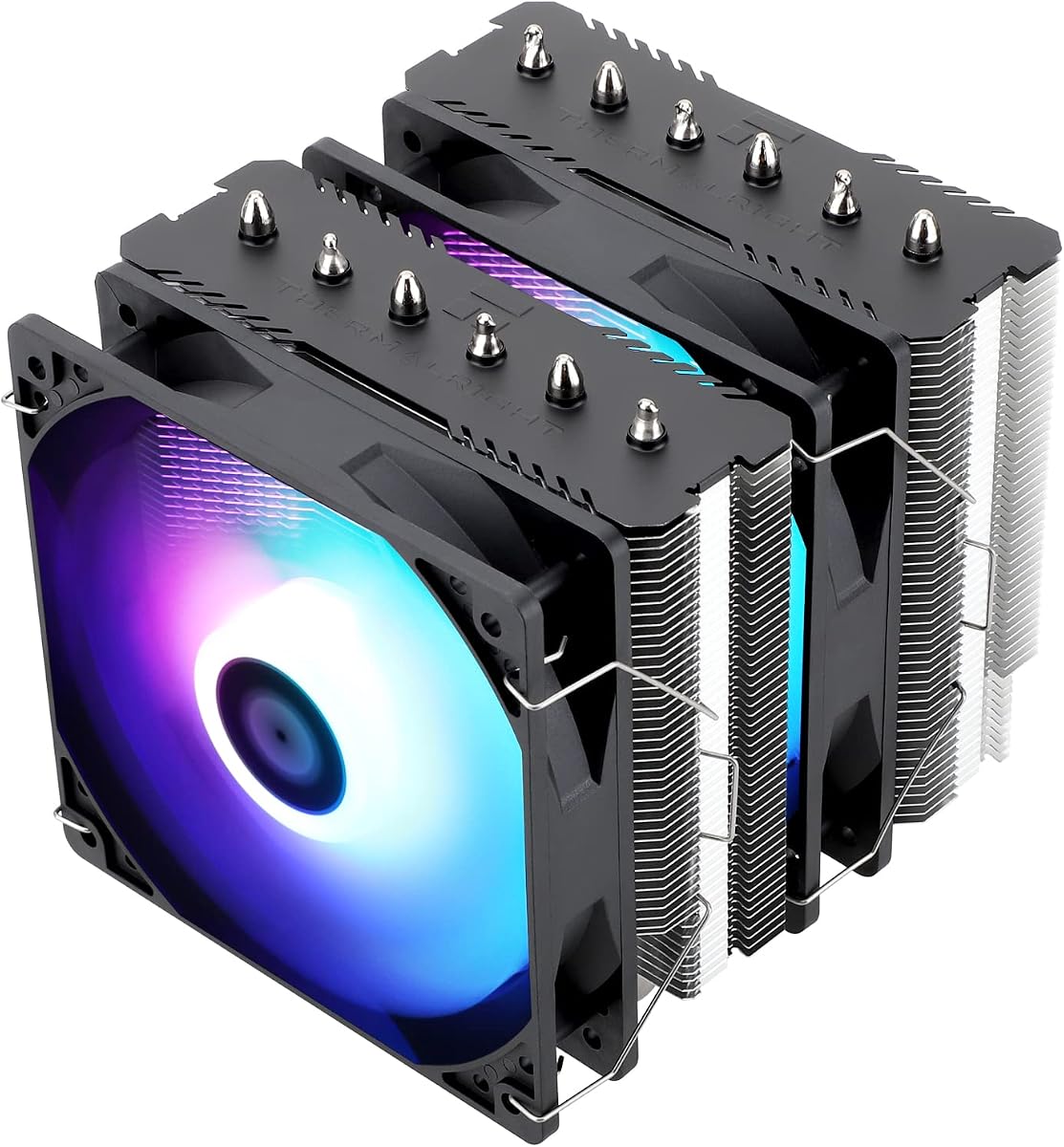


The Thermalright Assassin X120 Refined SE stands out as a top budget option with a 4.7 rating. It delivers efficient cooling for mid-range processors using four heat pipes and a quality PWM fan. Its compact design fits most cases while maintaining reliable thermal dissipation.
We may earn a commission when you buy through this link, at no additional cost to you.
AGHP technology ensures consistent performance regardless of orientation, solving gravity issues found in standard designs. The TL-C12C fan provides up to 66 CFM airflow at low noise levels. This makes it ideal for quiet builds without breaking the bank.
While it lacks RGB lighting or a digital display, these omissions keep costs low without sacrificing core cooling capabilities. The aluminum fins and copper base offer solid heat transfer. Installation is straightforward with included mounting hardware for various platforms.
Buy this if you need reliable cooling on a strict budget. It suits users who prioritize function over form and want strong performance from Intel or AMD systems. The price point makes it accessible for entry-level to mid-range builds.
AGHP technology ensures consistent performance regardless of orientation, solving gravity issues found in standard designs.
The TL-C12C fan provides up to 66 CFM airflow at low noise levels, ideal for quiet builds.
We may earn a commission when you buy through this link, at no additional cost to you.
The Thermalright Peerless Assassin 120 SE ARGB combines premium cooling with vibrant lighting for a 4.7 rated experience. Six heat pipes and dual fans handle high TDP loads effectively. Its dual tower design maximizes surface area for heat dissipation.
We may earn a commission when you buy through this link, at no additional cost to you.
ARGB lighting adds visual appeal synchronized with motherboard headers. The TL-C12C-S fans deliver robust airflow while staying quiet under load. AGHP technology ensures orientation-independent performance for flexible case installation options.
The height of 155mm means careful case selection is needed. RGB setup requires extra cabling and controller compatibility. Despite these minor issues, the performance and aesthetic balance offer strong value for enthusiasts.
Choose this for builds needing both top-tier cooling and style. It fits gamers or creators wanting visible flair alongside reliable thermal management for modern Intel or AMD CPUs.
ARGB lighting adds visual appeal synchronized with motherboard headers for customizable aesthetics.
Six heat pipes and dual fans handle high TDP loads effectively with large surface area.
We may earn a commission when you buy through this link, at no additional cost to you.
The Noctua NH-D15 chromax.Black earns a 4.8 rating as a top premium air cooler. Its dual tower design with two NF-A15 fans provides exceptional cooling rivaling liquid solutions. The all-black aesthetic blends seamlessly with dark builds.
We may earn a commission when you buy through this link, at no additional cost to you.
Noctua quality ensures long service life and consistent performance. The SecuFirm2 mounting system simplifies installation across modern sockets. NT-H1 thermal paste ensures optimal heat transfer out of the box.
The high price reflects the superior materials and noise engineering. Its size may limit case choices and RAM clearance on some boards. However, the trade-off is worth it for silent high-performance systems.
Invest in this if silence and peak cooling are your goals. It suits overclockers and professionals needing reliable stability without the complexity of water cooling loops.
Noctua quality ensures long service life and consistent performance with whisper quiet NF-A15 fans.
The six year warranty highlights confidence in durability and long term support for the cooler.
We may earn a commission when you buy through this link, at no additional cost to you.
The Noctua NH-U12A chromax.Black earns a 4.8 rating with its compact tower design. It uses dual NF-A12x25 fans and six heat pipes for strong cooling. The 120mm width avoids most RAM slot issues.
We may earn a commission when you buy through this link, at no additional cost to you.
It offers top tier performance in a smaller footprint than dual tower options. SecuFirm2 mounting works with current Intel and AMD sockets. Includes NT-H1 paste and reliable noise performance under load.
The price remains high compared to competitors of similar specs. Its weight requires adequate case support. Yet the balance of size and cooling justifies the cost for constrained builds.
Buy this when space is limited but you need high power. It suits enthusiasts wanting quiet performance without sacrificing compatibility or thermal capacity in mid sized cases.
The 120mm width avoids most RAM slot issues while delivering dual fan cooling power.
Six heat pipes and dual NF-A12x25 fans ensure high thermal capacity for powerful CPUs.
We may earn a commission when you buy through this link, at no additional cost to you.
The Thermalright Assassin X 120R Digital ARGB Black scores 4.7 for its digital screen feature. It displays real time CPU temp and usage without extra software. The single tower design with four heat pipes supports efficient cooling.
We may earn a commission when you buy through this link, at no additional cost to you.
The TL-P12-S fan provides high RPM airflow with PWM control. ARGB synchronization matches your system lighting scheme. Installation is straightforward with detailed instructions and included hardware.
The digital display depends on software which may require updates. The price exceeds standard coolers for the same hardware. This feature may not justify cost for users needing pure performance only.
Choose this for visual monitoring enthusiasts who want extra flair. It suits users needing quick system checks on the fly without switching to monitoring software on the desktop.
The digital display displays real time CPU temp and usage without extra software.
ARGB synchronization matches your system lighting scheme for a cohesive look.
We may earn a commission when you buy through this link, at no additional cost to you.
The Noctua NH-D15 maintains a 4.8 rating as a benchmark dual tower cooler. It uses two NF-A15 fans to push massive airflow quietly. The original color matches classic builds with a premium finish.
We may earn a commission when you buy through this link, at no additional cost to you.
Its success spans years of awards and recommendations from hardware sites. SecuFirm2 mounting simplifies install across modern boards. Thermal paste included ensures immediate setup without extra purchases.
High cost and size limit appeal to budget builds. However, the performance remains unmatched in air cooling. It remains a top pick for silent high performance enthusiasts.
Invest here for pure cooling and silence. It suits users who demand top thermal results and reliability above all else.
Its success spans years of awards and recommendations from hardware sites proving reliability.
SecuFirm2 mounting simplifies install across modern boards without complex tools.
We may earn a commission when you buy through this link, at no additional cost to you.
The Noctua NH-D15S chromax.Black rates 4.8 with asymmetrical design for better RAM clearance. It maintains high performance with one NF-A15 fan. The black finish enhances dark system aesthetics.
We may earn a commission when you buy through this link, at no additional cost to you.
The asymmetrical layout avoids blocking PCIe slots and clears RAM modules well. SecuFirm2 system ensures stable mounting. It keeps noise low while cooling effectively under load.
A single fan means slightly less airflow than dual versions. The premium price may seem high for a single fan. Still it balances performance and case fit effectively.
Buy if RAM clearance is a priority. It suits users needing high end cooling without sacrificing memory module options or PCIe access.
The asymmetrical layout avoids blocking PCIe slots and clears RAM modules well.
It keeps noise low while cooling effectively under load with a single high quality fan.
We may earn a commission when you buy through this link, at no additional cost to you.
The Noctua NH-D9L scores 4.7 as a compact dual tower option. It uses a 92mm fan to cool efficiently in small cases. Its 110mm height clears most HTPC cases easily.
We may earn a commission when you buy through this link, at no additional cost to you.
Designed for HTPCs and ITX builds, it does not block RAM. SecuFirm2 supports current sockets. NT-H1 paste included ensures optimal thermal contact for reliable cooling.
Peak performance is lower than larger coolers. The small fan may spin faster under load. But for small builds this model fits perfectly.
Choose for small form factor cases needing decent cooling. It suits users building compact systems where height and width are limited.
Designed for HTPCs and ITX builds, it does not block RAM or PCIe slots.
The 92mm fan spins quietly even under moderate loads.
We may earn a commission when you buy through this link, at no additional cost to you.
The Noctua NH-U12S rates 4.8 as a classic slim tower cooler. It uses one NF-F12 fan for quiet operation. The narrow profile clears most RAM and PCIe slots.
We may earn a commission when you buy through this link, at no additional cost to you.
Its slim width enhances compatibility in crowded cases. SecuFirm2 mounts it securely. NT-H1 paste included for thermal transfer. It balances performance with case fit well.
Peak cooling is lower than dual fan units. The price remains high for a single tower. Still it is reliable for standard desktop builds.
Buy if you need a slim and quiet cooler. It suits users wanting balance without large dimensions or extra fan noise.
Its slim width enhances compatibility in crowded cases and clears RAM slots.
The NF-F12 fan keeps noise low even under moderate CPU loads.
We may earn a commission when you buy through this link, at no additional cost to you.
The Thermalright Peerless Assassin 120 SE earns 4.8 for raw performance. Dual 120mm fans and six heat pipes drive strong cooling. AGHP ensures consistent heat transfer regardless of orientation.
We may earn a commission when you buy through this link, at no additional cost to you.
Nickel plated pipes and aluminum fins enhance durability. It fits most modern sockets. Its price offers high value compared to more expensive dual tower coolers.
Lacks RGB for users wanting extra aesthetics. The tall profile needs larger cases. But for performance focused users this model delivers.
Choose for strong thermal output at low cost. It suits builders prioritizing cooling power over visual flair.
AGHP ensures consistent heat transfer regardless of orientation for flexible mounting.
Its price offers high value compared to more expensive dual tower coolers on market.
We may earn a commission when you buy through this link, at no additional cost to you.
Selecting the right CPU Air Cooler Fan Heatsink involves evaluating thermal capacity, dimensions, noise, and platform compatibility to match your system needs and budget.
Check the cooler's rated TDP against your CPU's power draw to ensure adequate heat dissipation during peak loads. Underestimating TDP can lead to thermal throttling and reduced system performance.
Match the cooler TDP rating with your CPU specs for reliable cooling.
Measure your case maximum CPU cooler height and width to avoid fit issues. Tall dual tower coolers may clash with side panels or memory modules.
Verify case height limits before purchasing to ensure physical fit.
Ensure the cooler supports your motherboard socket such as LGA1851 LGA1700 AM4 or AM5. Mounting kits vary by manufacturer and socket generation.
Confirm socket support in product specs before purchase.
Look for PWM fans that adjust speed based on load to balance noise and cooling. Lower dB(A) ratings indicate quieter operation under idle or light use.
Select low noise fans for quiet home or office builds.
Copper heat pipes and aluminum fins offer effective heat transfer with durability. Soldered bases improve thermal conductivity compared to pressed contact.
Prioritize copper and aluminum for long term thermal performance.
Quality mounting systems like SecuFirm2 simplify install and ensure secure contact. Backplates may be needed for some AMD platforms to prevent bending.
Look for user friendly mounting hardware for easier install.
Long warranties such as six years reflect manufacturer confidence and protect your investment. Reliable support helps resolve installation or defect issues quickly.
Choose brands offering extended warranty for peace of mind.
Balance cost against needed performance tier. High end coolers cost more but deliver top cooling while budget options fit standard systems well.
Pick the tier that matches your cooling needs and budget.
Begin by removing the old cooler and cleaning thermal paste from the CPU and heatsink using isopropyl alcohol. Ensure the surface is smooth and dry before applying new thermal paste.
Mount the new cooler following the manufacturer instructions and apply a thin layer of thermal paste to the CPU. Secure the cooler evenly without overtightening to avoid pressure issues.
Dust the cooler fins and fan blades regularly to maintain airflow and cooling efficiency. Use compressed air to blow out debris without spinning the fan too fast.
Air coolers offer reliability and lower maintenance with no risk of leaks. They are sufficient for most users including moderate overclocking. Liquid cooling may suit extreme overclocking or compact cases needing lower height.
Thermal paste degrades over time and should be replaced every two to three years for optimal performance. Replacing it after cooler removal is essential for efficient heat transfer.
Choose a cooler rated at least equal to your CPU TDP under normal use. For overclocking select a cooler with higher TDP margin to handle extra heat load.
Dual tower coolers provide more surface area for heat dissipation and are ideal for high TDP processors. They offer better thermal capacity but require more case clearance.
AMD AM4 and AM5 typically use backplates that may need to be reused. Install the mounting brackets and secure the cooler using the provided screws carefully to avoid bending.
Most modern coolers with AGHP technology allow orientation freedom. Check product specs to confirm if your model supports inverted mounting without performance loss.
Noise often comes from dust buildup worn bearings or high fan speed. Clean the fins and adjust PWM settings to reduce noise levels while maintaining safe temps.
Check your case CPU cooler height limit against the cooler height specs. Ensure enough clearance for RAM and PCIe slots to avoid physical conflicts.
The top picks include budget options like the Thermalright Assassin X120 Refined SE and premium models like the Noctua NH-D15 chromax.Black for maximum performance.
Prioritize TDP support and case dimensions to match your build needs. Silent operation and warranty length add value for long term satisfaction.
Prices change frequently so check current listings before buying to secure the best deal for your chosen CPU Air Cooler Fan Heatsink.