
Power Strips with Surge Protection
4.8Editor score
12 AC outlets
4 smart USB ports
Flat plug design
This guide compares the top desk mounted outlet towers for 2026 to help you find the best surge protector and charging station for your workspace needs.
Desk mounted outlet towers transform cluttered workspaces into organized environments. These vertical charging stations offer multiple outlets and USB ports in a compact footprint. Selecting the right model ensures safe power delivery and efficient cable management for all your devices.
We evaluated ten leading models based on port counts, surge protection ratings, and build quality. Our analysis considers safety features, cord length, and design flexibility. Each product was assessed for its ability to handle high wattage demands while maintaining a sleek profile.
Each pick highlights key specifications and ideal use cases for different setups. Prices and availability change frequently so verify details before purchasing. This guide helps you choose a reliable power solution that fits your specific desk and electrical requirements perfectly.
4.8Editor score

4.5Editor score

4.8Editor score
This side-by-side comparison highlights key specifications for every model reviewed. Check outlet counts, USB capabilities, and safety ratings to find the perfect match for your power needs and workspace constraints.


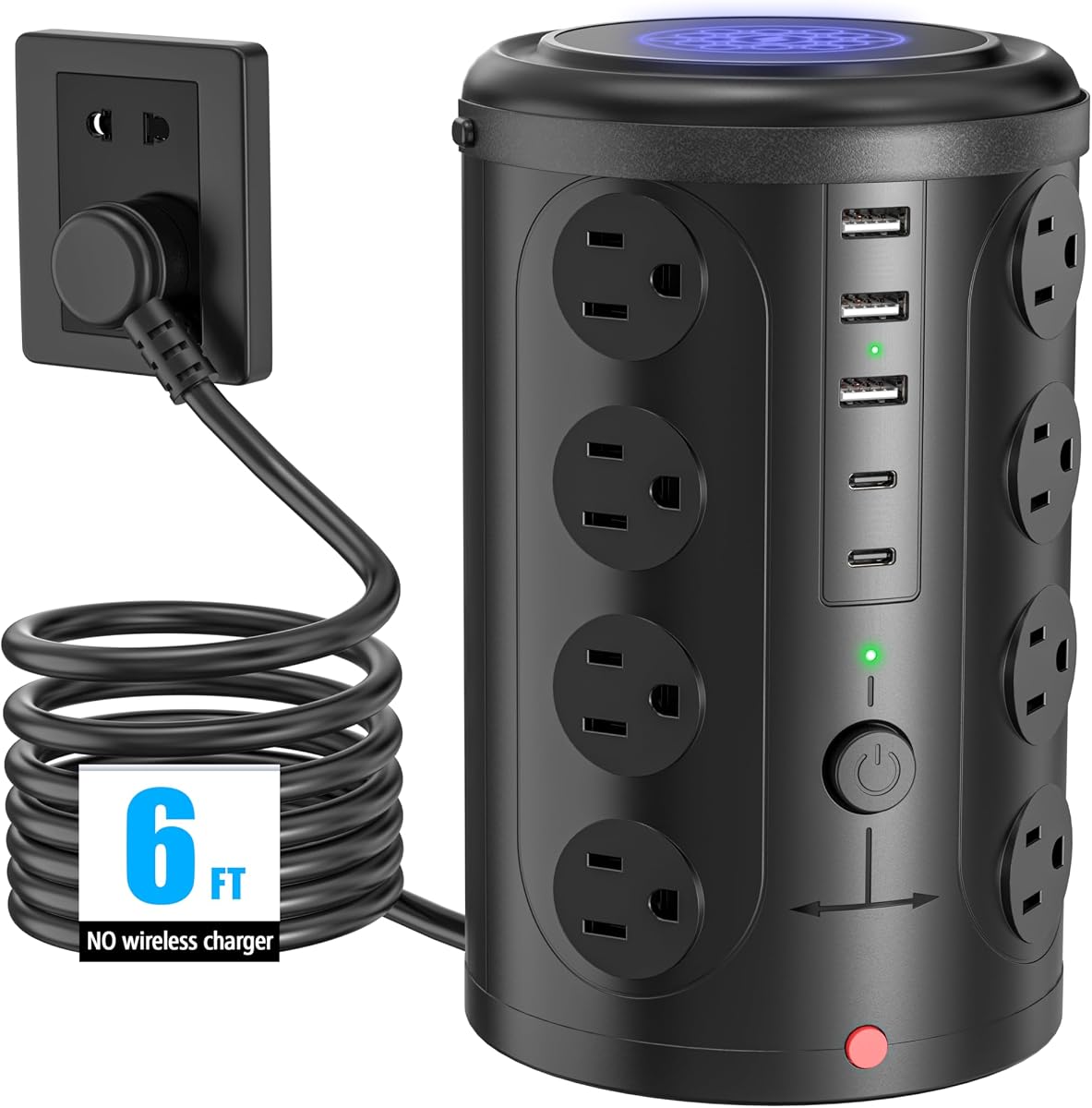


The TenTrend Power Strip Tower stands out as a top choice for users needing high capacity charging. It combines six AC outlets with eight USB ports to handle diverse devices simultaneously. With a 4.5-star rating, it offers reliable performance for home and office use.
We may earn a commission when you buy through this link, at no additional cost to you.
Its standout feature is the 65W USB-C port which can charge laptops quickly without external bricks. The tower design keeps cables organized and reduces clutter on your workspace. Safety protections like overcurrent and overheat guards ensure your equipment remains safe during operation.
While effective, the tower size might feel large on very limited desk space. The cord length is standard at five feet which may require careful positioning near outlets. However, the flat plug helps minimize obstruction against walls or furniture.
This model is ideal for power users managing multiple screens and gadgets daily. It provides the versatility needed for modern workstations where device counts continue to rise. Investing in this tower ensures your desk remains efficient and organized over time.
The 230W total output supports fast charging for phones and laptops simultaneously without slowing down.
Its compact footprint saves valuable desk real estate compared to traditional horizontal power strips.
We may earn a commission when you buy through this link, at no additional cost to you.
This retractable tower offers a unique solution for cable management. It allows you to pull only the needed length of cord and rewinds it automatically. The perfect5.0 rating reflects high user satisfaction with its engineering and reliability in daily use.
We may earn a commission when you buy through this link, at no additional cost to you.
The auto-rewind feature eliminates tangled cords and keeps your floor clear of tripping hazards. You can mount the base under desks to save surface area entirely. The surge protection rating of 320 joules defends sensitive electronics from unexpected power spikes effectively.
With fewer AC outlets than competitors, it may not suit setups needing many plugs. The retractable mechanism requires gentle handling to ensure longevity over years of use. Despite this, the convenience factor makes it a premium choice for minimalist spaces.
Ideal for home offices where clean lines are prioritized over maximum port counts. It balances functionality with aesthetic appeal to maintain a tidy workspace environment. This tower is a smart investment for those valuing innovation and design.
The retractable system stores excess cord neatly inside the base for a tidy appearance.
Mountable feet allow secure attachment to walls or undersides of desks for flexibility.
We may earn a commission when you buy through this link, at no additional cost to you.
This tower provides exceptional value with its generous number of outlets. It supports up to sixteen devices simultaneously making it perfect for shared workspaces. Users rate it highly for its durable construction and robust protection against electrical issues.
We may earn a commission when you buy through this link, at no additional cost to you.
The wide spacing between outlets allows bulky adapters to fit without blocking neighbors. Integrated circuit breakers automatically cut power during overloads to prevent damage. A braided fabric cord adds flexibility and a decorative touch to any room setup.
While it lacks high-wattage USB-C charging, it serves general charging needs well. The flat plug design helps fit into tight spaces behind furniture easily. It remains a top budget option for those needing capacity over speed.
Great for dorm rooms or small apartments where space and budget are limited. It offers reliable performance and safety features that justify its low price point. This tower ensures you get maximum power access without overspending.
Twelve outlets are spaced apart to accommodate large adapters without interference or blocking.
Overload protection and braided cord ensure long term reliability and device safety daily.
We may earn a commission when you buy through this link, at no additional cost to you.
Anker delivers a premium experience with its Nano Power Strip designed for laptops. The 70W USB-C port allows fast charging of high-end devices directly from the strip. Its 4.8 rating shows users appreciate its stability and engineering quality across different uses.
We may earn a commission when you buy through this link, at no additional cost to you.
The desk clamp mounts securely to edges allowing one-handed plugging and unplugging easily. Dual-zone layout organizes ports to reduce cable tangles effectively on desktop surfaces. Surge protection of 1500 joules safeguards gear from lightning strikes or grid failures.
It is priced higher than basic models but justifies cost with specialized laptop features. The clamp fits specific desk thicknesses so compatibility must be verified before buying. This limits its use to standard flat edges without curves or slopes.
Best for professionals relying on powerful notebooks and needing reliable power access. It eliminates the need for bulky adapters and keeps your desk looking professional. Anker's reputation adds confidence to this high-performance charging solution.
70W USB-C output supports fast charging for most modern laptops without extra bricks.
Adjustable clamp holds firmly allowing secure connection even with heavy cables attached.
We may earn a commission when you buy through this link, at no additional cost to you.
This SMALLRT tower focuses on delivering massive power capacity for heavy users. It offers twelve AC outlets and smart USB ports to charge many devices at once. A high 4.8 rating confirms users trust its build quality and safety mechanisms in daily use.
We may earn a commission when you buy through this link, at no additional cost to you.
The six point five foot cord provides flexibility to reach distant wall outlets easily. Smart USB ports detect connected devices to deliver optimal charging speeds automatically. Reinforced junctions protect terminals from wear and extend the product lifespan significantly.
Its size may dominate smaller desks which limits placement options in tight areas. Overload protection cuts power automatically during voltage spikes to keep equipment safe. It is a solid choice for those prioritizing outlet count over compact design.
Perfect for large offices or living rooms where many electronics need constant power. It handles high demands reliably without overheating or failing unexpectedly. This tower ensures you have enough ports for all your essential devices.
A six point five foot extension cord offers ample reach for hard to access outlets.
Smart USB ports optimize charging speeds based on device requirements automatically.
We may earn a commission when you buy through this link, at no additional cost to you.
This model leads in total outlet count with sixteen AC sockets for maximum versatility. Five USB ports complement the AC outlets to support diverse device types easily. A 4.6 rating indicates strong satisfaction with its robust power handling and safety features.
We may earn a commission when you buy through this link, at no additional cost to you.
Wide spacing ensures large adapters can plug in without blocking adjacent sockets. The 1875W rated capacity supports high load setups without tripping breakers. Overload protection and short circuit fuses guard against dangerous electrical conditions effectively.
The unit is heavier than others which may make it harder to move often. It is designed for stationary use where stability is more important than mobility. Users should ensure their desk can support the extra weight safely.
Ideal for control rooms or server racks needing extensive power access. It delivers consistent energy to many devices without interference. This tower is a powerful solution for demanding professional environments.
Sixteen outlets provide unmatched availability for connecting multiple heavy duty appliances.
Advanced safety components protect devices from surges and electrical failures reliably.
We may earn a commission when you buy through this link, at no additional cost to you.
TESSAN focuses on space saving with its ultra thin flat plug design. It turns one socket into eleven AC outlets and three USB ports efficiently. Users rate it highly for its ability to fit in tight spaces without obstruction.
We may earn a commission when you buy through this link, at no additional cost to you.
The flat plug sits flush against walls and saves space behind furniture. A 45 degree right angle creates extra room for other plugs below it. The four side design ensures stability with rubber feet to prevent slipping.
Limited USB options may require additional adapters for modern devices needing Type C. Surge protection covers basic needs but lacks high joule ratings for industrial use. It remains a stylish choice for home entertainment centers.
Best for users who value aesthetics and minimal footprint in their setup. It organizes cords neatly and blends into decor seamlessly. This tower keeps your workspace tidy while providing essential power access.
The thin flat plug fits behind furniture without blocking neighbors easily.
Four rubber feet secure the tower in place to prevent sliding on surfaces.
We may earn a commission when you buy through this link, at no additional cost to you.
VILONG offers a dual layer design supporting under desk or desktop charging. Ten AC outlets and three USB ports manage power needs efficiently for many users. A 4.4 rating reflects its practical utility for clutter reduction on workspaces.
We may earn a commission when you buy through this link, at no additional cost to you.
Independent switches allow specific control over outlet groups to save energy. The clamp mounts securely up to 1.6 inches thick for easy installation. A 45 degree flat plug ensures it does not block wall outlets when plugged in.
Clamp mounting restricts use to desks with suitable edges for attachment. The surge protection is moderate compared to higher rated models available today. It is a niche solution for those wanting under desk management.
Best for professionals who want to free up surface area entirely. It keeps cables hidden and power accessible right at your fingertips. This tower helps maintain a clean and efficient work environment.
Dual layers allow under desk or desktop charging options for flexible setup needs.
Two independent switches allow you to turn specific groups of outlets on or off.
We may earn a commission when you buy through this link, at no additional cost to you.
This tower balances outlet count with strong surge protection for safety. It features twelve AC outlets and four smart USB ports to handle diverse needs. A 4.7 rating shows users trust its ability to protect against power irregularities.
We may earn a commission when you buy through this link, at no additional cost to you.
High surge protection of 1800 joules guards expensive electronics during electrical events. Wide spaced outlets prevent blocking and simplify adapter usage significantly. The flat plug fits flush to walls for easy installation behind furniture.
USB ports are functional but lack advanced fast charging for laptops. It serves well for general charging needs like phones and tablets. The compact vertical design takes minimal space on any desk.
Ideal for home offices seeking safety without sacrificing connectivity. It keeps your desk organized and safe during use. This tower is a reliable partner for daily power needs.
1800 joules of protection guard against voltage spikes and surges effectively.
The ultra thin plug design allows flush mounting against walls without blocking.
We may earn a commission when you buy through this link, at no additional cost to you.
SmallRT delivers a solid station for students needing dorm essentials. It offers twelve AC outlets and USB ports to manage all gadgets. A 4.7 rating highlights its reliability and build quality for daily academic use.
We may earn a commission when you buy through this link, at no additional cost to you.
Separated switches allow turning off sections independently to save energy. A six point five foot cord reaches distant outlets in dorm rooms easily. Internal components cut power automatically if irregularities occur to keep devices safe.
The unit is constructed with durability which adds to its weight. It may not be ideal for frequent travel or relocation. However, it provides robust performance for stationary setups.
Perfect for college students managing laptops, lights, and chargers. It simplifies power access and reduces the need for multiple adapters. This tower is an essential tool for organized dorm life.
Four separated switches let you control specific sections to reduce power waste.
Long cord and USB ports make it easy to power multiple devices efficiently.
We may earn a commission when you buy through this link, at no additional cost to you.
Choosing the right desk mounted outlet tower requires evaluating specific features for your needs. This guide walks you through key factors to consider before buying.
Look for a tower that matches your device count. You need enough AC outlets for lamps and monitors plus USB ports for phones. Ensure USB-C ports are present if you have modern devices.
Select a model with total ports equal to or greater than your current devices.
Surge protection is critical for safeguarding electronics from power spikes. Aim for a minimum of 1000 joules to protect sensitive laptops and desktops. Higher ratings offer better defense against lightning or grid issues.
Always check the joule rating to ensure your equipment is fully protected.
Ensure the cord is long enough to reach your wall outlet without strain. Six feet is standard but longer cords may be needed for larger desks. Flat plugs are preferable for tight spaces behind furniture.
Choose a cord length that allows flexible placement without creating trip hazards.
USB ports vary by wattage and should support fast charging for your phones. If you charge laptops, look for USB-C ports with 45W or higher output. Smart technology helps optimize charging speeds automatically.
Verify USB wattage specs to confirm they match your device charging requirements.
The base should be sturdy enough to prevent tipping when devices are plugged in. Rubber feet help keep the tower stable on smooth surfaces like desks. Fire resistant materials add an extra layer of safety for your home.
Check reviews for stability feedback to ensure the unit remains secure during use.
Some towers offer clamp mounts for under desk use to save space. Others stand freely and require floor placement. Choose based on whether you want to free up your desk surface.
Decide if a stationary stand or clamp mount fits your workspace layout best.
Ensure the product has relevant safety certifications like ETL or UL. These indicate it meets industry standards for electrical safety. Avoid uncertified products to reduce fire risk significantly.
Always look for official safety labels to guarantee the tower is safe to use.
A good warranty shows manufacturer confidence in the product's quality. Look for at least a one year guarantee to cover defects. Responsive customer service helps resolve any issues quickly.
Confirm warranty terms before purchasing to protect your investment against damage.
Place the tower on a stable, flat surface away from water sources. Ensure the cord is routed safely to avoid tripping or sharp bends. Plug the tower directly into a wall outlet rather than another extension cord.
Plug devices one by one to avoid overloading the unit initially. Use the individual switches if available to turn off unused outlets. This practice helps manage heat and extends the life of the tower.
Clean the tower with a dry cloth to prevent dust buildup. Do not use water or liquid cleaners on the outlets. Periodically check the cord for wear and replace the unit if damage appears.
Yes if they have proper surge protection ratings and sufficient USB-C wattage. Look for models with at least 1000 joules and 45W USB-C to safely charge most modern laptops. Ensure the AC outlets match your laptop charger requirements.
Many towers are designed for dorm use with compact footprints and safety features. Check your dorm rules regarding power strips as some require specific certifications. Most models reviewed are suitable for standard dorm environments safely.
Yes most use standard plug designs fitting US duplex wall outlets. Flat plugs help fit in tight spaces without blocking other outlets. Ensure the voltage matches your local standard before connecting.
It depends on the wattage capacity of the tower. Some models support up to sixteen devices simultaneously including AC and USB loads. Check the total wattage rating to ensure it handles your combined device needs.
Not if the tower includes USB-C ports with fast charging capabilities. Many towers come with integrated USB-C to eliminate extra bricks. Verify the wattage matches your devices needs for proper charging speeds.
Most well-built towers last several years with regular use. Safety features like circuit breakers add to longevity by preventing overload damage. Proper care ensures the tower remains reliable over time.
The TenTrend and Anker Nano towers lead as top choices for general and premium use. They balance power capacity with safety features that meet modern workspace needs. Budget options like the SMALLRT provide excellent value for high capacity requirements.
Prioritize surge protection and port types based on your specific device ecosystem. Safety certifications and build quality are critical to ensure long-term reliability. Choose a model that fits your desk layout and power demands.
Prices and availability change so verify current deals before buying. Check warranty terms to protect your investment. With the right tower your workspace will remain organized and efficient daily.